Documentation Index
Fetch the complete documentation index at: https://circle-devdocs-test-ai-codegen-component.mintlify.app/llms.txt
Use this file to discover all available pages before exploring further.
USDC provides the ability to transfer digital dollars over public blockchains
using smart contracts. The smart contract allows you to send, receive, and store
digital dollars onchain with a wallet.
This guide demonstrates how to use the viem framework to
build a simple app that enables a user to connect their wallet and interact with
the blockchain by sending a USDC transaction from their wallet address.
Prerequisites
Before you start building the sample app to perform a USDC transfer, ensure you
meet the following prerequisites:
-
Node.js and npm are installed. You can
download and install Node.js directly, or use a version
manager like nvm. The npm binary comes with
Node.js.
-
MetaMask is installed. You can
download and install MetaMask from their website. When
performing initial setup, you should create a wallet for the Ethereum Sepolia
testnet.
-
You have testnet native tokens and testnet USDC in your wallet. You can get
Sepolia ETH (native token) from a
public faucet
and you can get Sepolia USDC from the
Circle Faucet.
Project setup
To begin building the sample app, first set up your project environment and
install dependencies. Create a new project directory and initialize a project in
it:
mkdir usdc-transfer-app
cd usdc-transfer-app
npm init -y
In your project directory, install the required dependencies:
npm install react@^18.2.0 \
react-dom@^18.2.0 \
@types/react@^18.0.27 \
@types/react-dom@^18.0.10 \
@vitejs/plugin-react@^3.1.0 \
typescript@^5.0.3 \
vite@^4.4.5
This sets up your development environment with the necessary libraries and tools
for building a React app with TypeScript and Vite.
Finally, install viem:
Building the transfer app
The following sections outline the relevant business logic of the example app.
You can view the full source for the app in the final section of
this guide.
Set up public client
The public client interacts with the blockchain network. In this example, you
should specify the Ethereum Sepolia network.
import { http, createPublicClient } from "viem";
import { sepolia } from "viem/chains";
const publicClient = createPublicClient({
chain: sepolia,
transport: http(),
});
Set up wallet client
The wallet client interacts with Ethereum accounts to retrieve balances, execute
transactions, and sign messages.
import { createWalletClient } from "viem";
import { sepolia } from "viem/chains";
const walletClient = createWalletClient({
chain: sepolia,
transport: custom(window.ethereum!),
});
Define USDC contract details
Define the USDC contract address and the application binary interface (ABI). The
ABI specifies the functions available on the smart contract. Note that the USDC
token contract address varies by blockchain. This example uses the Ethereum
Sepolia contract address. See
USDC Contract Addresses for a full list
of addresses for the USDC smart contract.
const USDC_CONTRACT_ADDRESS = "0x1c7D4B196Cb0C7B01d743Fbc6116a902379C7238";
const USDC_ABI = [
{
constant: false,
inputs: [
{ name: "_to", type: "address" },
{ name: "_value", type: "uint256" },
],
name: "transfer",
outputs: [{ name: "", type: "bool" }],
type: "function",
},
];
Connect wallet
Create a function to connect to the user’s wallet in MetaMask and retrieve the
wallet address.
const connect = async () => {
const [address] = await walletClient.requestAddresses();
setAccount(address);
};
Send transaction
Create a function to send the USDC transfer transaction. This function encodes
the transfer function data and sends the transaction to the blockchain using the
wallet client.
const data = encodeFunctionData({
abi: USDC_ABI,
functionName: "transfer",
args: [to, valueInWei],
});
const hash = await walletClient.sendTransaction({
account,
to: USDC_CONTRACT_ADDRESS,
data,
});
Wait for transaction receipt
Use the public client to wait for the transaction receipt, which confirms that
the transaction was included in a block.
useEffect(() => {
(async () => {
if (hash) {
const receipt = await publicClient.waitForTransactionReceipt({ hash });
setReceipt(receipt);
}
})();
}, [hash]);
Full source
Now that you understand the core steps for programmatically performing a USDC
transaction, create an index.tsx and index.html file in your project
directory and populate them with the sample code below. This app enables you to
send USDC tokens from one wallet to another. The source wallet must contain
native testnet tokens (to pay for gas fees) and testnet USDC.
index.tsx
import React, { useEffect, useState } from 'react';
import ReactDOM from 'react-dom/client';
import {
http,
type Address,
type Hash,
type TransactionReceipt,
createPublicClient,
createWalletClient,
custom,
stringify,
encodeFunctionData,
} from 'viem';
import { sepolia } from 'viem/chains';
import 'viem/window';
const publicClient = createPublicClient({
chain: sepolia,
transport: http()
});
const walletClient = createWalletClient({
chain: sepolia,
transport: custom(window.ethereum!)
});
const USDC_CONTRACT_ADDRESS = '0x1c7D4B196Cb0C7B01d743Fbc6116a902379C7238';
const USDC_ABI = [
{
constant: false,
inputs: [
{ name: '_to', type: 'address' },
{ name: '_value', type: 'uint256' },
],
name: 'transfer',
outputs: [{ name: '', type: 'bool' }],
type: 'function',
},
];
function Example() {
const [account, setAccount] = useState<Address>();
const [hash, setHash] = useState<Hash>();
const [receipt, setReceipt] = useState<TransactionReceipt>();
const addressInput = React.createRef<HTMLInputElement>();
const valueInput = React.createRef<HTMLInputElement>();
const connect = async () => {
const [address] = await walletClient.requestAddresses();
setAccount(address);
};
const sendTransaction = async () => {
if (!account) return;
const to = addressInput.current!.value as Address;
const value = valueInput.current!.value as `${number}`;
const valueInWei = BigInt(value) * BigInt(10 ** 6); // Assuming USDC has 6 decimals
const data = encodeFunctionData({
abi: USDC_ABI,
functionName: 'transfer',
args: [to, valueInWei],
});
const hash = await walletClient.sendTransaction({
account,
to: USDC_CONTRACT_ADDRESS,
data,
});
setHash(hash);
};
useEffect(() => {
(async () => {
if (hash) {
const receipt = await publicClient.waitForTransactionReceipt({ hash });
setReceipt(receipt);
}
})();
}, [hash]);
if (account) {
return (
<>
<div>Connected: {account}</div>
<input ref={addressInput} placeholder="address" />
<input ref={valueInput} placeholder="value (USDC)" />
<button onClick={sendTransaction}>Send</button>
{receipt && (
<div>
Receipt: <pre><code>{stringify(receipt, null, 2)}</code></pre>
</div>
)}
</>
);
}
return <button onClick={connect}>Connect Wallet</button>;
}
ReactDOM.createRoot(document.getElementById('root') as HTMLElement).render(
<Example />
);
index.html
<!DOCTYPE html>
<html lang="en">
<head>
<meta charset="UTF-8" />
<meta name="viewport" content="width=device-width, initial-scale=1.0" />
<title>USDC Transfer Sample App</title>
</head>
<body>
<h1>USDC Transfer Sample App</h1>
<div id="root"></div>
<script type="module" src="/index.tsx"></script>
</body>
</html>
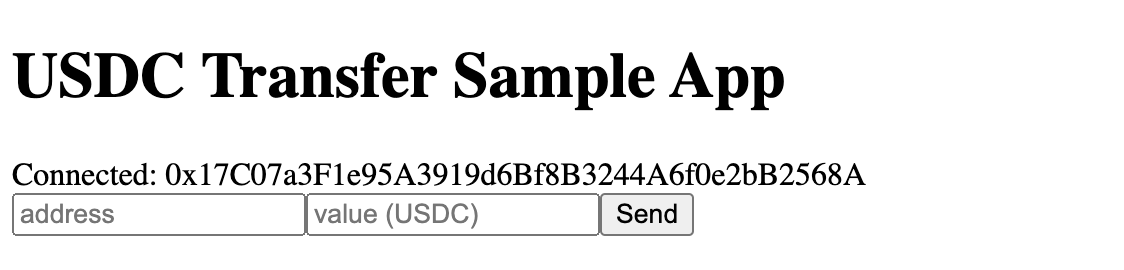
These two source files provide a complete demonstration app that you can use to
perform a USDC transfer from a MetaMask wallet. When you open the app, you can
connect your wallet, input the recipient address, and click Send to execute
the transaction on Ethereum Sepolia. The app provides a transaction receipt once
the transaction is included in a block.
Screenshots
Wallet connect screen:
Transfer screen: