> ## Documentation Index
> Fetch the complete documentation index at: https://circle-devdocs-test-ai-codegen-component.mintlify.site/llms.txt
> Use this file to discover all available pages before exploring further.
# Webhooks Logs
Utilizing Webhook notification logs, you gain visibility into the comprehensive
history of Webhook events triggered by Circle's systems. In addition, you are
empowered to resend any specific Webhook events, simplifying the process of
troubleshooting any potential issues that may arise.
## Webhook Logs Overview
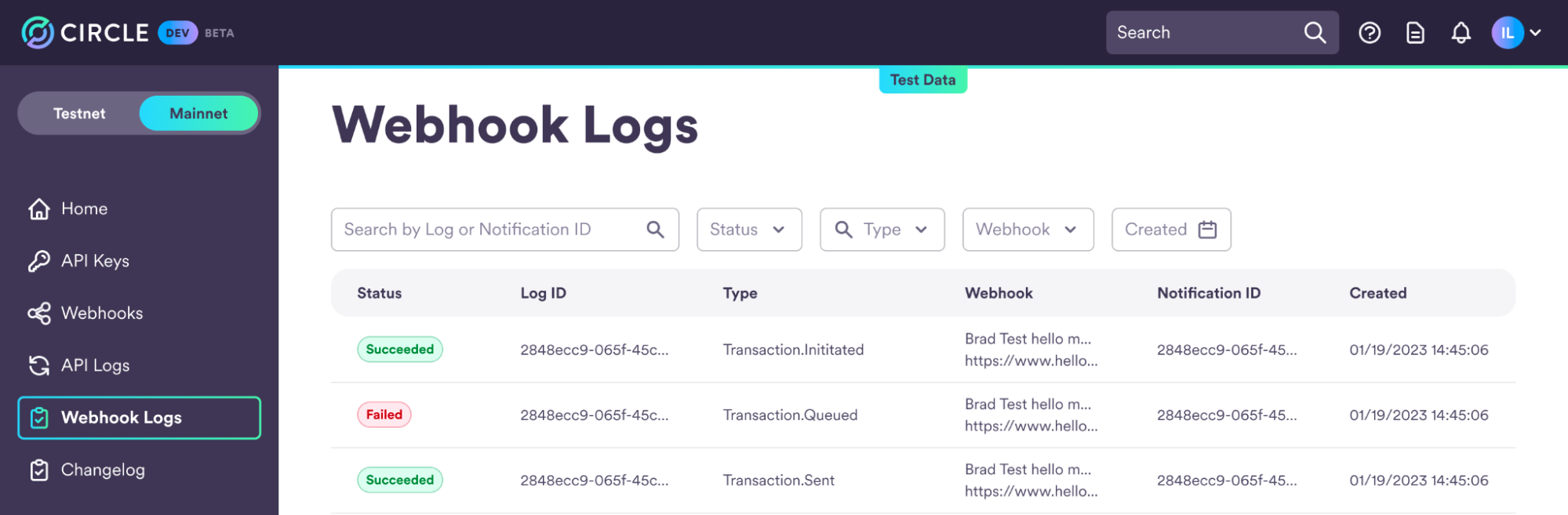
Within the Circle Developer Console, there is a dedicated tab for **Webhook
Logs**. By accessing this tab, you will be presented with an informative
overview highlighting the most recent Webhook Events, thereby facilitating
efficient monitoring and management of your Webhook integrations.
 ## Detailed Webhook View for Deeper Insight
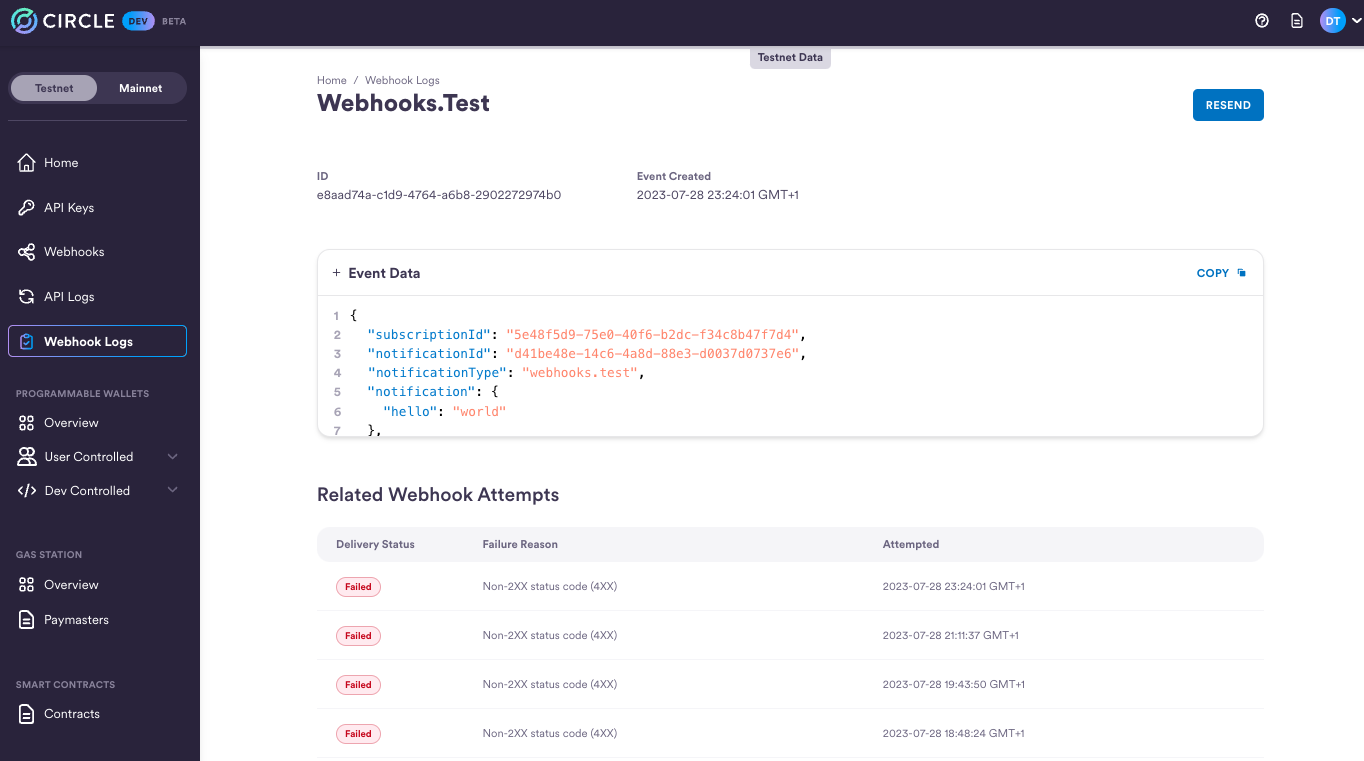
In addition, you have the ability to access a detailed page for each individual
entry within the Webhook Logs. By clicking on a specific entry, you will be
directed to a dedicated detail page that offers comprehensive information. This
includes nested event object data and an associated table of events, including
their respective Webhook attempts.
This detailed view enables you to gain deeper insights into the specific details
of each Webhook event, aiding in further analysis and troubleshooting. Moreover,
it provides you with the valuable option to resend a Webhook, allowing for
seamless management and control over your Webhook integration flow.
## Detailed Webhook View for Deeper Insight
In addition, you have the ability to access a detailed page for each individual
entry within the Webhook Logs. By clicking on a specific entry, you will be
directed to a dedicated detail page that offers comprehensive information. This
includes nested event object data and an associated table of events, including
their respective Webhook attempts.
This detailed view enables you to gain deeper insights into the specific details
of each Webhook event, aiding in further analysis and troubleshooting. Moreover,
it provides you with the valuable option to resend a Webhook, allowing for
seamless management and control over your Webhook integration flow.
 **Field Definitions:**
| | |
| :------------------ | :------------------------------------------------------------------------------------------------------------------------------------------------------------------------------------------------------------------------------------------------------------------------------------------------------------------------------------------------------------------------------------------------------------------------------------- |
| **Delivery Status** | The delivery status of a webhook notification indicates the outcome of the most recent delivery attempt(s). If any of the recent webhook attempts are marked as failed, it will affect the overall delivery status, resulting in a "failed" status. Monitoring the delivery status helps determine the reliability and success of webhook notifications, allowing for effective troubleshooting and resolution of any delivery issues. |
| **Log ID** | Unique identifier \[UUID] for the event. |
| **Notification ID** | Unique identifier \[UUID] for the notification. |
| **Event Type** | The event type and state of the event e.g. Transaction.Initiated. |
| **Event** | The webhook notification payload. |
**Field Definitions:**
| | |
| :------------------ | :------------------------------------------------------------------------------------------------------------------------------------------------------------------------------------------------------------------------------------------------------------------------------------------------------------------------------------------------------------------------------------------------------------------------------------- |
| **Delivery Status** | The delivery status of a webhook notification indicates the outcome of the most recent delivery attempt(s). If any of the recent webhook attempts are marked as failed, it will affect the overall delivery status, resulting in a "failed" status. Monitoring the delivery status helps determine the reliability and success of webhook notifications, allowing for effective troubleshooting and resolution of any delivery issues. |
| **Log ID** | Unique identifier \[UUID] for the event. |
| **Notification ID** | Unique identifier \[UUID] for the notification. |
| **Event Type** | The event type and state of the event e.g. Transaction.Initiated. |
| **Event** | The webhook notification payload. |