> ## Documentation Index
> Fetch the complete documentation index at: https://circle-devdocs-test-ai-codegen-component.mintlify.site/llms.txt
> Use this file to discover all available pages before exploring further.
# SDK Architecture for User-Controlled Wallets
> Learn the role of SDKs in enabling User-Controlled Wallets
Circle designed the Wallets SDK to guarantee that end-users have complete
control over the private keys of their
[user-controlled wallets](/wallets/infrastructure-models). For PIN
authentication method, users create their own PIN code and security questions
upon account creation to ensure their access, control, and recovery processes
are in place to use their wallets. Learn more about the available authentication
methods.
Go to one of the following guides to set up your local environment and review
the SDK API references:
* [Web SDK](/wallets/user-controlled/web-sdk)
* [iOS SDK](/wallets/user-controlled/ios-sdk)
* [Android SDK](/wallets/user-controlled/android-sdk)
* [React Native SDK](/wallets/user-controlled/react-native-sdk)
## SDK architecture
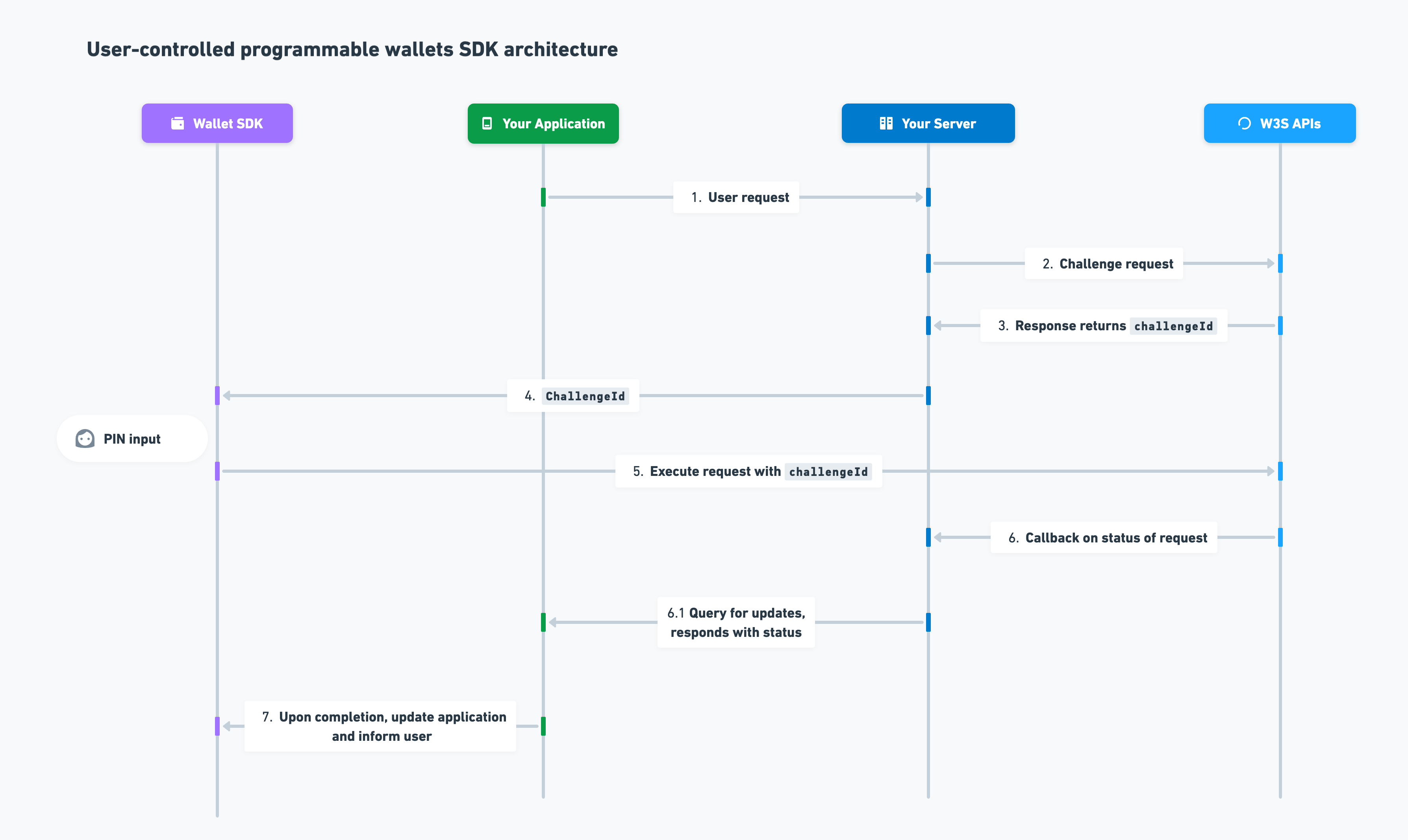 The SDK infrastructure uses the following design flow:
1. A user performs a request in their user-controlled wallet on the developer's
platform. For example, a user initiates a USDC transfer to an external
wallet.
2. The developer requests a user's transaction through Circle's Programmable
Wallets RESTful APIs.
3. Circle's RESTful APIs return a response containing a challenge ID. The
challenge must be completed to execute the requested transaction.
4. The developer passes the challenge ID to the Wallets SDK, prompting users to
input their PIN code to complete the challenge.
5. The user completes the challenge by entering their PIN code or click the
confirm/sign button on the Confirmation UIs, and the encrypted input is
delivered to Circle's SDK APIs.
6. Circle delivers a callback notification to the developer (or the developer
queries the corresponding GET endpoint for the given transaction) to receive
status updates on the requested transaction.
7. Upon completion of the request, the developer notifies the end-user in the
developer's application.
The SDK infrastructure uses the following design flow:
1. A user performs a request in their user-controlled wallet on the developer's
platform. For example, a user initiates a USDC transfer to an external
wallet.
2. The developer requests a user's transaction through Circle's Programmable
Wallets RESTful APIs.
3. Circle's RESTful APIs return a response containing a challenge ID. The
challenge must be completed to execute the requested transaction.
4. The developer passes the challenge ID to the Wallets SDK, prompting users to
input their PIN code to complete the challenge.
5. The user completes the challenge by entering their PIN code or click the
confirm/sign button on the Confirmation UIs, and the encrypted input is
delivered to Circle's SDK APIs.
6. Circle delivers a callback notification to the developer (or the developer
queries the corresponding GET endpoint for the given transaction) to receive
status updates on the requested transaction.
7. Upon completion of the request, the developer notifies the end-user in the
developer's application.