> ## Documentation Index
> Fetch the complete documentation index at: https://circle-devdocs-test-ai-codegen-component.mintlify.site/llms.txt
> Use this file to discover all available pages before exploring further.
# Recover an Account
> Help users regain access to their accounts when they forget their PIN code.
Circle Wallets provide a comprehensive developer solution to storing, sending,
and spending Web3 digital currencies and NFTs. You or your users can manage
asset infrastructure. Circle provides a one-stop-shop experience with all the
tools and services to handle the complex parts, including security, transaction
monitoring, account recovery flows, and more.
This guide outlines how users can regain access to their account using their
pre-set security questions in the event that they forget their original PIN
code.
Users should be aware that the answers to their security questions are their
responsibility to remember. No additional parties can help users regain access
to a user-controlled wallet if their PIN code is lost and they cannot remember
the answers to their security questions.
**Caution**: If a user loses both their PIN code and the answers to their
Security Questions, they will be permanently locked out of their account, losing
access to all of their wallets and assets.
## 1. Run Sample App
Once you have one of the web, iOS, or Android
[sample applications](/sample-projects) set up locally, you will then:
1. Run the sample app and simulator.
2. Obtain your App ID. This can be done by one of two options
1. Access the developer console and navigate to the
[configurator](https://console.circle.com/wallets/user/configurator)
within user-controlled wallets. From there, copy the App ID.
2. Make an API request to `GET /config/entity`
and copy the App ID from the response body.
3. Add the App ID to the sample app.
## 2. Acquire Session Token
Next, you will need to acquire a session token. Make a request to
the[`POST /users/token`](/api-reference/wallets/user-controlled-wallets/get-user-token)
using the previously created `userId` in Step 1. The `userToken` is a 60-minute
session token used to initiate requests requiring a user challenge (PIN code
entry). After 60 minutes, the session expires, and a new `userToken` must be
generated via the same endpoint.
From this response, you will acquire the `encryptionKey` and `userToken` which
you should provide in the respective fields in the sample app. Additionally, you
will use the `userToken` in Step 2.
```javascript Node.js SDk theme={null}
// Import and configure the user-controlled wallet SDK
const {
initiateUserControlledWalletsClient,
} = require("@circle-fin/user-controlled-wallets");
const circleUserSdk = initiateUserControlledWalletsClient({
apiKey: "",
});
const response = await circleUserSdk.createUserToken({
userId: "2f1dcb5e-312a-4b15-8240-abeffc0e3463",
});
```
```coffeescript Python SDK theme={null}
import uuid
from circle.web3 import user_controlled_wallets
from circle.web3 import utils
client = utils.init_user_controlled_wallets_client(api_key="Your API KEY")
# create an api instance
api_instance = user_controlled_wallets.UsersAndPinsApi(client)
# get user token
try:
request = user_controlled_wallets.GenerateUserTokenRequest.from_dict({"userId": ""})
response = api_instance.get_user_token(request)
print(response)
except user_controlled_wallets.ApiException as e:
print("Exception when calling UsersAndPinsApi->get_user_token: %s\n" % e)
```
```curl Curl theme={null}
curl --request POST \
--url 'https://api.circle.com/v1/w3s/users/token' \
--header 'accept: application/json' \
--header 'content-type: application/json' \
--header 'authorization: Bearer ' \
--data '
{
"userId": "2f1dcb5e-312a-4b15-8240-abeffc0e3463"
}
'
```
```json Response body theme={null}
{
"data": {
"userToken": "eyJhbGciOiJSUzI1NiIsInR5cCI6IkpXVCC9.eyJkZXZlbG9wZXJFbnRpdHlFbnZpcm9ubWVudCI6IlRFU1QiLCJlbnRpdHlJZCI6IjRlMDdhOGM5LTIxOTAtNDVlNC1hNjc0LWQyMGFkNjg4MWI3YyIsImV4cCI6MTY5MDU1MjcwNywiaWF0IjoxNjkwNTQ5MTA3LCJpbnRlcm5hbFVzZXJJZCI6ImQ2ZjkzODliLWQ5MzUtNWFlYy1iOTVhLWNjNTk1NjA2YWM5NiIsImlzcyI6Imh0dHBzOi8vcHJvZ3JhbW1hYmxlLXdhbGxldC5jaXJjbGUuY29tIiwianRpIjoiMmE0YmJlMzAtZTdkZi00YmM2LThiODMtNTk0NGUyMzE2ODlkIiwic3ViIjoiZXh0X3VzZXJfaWRfOSJ9.dhfByhxZFbJx0XWlzxneadT4RQWdnxLu3FSN9ln65hCDOfavaTL1sc4h-jUR8i4zMmfdURw3FFcQIdSbm-BUg6M7FP_fp-cs9xBbNmRZa31gMd1aKdcajJ9SvlVrfUowYfGXM3VcNF8rtTFtW-gk1-KzU4u10U35XXbbMcW1moxE0Rqx_fKotDgk2VdITuuds5d5TiQzAXECqeCOCtNoDKktMkglltbnLxOaRl2ReZjGt-ctD2V0DbYNO4T_ndPSUDI6qD7dXQRed5uDcezJYoha3Qj3tFGBglEnox2Y6DWTbllqjwmfTGrU8Pr0yz4jQz7suGwmiCzHPxcpYxMzYQ",
"encryptionKey": "Tlcyxz7Ts9ztRLQq5+pic0MIETblYimOo2d7idV/UFM="
}
}
```
## 3. Initialize Account Recovery and Acquire a Challenge ID
Make a request to
[`POST /user/pin/restore`](/api-reference/wallets/user-controlled-wallets/create-user-pin-restore-challenge)
using the `userToken` returned from Step 1. This call returns a `challengeId`,
which is used with the Circle Programmable Wallet SDK to have the user reset
their PIN code.
```javascript Node.js SDK theme={null}
const response = await circleUserSdk.restoreUserPin({
userToken: "",
});
```
```coffeescript Python SDK theme={null}
# create an api instance
api_instance = user_controlled_wallets.UsersAndPinsApi(client)
# get user token
try:
request = user_controlled_wallets.RestorePinRequest.from_dict({
"idempotencyKey": str(uuid.uuid4()),
})
response = api_instance.create_user_pin_restore_challenge("", request)
print(response)
except user_controlled_wallets.ApiException as e:
print("Exception when calling UsersAndPinsApi->create_user_pin_restore_challenge: %s\n" % e)
```
```curl Curl theme={null}
curl --request POST \
--url 'https://api.circle.com/v1/w3s/user/pin/restore' \
--header 'accept: application/json' \
--header 'content-type: application/json' \
--header 'authorization: Bearer ' \
--header 'X-User-Token: ' \
--data '
{
"idempotencyKey": "bb3d64d9-d421-41c7-aae2-84fc4732be2f"
}
'
```
```json JSON theme={null}
{
"data": {
"challengeId": "c4d1da72-111e-4d52-bdbf-2e74a2d803d5"
}
}
```
## 4. Recover Account in the Sample App
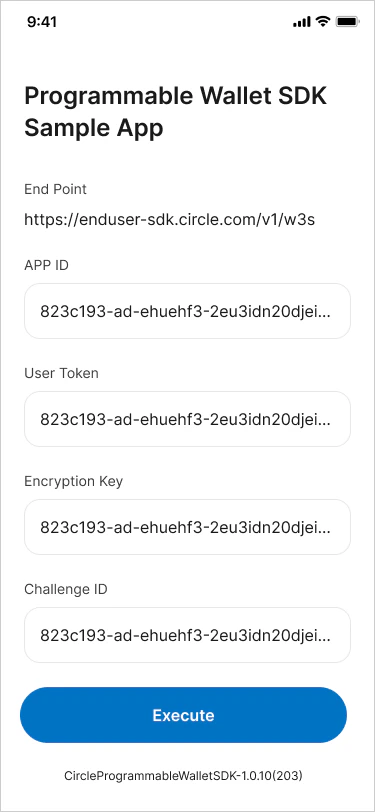
Using the sample application, enter the `userToken` and `secretKey` returned
from Step 1. Enter the `challengeId` returned from Step 2.
At this point, you should be ready to execute the account recovery workflow
through the Circle Programmable Wallet SDK. Once you've entered the required
fields indicated in Step 3, click **Execute** to continue.
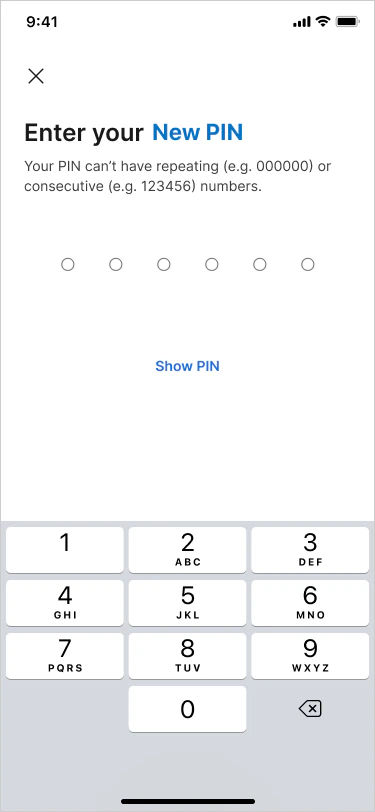
 The sample application takes you through the account recovery process by
answering your Security Questions. If answered correctly, the sample application
prompts you to enter a new PIN code.
The sample application takes you through the account recovery process by
answering your Security Questions. If answered correctly, the sample application
prompts you to enter a new PIN code.
 ## 5. Check the Challenge Status
Make a request to
[`GET /user/challenges/{id}`](/api-reference/wallets/user-controlled-wallets/get-user-challenge)
using the `challengeId` received from Step 2 to retrieve the status of the
challenge. Additionally, Circle sends a notification to a
[subscribed endpoint](/wallets/webhook-notifications) once the account recovery
process is complete. For a full list of possible `statuses`, see the
[Asynchronous States and Statuses guide](/w3s/asynchronous-states-and-statuses).
```javascript Node.js SDK theme={null}
const response = await circleUserSdk.getUserChallenge({
userToken: "",
challengeId: "",
});
```
```coffeescript Python SDK theme={null}
# create an api instance
api_instance = user_controlled_wallets.UsersAndPinsApi(client)
# get user token
try:
request = user_controlled_wallets.ChangePinRequest.from_dict({
"idempotencyKey": str(uuid.uuid4()),
})
response = api_instance.get_user_challenge("", "")
print(response)
except user_controlled_wallets.ApiException as e:
print("Exception when calling UsersAndPinsApi->get_user_challenge: %s\n" % e)
```
```curl Curl theme={null}
curl --request GET \
--url 'https://api.circle.com/v1/w3s//user/challenges/{id}' \
--header 'accept: application/json' \
--header 'content-type: application/json' \
--header 'authorization: Bearer ' \
--header 'X-User-Token: '
```
```json Response Body theme={null}
{
"data": {
"challenge": {
"id": "c4d1da72-111e-4d52-bdbf-2e74a2d803d5",
"correlationIds": ["54399e5a-1bf6-4921-9559-10c1115678cd"],
"status": "COMPLETED",
"type": "RESTORE_PIN"
}
}
}
```
## 5. Check the Challenge Status
Make a request to
[`GET /user/challenges/{id}`](/api-reference/wallets/user-controlled-wallets/get-user-challenge)
using the `challengeId` received from Step 2 to retrieve the status of the
challenge. Additionally, Circle sends a notification to a
[subscribed endpoint](/wallets/webhook-notifications) once the account recovery
process is complete. For a full list of possible `statuses`, see the
[Asynchronous States and Statuses guide](/w3s/asynchronous-states-and-statuses).
```javascript Node.js SDK theme={null}
const response = await circleUserSdk.getUserChallenge({
userToken: "",
challengeId: "",
});
```
```coffeescript Python SDK theme={null}
# create an api instance
api_instance = user_controlled_wallets.UsersAndPinsApi(client)
# get user token
try:
request = user_controlled_wallets.ChangePinRequest.from_dict({
"idempotencyKey": str(uuid.uuid4()),
})
response = api_instance.get_user_challenge("", "")
print(response)
except user_controlled_wallets.ApiException as e:
print("Exception when calling UsersAndPinsApi->get_user_challenge: %s\n" % e)
```
```curl Curl theme={null}
curl --request GET \
--url 'https://api.circle.com/v1/w3s//user/challenges/{id}' \
--header 'accept: application/json' \
--header 'content-type: application/json' \
--header 'authorization: Bearer ' \
--header 'X-User-Token: '
```
```json Response Body theme={null}
{
"data": {
"challenge": {
"id": "c4d1da72-111e-4d52-bdbf-2e74a2d803d5",
"correlationIds": ["54399e5a-1bf6-4921-9559-10c1115678cd"],
"status": "COMPLETED",
"type": "RESTORE_PIN"
}
}
}
```