> ## Documentation Index
> Fetch the complete documentation index at: https://circle-devdocs-test-ai-codegen-component.mintlify.site/llms.txt
> Use this file to discover all available pages before exploring further.
# Create Your First User-Controlled Wallet with PIN
This guide outlines how to initialize and create a user-controlled wallet by
setting their PIN code and security questions. It utilizes Circle's sample
application in combination with API requests that can be done via Circle's API
references or cURL requests. cURL requests are provided inline, while API
references are linked from the API endpoint text. Instructions on using the API
references are in this [guide](/api-reference).
You can create both Smart Contract Accounts (SCA) and Externally Owned Accounts
(EOA) wallets. To learn more, see the [Account Types](/wallets/account-types)
guide.
## Prerequisites
1. Create a
[developer account and acquire an API key in the console](/w3s/circle-developer-account).
2. Install the [Developer Services SDKs](/w3s/web3-services-sdks), which is only
available for Node.js. (*optional*)
3. Set up one of the web, iOS, or Android
[sample applications](/sample-projects) locally.
## 1. Configure and Run the Sample App
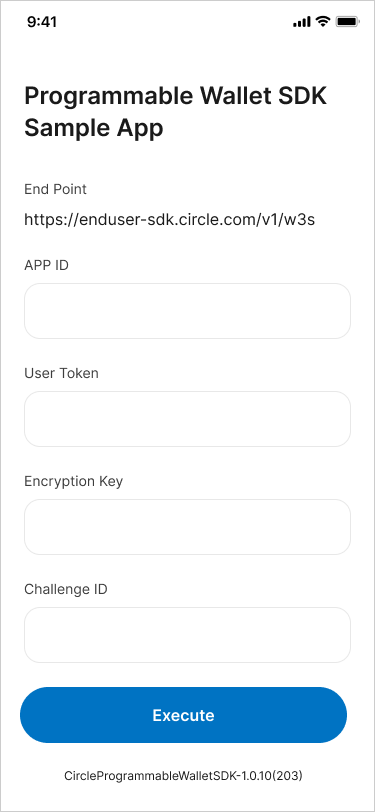
Once you have one of the web, iOS, or Android
[sample applications](/sample-projects) set up locally, you will then:
1. Run the sample app and simulator.
2. Obtain your App ID. This can be done by one of two options
1. Access the developer console and navigate to the
[configurator](https://console.circle.com/wallets/user/configurator)
within user-controlled wallets. From there, copy the App ID.
2. Make an API request to `GET /config/entity`
and copy the App ID from the response body.
3. Add the App ID to the sample app.
**App ID**
AKA Application ID is a unique identifier assigned to your application. It
serves as a key that allows you to configure and manage various settings
specific to your User-Controlled Wallet integration. The App ID is essential for
identifying your application and enabling communication with the Circle Platform
APIs.
 ## 2. Create a User
Make a request to
[`POST /users`](/api-reference/wallets/user-controlled-wallets/create-user) to
create a `userId`. This represents the user’s account and all associated
wallets, assets, and transactions. The `userId` is recommended to be in the UUID
format.
We recommend that you maintain a mapping to associate the end-user profile
usernames with the `userId` provided to our service/end-point. You can use a
local database to maintain this mapping.
```javascript Node.js SDK theme={null}
// Import and configure the user-controlled wallet SDK
const {
initiateUserControlledWalletsClient,
} = require("@circle-fin/user-controlled-wallets");
const circleUserSdk = initiateUserControlledWalletsClient({
apiKey: "",
});
const response = await circleUserSdk.createUser({
userId: "2f1dcb5e-312a-4b15-8240-abeffc0e3463",
});
```
```coffeescript Python SDK theme={null}
import uuid
from circle.web3 import user_controlled_wallets
from circle.web3 import utils
client = utils.init_user_controlled_wallets_client(api_key="Your API KEY")
# generate a user id
user_id = str(uuid.uuid4())
# create an api instance
api_instance = user_controlled_wallets.UsersAndPinsApi(client)
# create user
try:
request = user_controlled_wallets.CreateUserRequest(user_id=user_id)
api_instance.create_user(request)
except user_controlled_wallets.ApiException as e:
print("Exception when calling UsersAndPinsApi->create_user: %s\n" % e)
```
```curl cURL theme={null}
curl --request POST \
--url 'https://api.circle.com/v1/w3s/users' \
--header 'accept: application/json' \
--header 'content-type: application/json' \
--header 'authorization: Bearer ' \
--data '
{
"userId": "2f1dcb5e-312a-4b15-8240-abeffc0e3463"
}
'
```
If the request is successful, you will receive an empty response body.
```json Response Body theme={null}
{}
```
## 3. Acquire a Session Token
Next, you will need to acquire a session token. To do this, you will make a
request to the
[`POST /users/token`](/api-reference/wallets/user-controlled-wallets/get-user-token)
using the previously created `userId` in Step 2. The `userToken` is a 60-minute
session token, which is used to initiate requests that require a user
challenge (PIN code entry). After 60 minutes, the session
expires, and a new `userToken` must be generated via the same endpoint.
From this response, you will acquire the `encryptionKey` and `userToken` which
you should provide in the respective sample app fields. Additionally, you will
use the `userToken` in Step 4.
```javascript Node.js SDK theme={null}
const response = await circleUserSdk.createUserToken({
userId: "2f1dcb5e-312a-4b15-8240-abeffc0e3463",
});
```
```coffeescript Python SDK theme={null}
import uuid
from circle.web3 import user_controlled_wallets
from circle.web3 import utils
client = utils.init_user_controlled_wallets_client(api_key="Your API KEY")
# create an api instance
api_instance = user_controlled_wallets.UsersAndPinsApi(client)
# get user token
try:
request = user_controlled_wallets.GenerateUserTokenRequest.from_dict({"userId": ""})
response = api_instance.get_user_token(request)
print(response)
except user_controlled_wallets.ApiException as e:
print("Exception when calling UsersAndPinsApi->get_user_token: %s\n" % e)
```
```curl cURL theme={null}
curl --request POST \
--url 'https://api.circle.com/v1/w3s/users/token' \
--header 'accept: application/json' \
--header 'content-type: application/json' \
--header 'authorization: Bearer ' \
--data '
{
"userId": "2f1dcb5e-312a-4b15-8240-abeffc0e3463"
}
'
```
```json Response body theme={null}
{
"data": {
"userToken": "eyJhbGciOiJSUzI1NiIsInR5cCI6IkpXVCC9.eyJkZXZlbG9wZXJFbnRpdHlFbnZpcm9ubWVudCI6IlRFU1QiLCJlbnRpdHlJZCI6IjRlMDdhOGM5LTIxOTAtNDVlNC1hNjc0LWQyMGFkNjg4MWI3YyIsImV4cCI6MTY5MDU1MjcwNywiaWF0IjoxNjkwNTQ5MTA3LCJpbnRlcm5hbFVzZXJJZCI6ImQ2ZjkzODliLWQ5MzUtNWFlYy1iOTVhLWNjNTk1NjA2YWM5NiIsImlzcyI6Imh0dHBzOi8vcHJvZ3JhbW1hYmxlLXdhbGxldC5jaXJjbGUuY29tIiwianRpIjoiMmE0YmJlMzAtZTdkZi00YmM2LThiODMtNTk0NGUyMzE2ODlkIiwic3ViIjoiZXh0X3VzZXJfaWRfOSJ9.dhfByhxZFbJx0XWlzxneadT4RQWdnxLu3FSN9ln65hCDOfavaTL1sc4h-jUR8i4zMmfdURw3FFcQIdSbm-BUg6M7FP_fp-cs9xBbNmRZa31gMd1aKdcajJ9SvlVrfUowYfGXM3VcNF8rtTFtW-gk1-KzU4u10U35XXbbMcW1moxE0Rqx_fKotDgk2VdITuuds5d5TiQzAXECqeCOCtNoDKktMkglltbnLxOaRl2ReZjGt-ctD2V0DbYNO4T_ndPSUDI6qD7dXQRed5uDcezJYoha3Qj3tFGBglEnox2Y6DWTbllqjwmfTGrU8Pr0yz4jQz7suGwmiCzHPxcpYxMzYQ",
"encryptionKey": "Tlcyxz7Ts9ztRLQq5+pic0MIETblYimOo2d7idV/UFM="
}
}
```
## 4. Initialize the User's Account and Acquire the Challenge ID
You have two options to initialize your user’s account:
*For this guide, we will use Option 1 to create a user and a wallet
simultaneously.*
| Option | API endpoint | Result |
| :----- | :------------------------------------------------------------------------------------------------------------------------------------------------------ | :---------------------------------------------------------------------------------------------------------------------------------------------------------------------- |
| **1** | [`POST /user/initialize`](/api-reference/wallets/user-controlled-wallets/create-user-with-pin-challenge): Initialize a user account and create a wallet | This call generates wallets for the specified blockchains at the time of account creation. Use this method if you know which blockchain the wallet will be created on. |
| 2 | [`POST /user/pin`](/api-reference/wallets/user-controlled-wallets/create-user-pin-challenge): Initialize the user account | This call generates an account without creating a wallet. Use this method if you are unsure when creating an account on which blockchain the wallet will be created on. |
Make a request to
[`POST /user/initialize`](/api-reference/wallets/user-controlled-wallets/create-user-with-pin-challenge)
using the `userToken` returned from Step 3. This call returns a
Challenge ID, which is used with the Circle Programmable
Wallet SDK to have the user set their PIN code and security questions.
Make sure to provide a Testnet blockchain such as `ETH-SEPOLIA`, `MATIC-AMOY`,
and `AVAX-FUJI`.
### Amoy example
The following code samples show how to create an SCA wallet on Amoy and the
response.
```javascript Node.js SDK theme={null}
const response = await circleUserSdk.createUserPinWithWallets({
userToken: "",
accountType: "SCA",
blockchains: ["MATIC-AMOY"],
});
```
```coffeescript Python SDK theme={null}
# create an api instance
api_instance = user_controlled_wallets.UsersAndPinsApi(client)
try:
request = user_controlled_wallets.SetPinAndInitWalletRequest.from_dict({"accountType": 'SCA', "blockchains": ['MATIC-AMOY'], "idempotencyKey": str(uuid.uuid4()) })
response = api_instance.create_user_with_pin_challenge("", request)
print(response)
except user_controlled_wallets.ApiException as e:
print("Exception when calling UsersAndPinsApi->create_user_with_pin_challenge: %s\n" % e)
```
```curl cURL theme={null}
curl --request POST \
--url 'https://api.circle.com/v1/w3s/user/initialize' \
--header 'accept: application/json' \
--header 'content-type: application/json' \
--header 'authorization: Bearer ' \
--header 'X-User-Token: ' \
--data '
{
"idempotencyKey": "49e3f455-60a2-4b5e-9e9e-9400b86e5f34",
"accountType": "SCA",
"blockchains": [
"MATIC-MUMBAI"
]
}
'
```
```json Response Body theme={null}
{
"data": {
"challengeId": "0d1b5f41-1381-50af-983b-f54691415158"
}
}
```
### Solana example
The following code samples show how to create an EOA wallet on Solana and the
response.
```javascript Node.js SDK theme={null}
const response = await circleUserSdk.createUserPinWithWallets({
userToken: "",
accountType: "EOA",
blockchains: ["SOL-DEVNET"],
});
```
```coffeescript Python SDK theme={null}
# create an api instance
api_instance = user_controlled_wallets.UsersAndPinsApi(client)
try:
request = user_controlled_wallets.SetPinAndInitWalletRequest.from_dict({"accountType": 'EOA', "blockchains": ['SOL-DEVNET'], "idempotencyKey": str(uuid.uuid4()) })
response = api_instance.create_user_with_pin_challenge("", request)
print(response)
except user_controlled_wallets.ApiException as e:
print("Exception when calling UsersAndPinsApi->create_user_with_pin_challenge: %s\n" % e)
```
```curl cURL theme={null}
curl --request POST \
--url 'https://api.circle.com/v1/w3s/user/initialize' \
--header 'accept: application/json' \
--header 'content-type: application/json' \
--header 'authorization: Bearer ' \
--header 'X-User-Token: ' \
--data '
{
"idempotencyKey": "a6f4c8d2-33b1-43b0-8a46-5b14efe063d8",
"accountType": "EOA",
"blockchains": [
"SOL-DEVNET"
]
}
'
```
```json Response Body theme={null}
{
"data": {
"challengeId": "0d1b5f41-1381-50af-983b-f54691415158"
}
}
```
## 5. Create a Wallet in the Sample App
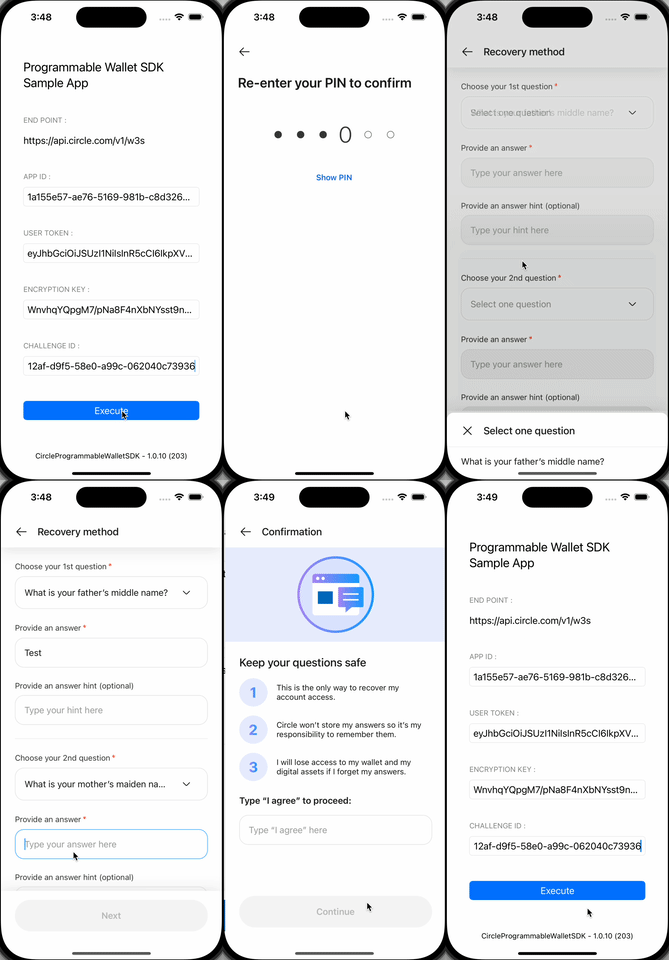
At this point, you should be ready to execute your first request through the
sample app. Once you've entered the required fields indicated in Step 4, click
**Execute** to continue.
The sample application takes you through the end user initialization process,
which includes setting up the user's PIN code and security questions and having
the user confirm their configuration.
## 2. Create a User
Make a request to
[`POST /users`](/api-reference/wallets/user-controlled-wallets/create-user) to
create a `userId`. This represents the user’s account and all associated
wallets, assets, and transactions. The `userId` is recommended to be in the UUID
format.
We recommend that you maintain a mapping to associate the end-user profile
usernames with the `userId` provided to our service/end-point. You can use a
local database to maintain this mapping.
```javascript Node.js SDK theme={null}
// Import and configure the user-controlled wallet SDK
const {
initiateUserControlledWalletsClient,
} = require("@circle-fin/user-controlled-wallets");
const circleUserSdk = initiateUserControlledWalletsClient({
apiKey: "",
});
const response = await circleUserSdk.createUser({
userId: "2f1dcb5e-312a-4b15-8240-abeffc0e3463",
});
```
```coffeescript Python SDK theme={null}
import uuid
from circle.web3 import user_controlled_wallets
from circle.web3 import utils
client = utils.init_user_controlled_wallets_client(api_key="Your API KEY")
# generate a user id
user_id = str(uuid.uuid4())
# create an api instance
api_instance = user_controlled_wallets.UsersAndPinsApi(client)
# create user
try:
request = user_controlled_wallets.CreateUserRequest(user_id=user_id)
api_instance.create_user(request)
except user_controlled_wallets.ApiException as e:
print("Exception when calling UsersAndPinsApi->create_user: %s\n" % e)
```
```curl cURL theme={null}
curl --request POST \
--url 'https://api.circle.com/v1/w3s/users' \
--header 'accept: application/json' \
--header 'content-type: application/json' \
--header 'authorization: Bearer ' \
--data '
{
"userId": "2f1dcb5e-312a-4b15-8240-abeffc0e3463"
}
'
```
If the request is successful, you will receive an empty response body.
```json Response Body theme={null}
{}
```
## 3. Acquire a Session Token
Next, you will need to acquire a session token. To do this, you will make a
request to the
[`POST /users/token`](/api-reference/wallets/user-controlled-wallets/get-user-token)
using the previously created `userId` in Step 2. The `userToken` is a 60-minute
session token, which is used to initiate requests that require a user
challenge (PIN code entry). After 60 minutes, the session
expires, and a new `userToken` must be generated via the same endpoint.
From this response, you will acquire the `encryptionKey` and `userToken` which
you should provide in the respective sample app fields. Additionally, you will
use the `userToken` in Step 4.
```javascript Node.js SDK theme={null}
const response = await circleUserSdk.createUserToken({
userId: "2f1dcb5e-312a-4b15-8240-abeffc0e3463",
});
```
```coffeescript Python SDK theme={null}
import uuid
from circle.web3 import user_controlled_wallets
from circle.web3 import utils
client = utils.init_user_controlled_wallets_client(api_key="Your API KEY")
# create an api instance
api_instance = user_controlled_wallets.UsersAndPinsApi(client)
# get user token
try:
request = user_controlled_wallets.GenerateUserTokenRequest.from_dict({"userId": ""})
response = api_instance.get_user_token(request)
print(response)
except user_controlled_wallets.ApiException as e:
print("Exception when calling UsersAndPinsApi->get_user_token: %s\n" % e)
```
```curl cURL theme={null}
curl --request POST \
--url 'https://api.circle.com/v1/w3s/users/token' \
--header 'accept: application/json' \
--header 'content-type: application/json' \
--header 'authorization: Bearer ' \
--data '
{
"userId": "2f1dcb5e-312a-4b15-8240-abeffc0e3463"
}
'
```
```json Response body theme={null}
{
"data": {
"userToken": "eyJhbGciOiJSUzI1NiIsInR5cCI6IkpXVCC9.eyJkZXZlbG9wZXJFbnRpdHlFbnZpcm9ubWVudCI6IlRFU1QiLCJlbnRpdHlJZCI6IjRlMDdhOGM5LTIxOTAtNDVlNC1hNjc0LWQyMGFkNjg4MWI3YyIsImV4cCI6MTY5MDU1MjcwNywiaWF0IjoxNjkwNTQ5MTA3LCJpbnRlcm5hbFVzZXJJZCI6ImQ2ZjkzODliLWQ5MzUtNWFlYy1iOTVhLWNjNTk1NjA2YWM5NiIsImlzcyI6Imh0dHBzOi8vcHJvZ3JhbW1hYmxlLXdhbGxldC5jaXJjbGUuY29tIiwianRpIjoiMmE0YmJlMzAtZTdkZi00YmM2LThiODMtNTk0NGUyMzE2ODlkIiwic3ViIjoiZXh0X3VzZXJfaWRfOSJ9.dhfByhxZFbJx0XWlzxneadT4RQWdnxLu3FSN9ln65hCDOfavaTL1sc4h-jUR8i4zMmfdURw3FFcQIdSbm-BUg6M7FP_fp-cs9xBbNmRZa31gMd1aKdcajJ9SvlVrfUowYfGXM3VcNF8rtTFtW-gk1-KzU4u10U35XXbbMcW1moxE0Rqx_fKotDgk2VdITuuds5d5TiQzAXECqeCOCtNoDKktMkglltbnLxOaRl2ReZjGt-ctD2V0DbYNO4T_ndPSUDI6qD7dXQRed5uDcezJYoha3Qj3tFGBglEnox2Y6DWTbllqjwmfTGrU8Pr0yz4jQz7suGwmiCzHPxcpYxMzYQ",
"encryptionKey": "Tlcyxz7Ts9ztRLQq5+pic0MIETblYimOo2d7idV/UFM="
}
}
```
## 4. Initialize the User's Account and Acquire the Challenge ID
You have two options to initialize your user’s account:
*For this guide, we will use Option 1 to create a user and a wallet
simultaneously.*
| Option | API endpoint | Result |
| :----- | :------------------------------------------------------------------------------------------------------------------------------------------------------ | :---------------------------------------------------------------------------------------------------------------------------------------------------------------------- |
| **1** | [`POST /user/initialize`](/api-reference/wallets/user-controlled-wallets/create-user-with-pin-challenge): Initialize a user account and create a wallet | This call generates wallets for the specified blockchains at the time of account creation. Use this method if you know which blockchain the wallet will be created on. |
| 2 | [`POST /user/pin`](/api-reference/wallets/user-controlled-wallets/create-user-pin-challenge): Initialize the user account | This call generates an account without creating a wallet. Use this method if you are unsure when creating an account on which blockchain the wallet will be created on. |
Make a request to
[`POST /user/initialize`](/api-reference/wallets/user-controlled-wallets/create-user-with-pin-challenge)
using the `userToken` returned from Step 3. This call returns a
Challenge ID, which is used with the Circle Programmable
Wallet SDK to have the user set their PIN code and security questions.
Make sure to provide a Testnet blockchain such as `ETH-SEPOLIA`, `MATIC-AMOY`,
and `AVAX-FUJI`.
### Amoy example
The following code samples show how to create an SCA wallet on Amoy and the
response.
```javascript Node.js SDK theme={null}
const response = await circleUserSdk.createUserPinWithWallets({
userToken: "",
accountType: "SCA",
blockchains: ["MATIC-AMOY"],
});
```
```coffeescript Python SDK theme={null}
# create an api instance
api_instance = user_controlled_wallets.UsersAndPinsApi(client)
try:
request = user_controlled_wallets.SetPinAndInitWalletRequest.from_dict({"accountType": 'SCA', "blockchains": ['MATIC-AMOY'], "idempotencyKey": str(uuid.uuid4()) })
response = api_instance.create_user_with_pin_challenge("", request)
print(response)
except user_controlled_wallets.ApiException as e:
print("Exception when calling UsersAndPinsApi->create_user_with_pin_challenge: %s\n" % e)
```
```curl cURL theme={null}
curl --request POST \
--url 'https://api.circle.com/v1/w3s/user/initialize' \
--header 'accept: application/json' \
--header 'content-type: application/json' \
--header 'authorization: Bearer ' \
--header 'X-User-Token: ' \
--data '
{
"idempotencyKey": "49e3f455-60a2-4b5e-9e9e-9400b86e5f34",
"accountType": "SCA",
"blockchains": [
"MATIC-MUMBAI"
]
}
'
```
```json Response Body theme={null}
{
"data": {
"challengeId": "0d1b5f41-1381-50af-983b-f54691415158"
}
}
```
### Solana example
The following code samples show how to create an EOA wallet on Solana and the
response.
```javascript Node.js SDK theme={null}
const response = await circleUserSdk.createUserPinWithWallets({
userToken: "",
accountType: "EOA",
blockchains: ["SOL-DEVNET"],
});
```
```coffeescript Python SDK theme={null}
# create an api instance
api_instance = user_controlled_wallets.UsersAndPinsApi(client)
try:
request = user_controlled_wallets.SetPinAndInitWalletRequest.from_dict({"accountType": 'EOA', "blockchains": ['SOL-DEVNET'], "idempotencyKey": str(uuid.uuid4()) })
response = api_instance.create_user_with_pin_challenge("", request)
print(response)
except user_controlled_wallets.ApiException as e:
print("Exception when calling UsersAndPinsApi->create_user_with_pin_challenge: %s\n" % e)
```
```curl cURL theme={null}
curl --request POST \
--url 'https://api.circle.com/v1/w3s/user/initialize' \
--header 'accept: application/json' \
--header 'content-type: application/json' \
--header 'authorization: Bearer ' \
--header 'X-User-Token: ' \
--data '
{
"idempotencyKey": "a6f4c8d2-33b1-43b0-8a46-5b14efe063d8",
"accountType": "EOA",
"blockchains": [
"SOL-DEVNET"
]
}
'
```
```json Response Body theme={null}
{
"data": {
"challengeId": "0d1b5f41-1381-50af-983b-f54691415158"
}
}
```
## 5. Create a Wallet in the Sample App
At this point, you should be ready to execute your first request through the
sample app. Once you've entered the required fields indicated in Step 4, click
**Execute** to continue.
The sample application takes you through the end user initialization process,
which includes setting up the user's PIN code and security questions and having
the user confirm their configuration.
 ## 6. Check User Status
Once you have completed all the steps in the sample app, you can then check the
user status by making a request to
[`GET /user`](/api-reference/wallets/user-controlled-wallets/get-user-by-token)
providing the `userToken` to retrieve the status of the user’s account.
To understand the current state of the user, inspect the following values:
1. **PIN Status**: This parameter indicates whether the end-user has
successfully set a 6-digit PIN. If the user has set the PIN successfully, the
`pinStatus` value will be `enabled`.
2. **Security Question Status**: This parameter provides information about the
user's recovery method status, specifically related to the defined security
questions. If the end-user has successfully established a recovery method by
defining their security questions, the `securityQuestionStatus` will be set
to `enabled`.
Additional information provided will include the number of failed attempts for
both the `pinStatus` and the security questions. If the end-user enters an
incorrect PIN or security answers more than three times, the pin entry or
recovery method will be locked, and they will need to wait 30 minutes for it
to be unlocked.
```javascript Node.js SDK theme={null}
const response = await circleUserSdk.getUserStatus({
userToken: "",
});
```
```coffeescript Python SDK theme={null}
# create an api instance
api_instance = user_controlled_wallets.UsersAndPinsApi(client)
# get user by token
try:
response = api_instance.get_user_by_token("")
print(response)
except user_controlled_wallets.ApiException as e:
print("Exception when calling UsersAndPinsApi->get_user_by_token: %s\n" % e)
```
```curl cURL theme={null}
curl --request GET \
--url 'https://api.circle.com/v1/w3s/user' \
--header 'accept: application/json' \
--header 'content-type: application/json' \
--header 'authorization: Bearer ' \
--header 'X-User-Token: '
```
```json Response Body theme={null}
{
"data": {
"id": "2f1dcb5e-312a-4b15-8240-abeffc0e3463",
"status": "ENABLED",
"createDate": "2023-07-26T15:27:32Z",
"pinStatus": "ENABLED",
"pinDetails": {
"failedAttempts": 0
},
"securityQuestionStatus": "ENABLED",
"securityQuestionDetails": {
"failedAttempts": 0
}
}
}
```
## 7. Check Wallet Status
Additionally, you can make an API request to
[`GET /wallets`](/api-reference/wallets/developer-controlled-wallets/get-wallets)
using the `userToken` to see the user’s newly created wallets.
```javascript Node.js SDK theme={null}
const response = await circleUserSdk.listWallets({
userToken: "",
});
```
```coffeescript Python SDK theme={null}
# create an api instance
api_instance = user_controlled_wallets.WalletsApi(client)
# get user token
try:
response = api_instance.list_wallets("")
print(response)
except user_controlled_wallets.ApiException as e:
print("Exception when calling WalletsApi->list_wallets: %s\n" % e)
```
```curl Curl theme={null}
curl --request GET \
--url 'https://api.circle.com/v1/w3s/wallets' \
--header 'accept: application/json' \
--header 'content-type: application/json' \
--header 'authorization: Bearer ' \
--header 'X-User-Token: '
```
### Amoy sample response
```json Response Body theme={null}
{
"data": {
"wallets": [
{
"id": "01899cf2-d415-7052-a207-f9862157e546",
"state": "LIVE",
"walletSetId": "01899cf2-d407-7f89-b4d9-84d63573f138",
"custodyType": "ENDUSER",
"userId": "2f1dcb5e-312a-4b15-8240-abeffc0e3463",
"address": "0x075e62c80e55d024cfd8fd4e3d1184834461db57",
"addressIndex": 0,
"blockchain": "MATIC-AMOY",
"accountType": "SCA",
"updateDate": "2023-07-28T14:41:47Z",
"createDate": "2023-07-28T14:41:47Z"
}
]
}
}
```
### Solana sample response
```json Response Body theme={null}
{
"data": {
"wallets": [
{
"id": "8a79c80b-4d4f-4032-971a-8bb9f9b0254f",
"state": "LIVE",
"walletSetId": "c43221d3-9db1-4cbf-8b18-e1dcae16b55d",
"custodyType": "ENDUSER",
"userId": "d8c8f832-5d4f-4123-9a7f-60120c2da5f0",
"address": "8UFfxP3zzSeqdkZ5iLTmUGzpHPRGnydZ1Vnq5GkzKTep",
"addressIndex": 0,
"blockchain": "SOL-DEVNET",
"accountType": "EOA",
"updateDate": "2023-07-28T14:43:48Z",
"createDate": "2023-07-28T14:43:48Z"
}
]
}
}
```
## 6. Check User Status
Once you have completed all the steps in the sample app, you can then check the
user status by making a request to
[`GET /user`](/api-reference/wallets/user-controlled-wallets/get-user-by-token)
providing the `userToken` to retrieve the status of the user’s account.
To understand the current state of the user, inspect the following values:
1. **PIN Status**: This parameter indicates whether the end-user has
successfully set a 6-digit PIN. If the user has set the PIN successfully, the
`pinStatus` value will be `enabled`.
2. **Security Question Status**: This parameter provides information about the
user's recovery method status, specifically related to the defined security
questions. If the end-user has successfully established a recovery method by
defining their security questions, the `securityQuestionStatus` will be set
to `enabled`.
Additional information provided will include the number of failed attempts for
both the `pinStatus` and the security questions. If the end-user enters an
incorrect PIN or security answers more than three times, the pin entry or
recovery method will be locked, and they will need to wait 30 minutes for it
to be unlocked.
```javascript Node.js SDK theme={null}
const response = await circleUserSdk.getUserStatus({
userToken: "",
});
```
```coffeescript Python SDK theme={null}
# create an api instance
api_instance = user_controlled_wallets.UsersAndPinsApi(client)
# get user by token
try:
response = api_instance.get_user_by_token("")
print(response)
except user_controlled_wallets.ApiException as e:
print("Exception when calling UsersAndPinsApi->get_user_by_token: %s\n" % e)
```
```curl cURL theme={null}
curl --request GET \
--url 'https://api.circle.com/v1/w3s/user' \
--header 'accept: application/json' \
--header 'content-type: application/json' \
--header 'authorization: Bearer ' \
--header 'X-User-Token: '
```
```json Response Body theme={null}
{
"data": {
"id": "2f1dcb5e-312a-4b15-8240-abeffc0e3463",
"status": "ENABLED",
"createDate": "2023-07-26T15:27:32Z",
"pinStatus": "ENABLED",
"pinDetails": {
"failedAttempts": 0
},
"securityQuestionStatus": "ENABLED",
"securityQuestionDetails": {
"failedAttempts": 0
}
}
}
```
## 7. Check Wallet Status
Additionally, you can make an API request to
[`GET /wallets`](/api-reference/wallets/developer-controlled-wallets/get-wallets)
using the `userToken` to see the user’s newly created wallets.
```javascript Node.js SDK theme={null}
const response = await circleUserSdk.listWallets({
userToken: "",
});
```
```coffeescript Python SDK theme={null}
# create an api instance
api_instance = user_controlled_wallets.WalletsApi(client)
# get user token
try:
response = api_instance.list_wallets("")
print(response)
except user_controlled_wallets.ApiException as e:
print("Exception when calling WalletsApi->list_wallets: %s\n" % e)
```
```curl Curl theme={null}
curl --request GET \
--url 'https://api.circle.com/v1/w3s/wallets' \
--header 'accept: application/json' \
--header 'content-type: application/json' \
--header 'authorization: Bearer ' \
--header 'X-User-Token: '
```
### Amoy sample response
```json Response Body theme={null}
{
"data": {
"wallets": [
{
"id": "01899cf2-d415-7052-a207-f9862157e546",
"state": "LIVE",
"walletSetId": "01899cf2-d407-7f89-b4d9-84d63573f138",
"custodyType": "ENDUSER",
"userId": "2f1dcb5e-312a-4b15-8240-abeffc0e3463",
"address": "0x075e62c80e55d024cfd8fd4e3d1184834461db57",
"addressIndex": 0,
"blockchain": "MATIC-AMOY",
"accountType": "SCA",
"updateDate": "2023-07-28T14:41:47Z",
"createDate": "2023-07-28T14:41:47Z"
}
]
}
}
```
### Solana sample response
```json Response Body theme={null}
{
"data": {
"wallets": [
{
"id": "8a79c80b-4d4f-4032-971a-8bb9f9b0254f",
"state": "LIVE",
"walletSetId": "c43221d3-9db1-4cbf-8b18-e1dcae16b55d",
"custodyType": "ENDUSER",
"userId": "d8c8f832-5d4f-4123-9a7f-60120c2da5f0",
"address": "8UFfxP3zzSeqdkZ5iLTmUGzpHPRGnydZ1Vnq5GkzKTep",
"addressIndex": 0,
"blockchain": "SOL-DEVNET",
"accountType": "EOA",
"updateDate": "2023-07-28T14:43:48Z",
"createDate": "2023-07-28T14:43:48Z"
}
]
}
}
```