> ## Documentation Index
> Fetch the complete documentation index at: https://circle-devdocs-test-ai-codegen-component.mintlify.site/llms.txt
> Use this file to discover all available pages before exploring further.
# Key Management
This article describes the different types of key management models, with either
Multi-Party Computation (MPC) or Passkeys, so you can choose which approach to
use for your development. Each wallet type has specific requirements and
provides specific benefits. Use the information in this topic to choose the
wallet type that best supports your business objectives.
| Type | Who Controls Use of Private Key | Supported Wallet types | Example Use-cases |
| ------------------------ | ---------------------------------- | ----------------------------------- | ----------------------------------------------------------------------------------------------------------------------------------------------------------------------------------------------------------------------------------------------------------------------------------------------------------------------- |
| **Developer-controlled** | Developer, secured using MPC | • Developer-controlled (EOA or SCA) | Backend wallets that you create either for end-user or your own business’s use-case that you completely control, such as:
• Receive payment deposits and reconciliation
• Programmatic distribution of tokens, one-to-many payouts
• Programmatic interaction with dApps
• AI agent wallets |
| **User-controlled** | End-user, secured using MPC | • User-controlled (EOA or SCA) | Non-custodial embedded wallets in your app. End user authentication via social login or email. Users can collect NFTs and tokens, and have full control over transactions and signing from their wallets. |
| **Passkeys** | End-user, secured on user’s device | Modular wallets | Non-custodial embedded wallets that are secured on your users’ devices. End user authentication via passkey, with ability to backup passkey to personal cloud. Users can collect NFTs and tokens, and have full control over transactions and signing from their wallets. |
## Developer-controlled wallets
Developer-controlled wallets allow developers to retain control over their own
wallets, or their users' while streamlining user interactions with the Web3
ecosystem. With developer-controlled wallets, developers can programmatically
transact on behalf of their users without the need to manually sign or manage
private keys.
To start building developer-controlled wallets, see
[Create Your First Developer-Controlled Wallet](/wallets/dev-controlled/create-your-first-wallet).
For security setup, we use 2-of-2 multi-party computation (MPC) where developers
have the choice of hosting one or two of the MPC nodes, or relying on Circle to
host and protect them through cryptography to ensure that developers have full
control over these wallets. The options include:
* Rely on **Circle to host the 2 MPC nodes** (default): The signing is protected
cryptographically by an
[Entity Secret](/wallets/dev-controlled/entity-secret-management#what-is-an-entity-secret-ciphertext)
that you create and store on your server, and is used for every wallet
creation and transaction. This option is ideal for getting started quickly
with minimum setup effort.
* Rely on **Circle to host 1 of the 2 MPC nodes**. Shared key management where
you and Circle each host one of the MPC nodes. Circle offers a keyguard
service that you host on your servers to authorize the MPC signing before
every transaction. This splits the management of private keys to two parties
across different servers.
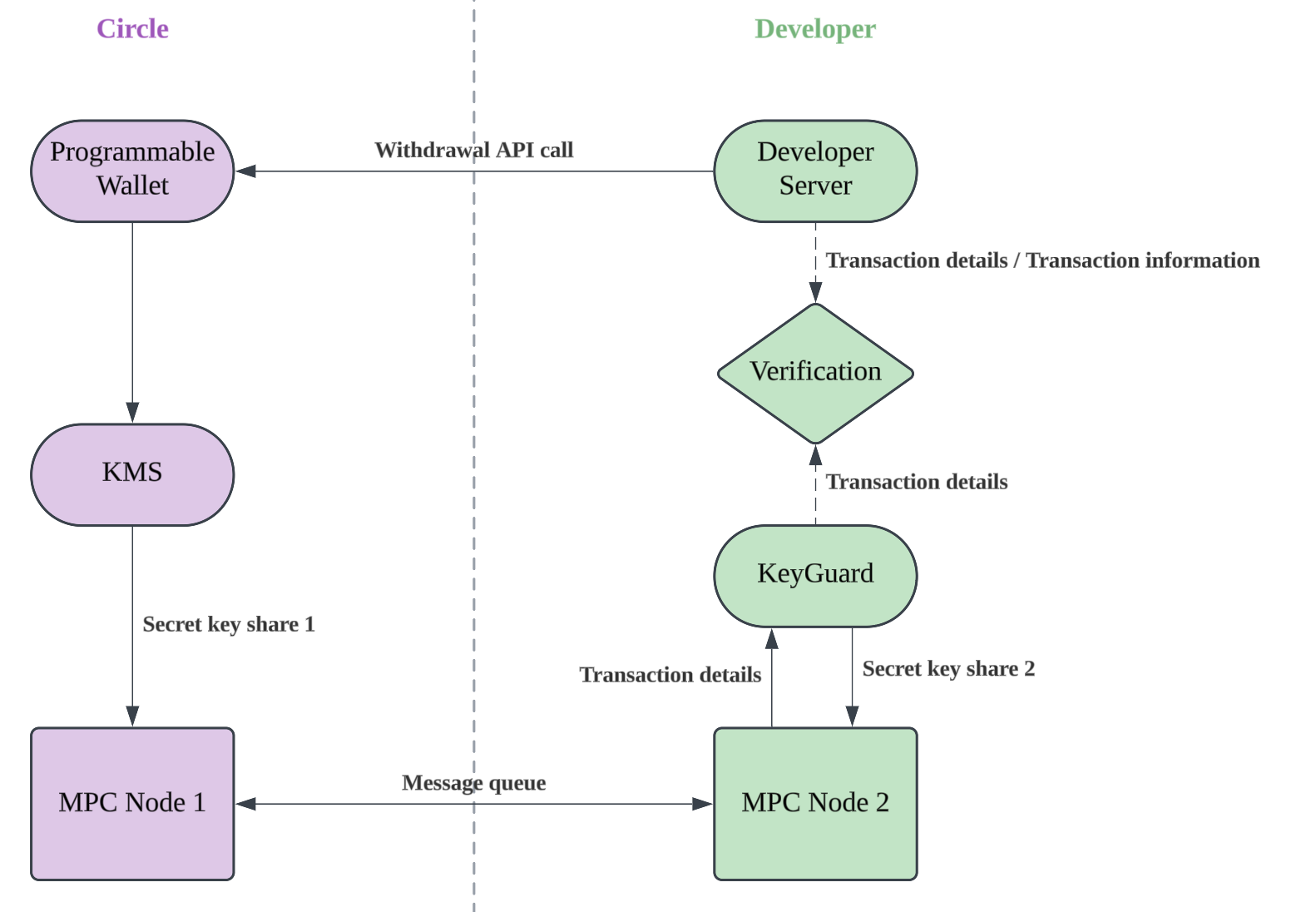 * Host both of the MPC nodes: similar to the setting above, but you host both of
the MPC nodes with the keyguard service that authorizes the signing for every
transaction. Such setup might be required in certain regulatory jurisdictions.
[Contact Circle](https://help.circle.com/s/submit-ticket?language=en_US) if you
would like to host 1 or 2 of the MPC nodes yourself.
## User-controlled wallets
User-controlled wallets grant your users full autonomy to control their assets.
We use a 2-of-2 MPC setup where the MPC nodes are hosted by Circle. We leverage
Shamir’s secret sharing to ensure you, your end users, and Circle, each have a
key shard that is needed to access the MPC signing performed on Circle’s
servers. This ensures that only end users can perform the signing after they
authenticate with a familiar UX like
[social login, email + OTP, or PIN](/wallets/user-controlled/authentication-methods).
To start building user-controlled wallets, see
[Quickstarts for Social Logins or Email Authentication](/wallets/user-controlled/create-your-first-wallet-with-social-logins).
## Passkeys
Modular wallets can use passkeys as signers. Passkeys are secured on the user
device's secure enclave, ensuring end users have full autonomy over signing and
transacting with their wallet. This setup ensures that end users authorize all
signing activities, while providing a familiar and seamless Web2-like user
experience.
To start building passkey authenticated modular wallets, see
[Create Your First Passkey Authenticated Modular Wallet](/wallets/modular/create-a-wallet-and-send-gasless-txn).
## Backing up your keys for recovery
To reassure that you and your users have access to your wallets at all times,
Circle provides ways to backup your keys or your end users’ keys for operational
continuity.
For developer-controlled wallets, Circle offers a key backup and recovery tool
that allows you to backup your keys and perform signing.
[Contact Circle](https://help.circle.com/s/submit-ticket?language=en_US) if you
have this need.
For modular wallets with Passkey signing by your end users, you can leverage the
FIDO2 backup standard supported by iCloud, Google Drive, and password managers
like 1Password to let your end users backup their passkeys in a secure way that
only they have access to.
## Choosing your key management type
The critical distinction between user-controlled, developer-controlled, and
passkey wallets is which party controls the ability to access the private key
used to interact with the blockchain. In the case of user-controlled or passkey
wallets, the user controls this ability. In the case of developer-controlled
wallets, the developer has this control. All types of wallets can make
transactions, interact with smart contracts, and sign messages.
* Host both of the MPC nodes: similar to the setting above, but you host both of
the MPC nodes with the keyguard service that authorizes the signing for every
transaction. Such setup might be required in certain regulatory jurisdictions.
[Contact Circle](https://help.circle.com/s/submit-ticket?language=en_US) if you
would like to host 1 or 2 of the MPC nodes yourself.
## User-controlled wallets
User-controlled wallets grant your users full autonomy to control their assets.
We use a 2-of-2 MPC setup where the MPC nodes are hosted by Circle. We leverage
Shamir’s secret sharing to ensure you, your end users, and Circle, each have a
key shard that is needed to access the MPC signing performed on Circle’s
servers. This ensures that only end users can perform the signing after they
authenticate with a familiar UX like
[social login, email + OTP, or PIN](/wallets/user-controlled/authentication-methods).
To start building user-controlled wallets, see
[Quickstarts for Social Logins or Email Authentication](/wallets/user-controlled/create-your-first-wallet-with-social-logins).
## Passkeys
Modular wallets can use passkeys as signers. Passkeys are secured on the user
device's secure enclave, ensuring end users have full autonomy over signing and
transacting with their wallet. This setup ensures that end users authorize all
signing activities, while providing a familiar and seamless Web2-like user
experience.
To start building passkey authenticated modular wallets, see
[Create Your First Passkey Authenticated Modular Wallet](/wallets/modular/create-a-wallet-and-send-gasless-txn).
## Backing up your keys for recovery
To reassure that you and your users have access to your wallets at all times,
Circle provides ways to backup your keys or your end users’ keys for operational
continuity.
For developer-controlled wallets, Circle offers a key backup and recovery tool
that allows you to backup your keys and perform signing.
[Contact Circle](https://help.circle.com/s/submit-ticket?language=en_US) if you
have this need.
For modular wallets with Passkey signing by your end users, you can leverage the
FIDO2 backup standard supported by iCloud, Google Drive, and password managers
like 1Password to let your end users backup their passkeys in a secure way that
only they have access to.
## Choosing your key management type
The critical distinction between user-controlled, developer-controlled, and
passkey wallets is which party controls the ability to access the private key
used to interact with the blockchain. In the case of user-controlled or passkey
wallets, the user controls this ability. In the case of developer-controlled
wallets, the developer has this control. All types of wallets can make
transactions, interact with smart contracts, and sign messages.