> ## Documentation Index
> Fetch the complete documentation index at: https://circle-devdocs-test-ai-codegen-component.mintlify.site/llms.txt
> Use this file to discover all available pages before exploring further.
# Register Your Entity Secret
> Learn to create an Entity Secret and register its ciphertext to enable developer-wallet functionality.
In this guide you will learn how to generate, encrypt, and register an
Entity Secret. You can use standard libraries for generating
and encrypting the Entity Secret, or SDK methods to simplify your development
journey. Likewise, for registering an
Entity Secret Ciphertext, you can use an SDK method or the
Circle Console.
## Prerequisites
1. Create a
[Developer Account and acquire an API key in the Console](/w3s/circle-developer-account).
2. Install the applicable [server-side SDK](/sdk-explorer#server-side-sdks) for
your language - needed for 1a, 2a, 3a below.
## Introduction
The Entity Secret is a randomly generated 32-byte key designed to enhance
security in developer-controlled wallets. After being generated, the hex-encoded
Entity Secret key is encrypted into ciphertext for greater data safety. Later
on, to create a wallet or to perform a transaction, you must append the Entity
Secret ciphertext to the API request arguments. The ciphertext must be
re-encrypted (rotated) whenever an API requires it.
## 1. Generate an Entity Secret
There are two ways to generate an Entity Secret: using the SDK, or using
standard libraries or CLI tools. Once generated the Entity Secret will consist
of a 32-byte hex string value similar to:
`7ae43b03d7e48795cbf39ddad2f58dc8e186eb3d2dab3a5ec5bb3b33946639a4`.
Remember to keep your Entity Secret safe and store it securely, for instance in
your password manager, to ensure access to your developer-controlled wallet.
Although creating a ciphertext is not required for Entity Secret registration
using a server-side SDK, it is still important to store and keep the Entity
Secret for future API calls.
### 1a. Generate Entity Secret Using the SDK
You can use the SDK methods below to generate an Entity Secret.
```javascript Node.js SDK theme={null}
import { generateEntitySecret } from "@circle-fin/developer-controlled-wallets";
// This will print out a new entity secret and sample code to register the entity secret
generateEntitySecret();
```
```python Python SDK theme={null}
from circle.web3 import utils
## This will print out a new entity secret and sample code to register the entity secret
utils.generate_entity_secret()
```
The above code generates an Entity Secret and displays it on your terminal
screen. Make sure to save your Entity Secret since you will use it in the
following steps.
### 1b. Generate Entity Secret Using Standard Libraries
You can also use standard libraries or CLI tools to generate the Entity Secret.
Below are a few examples.
```shell Shell theme={null}
openssl rand -hex 32
```
```javascript Node.js theme={null}
const crypto = require("crypto");
const secret = crypto.randomBytes(32).toString("hex");
console.log(secret);
```
```javascript JavaScript theme={null}
let array = new Uint8Array(32);
window.crypto.getRandomValues(array);
let secret = Array.from(array)
.map((b) => b.toString(16).padStart(2, "0"))
.join("");
console.log(secret);
```
```python Python theme={null}
import os
secret = os.urandom(32).hex()
print(secret)
```
```go Go theme={null}
package main
import (
"crypto/rand"
"fmt"
"io"
)
func generateRandomHex() []byte {
mainBuff := make([]byte, 32)
_, err := io.ReadFull(rand.Reader, mainBuff)
if err != nil {
panic("reading from crypto/rand failed: " + err.Error())
}
return mainBuff
}
// The following sample codes generate a distinct hex encoded entity secret with each execution
// The generation of entity secret only need to be executed once unless you need to rotate entity secret.
func main() {
entitySecret := generateRandomHex()
fmt.Printf("Hex encoded entity secret: %x", entitySecret)
}
```
The Entity Secret is displayed on your terminal screen. Make sure to save your
Entity Secret since you will use it in the following steps.
## 2. Encrypt the Entity Secret
**Note:** If you use an SDK method to register the Entity Secret, then this
step is *optional* - see step [3a. Register the Entity Secret Using the
SDK](#3a-register-the-entity-secret-using-the-sdk) below.
Similarly, you can encrypt the Entity Secret in two ways to generate the Entity
Secret Ciphertext: using the SDK, or manually using standard libraries.
### 2a. Encrypt Entity Secret Using the SDK
You can use the SDK methods below to generate the Entity Secret Ciphertext.
```javascript Node.js SDK theme={null}
import { generateEntitySecretCiphertext } from "@circle-fin/developer-controlled-wallets";
async function main() {
await generateEntitySecretCiphertext({
apiKey: "",
entitySecret: "",
});
}
main()[OR];
import { initiateDeveloperControlledWalletsClient } from "@circle-fin/developer-controlled-wallets";
const developerSDK = initiateDeveloperControlledWalletsClient({
apiKey: "",
entitySecret: "",
});
const entitySecretCiphertext =
await developerSDK.generateEntitySecretCiphertext();
console.log(entitySecretCiphertext);
```
```python Python SDK theme={null}
from circle.web3 import utils
utils.generate_entity_secret_ciphertext('', '')
```
### 2b. Encrypt Entity Secret Using Standard Libraries
Similarly, you can create the Entity Secret Ciphertext using standard libraries
or CLI tools. To that end, you must first retrieve your Entity Secret's **public
key**. The public key plays a crucial role in generating the Entity Secret
Ciphertext in the upcoming step. To obtain the required public key, initiate a
request to the
[Get public key for entity](/api-reference/wallets/programmable-wallets/get-public-key)
API endpoint. Remember, this endpoint can be accessed by providing your valid
[API key](/w3s/web3-services-api-client-keys-auth) for authentication.
```javascript Node.js SDK theme={null}
// Import and configure the developer-controlled wallet SDK
const {
initiateDeveloperControlledWalletsClient,
} = require("@circle-fin/developer-controlled-wallets");
const circleDeveloperSdk = initiateDeveloperControlledWalletsClient({
apiKey: "",
entitySecret: "", // Make sure to enter the entity secret from the step above.
});
const response = await circleDeveloperSdk.getPublicKey({});
```
```python Python SDK theme={null}
from circle.web3 import developer_controlled_wallets
from circle.web3 import utils
client = utils.init_developer_controlled_wallets_client(api_key=key, entity_secret=entitySecret)
# get public key
try:
resposne = client.configuration.get_public_key()
print(resposne)
except developer_controlled_wallets.ApiException as e:
print("Exception when calling configuration->get_public_key: %s\n" % e)
```
```curl cURL theme={null}
curl --request GET \
--url 'https://api.circle.com/v1/w3s/config/entity/publicKey' \
--header 'accept: application/json' \
--header 'authorization: Bearer '
```
```json Response Body theme={null}
{
"data": {
"publicKey": "-----BEGIN RSA PUBLIC KEY-----\nMIICIjANBgkqhkiG9w0BAQEFAAOCAg8AMIICCgKCAgEAsL4dzMMQX8pYbiyj0g5H\nFGwdygAA2xDm2VquY8Sk0xlOC0yKr+rqUrqnZCj09vLuXbg1BreO/BP4F4GEIHgR\nBNT+o5Q8k0OqxLXmcm5sz6CPlsFCom+MiOj6s7RD0SXg91WF8MrN88GyN53xkemA\nOYU1AlIt4dVIrFyGY8aQ57sbWHyIjim+do1kBX+svIA/FLHG/sycoGiPU1E+Kydf\nlEDga4iR2DSbW6Zte9cGDg9Ivw/seNd0TLzJz6oC9XgSK5Et6/ZpOmqJgvISQ6rT\nK15DJ8EzIOzZZuEVOefgy1S7rLdSH7DexuR4W7T+KpP/f8Px0bxd4N6MT5V5kBYa\ngYHHIvqlJvXe5EzwidIWk1rg1X+YJt2M48h3Pr9HeECcmrnEYOgp32m/9lJ8vKp9\nhNh0rEKww/ULd1HqCEm/I0QGuji13XcGxVo5+7KCb/C76CNdW3pdRMn6fwFh4WVu\nu99iRc9OZhlkphysWm44hs1ZPpMCAkKttWjhnLZwIatN27x2JUqoCEUOho19iT+F\nwlPFA7E0Ju9Rqm68AkCXxHsJsAuGT8m6FLQZLHv4JyO/QEVzD7vY08A2I5dz1mVt\ngVam1/05Axju6poRomx/DUxiR0QH1+0Kg15+2A0fRkBggTTn7kvGsgz0cqk9cTm0\nEITpIVGcSGrVNRrmSye2OW0CAwEAAQ==\n-----END RSA PUBLIC KEY-----\n"
}
}
```
Once you have the public key, you will use RSA to encrypt your Entity Secret and
generate its ciphertext. Immediately after, you will transform this encrypted
data into a Base64 format. The output ciphertext will be exactly 684 characters
long.
```javascript Node.js theme={null}
const forge = require("node-forge");
const entitySecret = forge.util.hexToBytes("YOUR_ENTITY_SECRET");
const publicKey = forge.pki.publicKeyFromPem("YOUR_PUBLIC_KEY");
const encryptedData = publicKey.encrypt(entitySecret, "RSA-OAEP", {
md: forge.md.sha256.create(),
mgf1: {
md: forge.md.sha256.create(),
},
});
console.log(forge.util.encode64(encryptedData));
```
```python Python theme={null}
import base64
import codecs
# Installed by `pip install pycryptodome`
from Crypto.PublicKey import RSA
from Crypto.Cipher import PKCS1_OAEP
from Crypto.Hash import SHA256
# Paste your entity public key here.
public_key_string = 'PASTE_YOUR_PUBLIC_KEY_HERE'
# If you already have a hex encoded entity secret, you can paste it here. the length of the hex string should be 64.
hex_encoded_entity_secret = 'PASTE_YOUR_HEX_ENCODED_ENTITY_SECRET_KEY_HERE'
# The following sample codes generate a distinct entity secret ciphertext with each execution.
if __name__ == '__main__':
entity_secret = bytes.fromhex(hex_encoded_entity_secret)
if len(entity_secret) != 32:
print("invalid entity secret")
exit(1)
public_key = RSA.importKey(public_key_string)
# encrypt data by the public key
cipher_rsa = PKCS1_OAEP.new(key=public_key, hashAlgo=SHA256)
encrypted_data = cipher_rsa.encrypt(entity_secret)
# encode to base64
encrypted_data_base64 = base64.b64encode(encrypted_data)
print("Hex encoded entity secret:", codecs.encode(entity_secret, 'hex').decode())
print("Entity secret ciphertext:", encrypted_data_base64.decode())
```
```go Go theme={null}
package main
import (
"crypto/rand"
"crypto/rsa"
"crypto/sha256"
"crypto/x509"
"encoding/base64"
"encoding/hex"
"encoding/pem"
"errors"
"fmt"
)
// Paste your entity public key here.
var publicKeyString = "PASTE_YOUR_PUBLIC_KEY_HERE"
// If you already have a hex encoded entity secret, you can paste it here. the length of the hex string should be 64.
var hexEncodedEntitySecret = "PASTE_YOUR_HEX_ENCODED_ENTITY_SECRET_KEY_HERE"
// The following sample codes generate a distinct entity secret ciphertext with each execution
func main() {
entitySecret, err := hex.DecodeString(hexEncodedEntitySecret)
if err != nil {
panic(err)
}
if len(entitySecret) != 32 {
panic("invalid entity secret")
}
pubKey, err := ParseRsaPublicKeyFromPem([]byte(publicKeyString))
if err != nil {
panic(err)
}
cipher, err := EncryptOAEP(pubKey, entitySecret)
if err != nil {
panic(err)
}
fmt.Printf("Hex encoded entity secret: %x", entitySecret)
fmt.Printf("Entity secret ciphertext: %s", base64.StdEncoding.EncodeToString(cipher))
}
// ParseRsaPublicKeyFromPem parse rsa public key from pem.
func ParseRsaPublicKeyFromPem(pubPEM []byte) (*rsa.PublicKey, error) {
block, _ := pem.Decode(pubPEM)
if block == nil {
return nil, errors.New("failed to parse PEM block containing the key")
}
pub, err := x509.ParsePKIXPublicKey(block.Bytes)
if err != nil {
return nil, err
}
switch pub := pub.(type) {
case *rsa.PublicKey:
return pub, nil
default:
}
return nil, errors.New("key type is not rsa")
}
// EncryptOAEP rsa encrypt oaep.
func EncryptOAEP(pubKey *rsa.PublicKey, message []byte) (ciphertext []byte, err error) {
random := rand.Reader
ciphertext, err = rsa.EncryptOAEP(sha256.New(), random, pubKey, message, nil)
if err != nil {
return nil, err
}
return
}
```
**Note**: You can also refer to the provided [sample
code](https://github.com/circlefin/w3s-entity-secret-sample-code) for
encrypting and encoding the Entity Secret.
## 3. Register the Entity Secret
Finally, you can register your Entity Secret in two ways: using the SDK, or
using the Circle Console.
**Caution:** It is important to store a recovery file in case the Entity
Secret is lost. Such a recovery file can then be used to reset your Entity
Secret. You can optionally specify the path to store the recovery file when
you register your Entity Secret.
**Note:** Circle's platform does not store the Entity Secret, meaning only you
can invoke private keys. However, it also means that you must save the Entity
Secret yourself to ensure the security and accessibility of your
developer-controlled wallets.
### 3a. Register the Entity Secret Using the SDK
**Note:** If you use the SDK to register, then this step accepts the
unencrypted Entity Secret directly. Therefore, step [2. Encrypt the Entity
Secret](#2-encrypt-the-entity-secret) above would not be required.
You can use the SDK methods below to register your Entity Secret.
```javascript Node.js SDK theme={null}
import { registerEntitySecretCiphertext } from "@circle-fin/developer-controlled-wallets";
registerEntitySecretCiphertext({
apiKey: "",
entitySecret: "",
recoveryFileDownloadPath: "",
});
```
```python Python SDK theme={null}
from circle.web3 import utils
utils.register_entity_secret_ciphertext(api_key='', entity_secret='', recoveryFileDownloadPath='')
```
Now that the Entity Secret has been registered, make sure to read and follow
some [Final Considerations](#final-considerations).
### 3b. Register the Entity Secret Ciphertext Using the Console
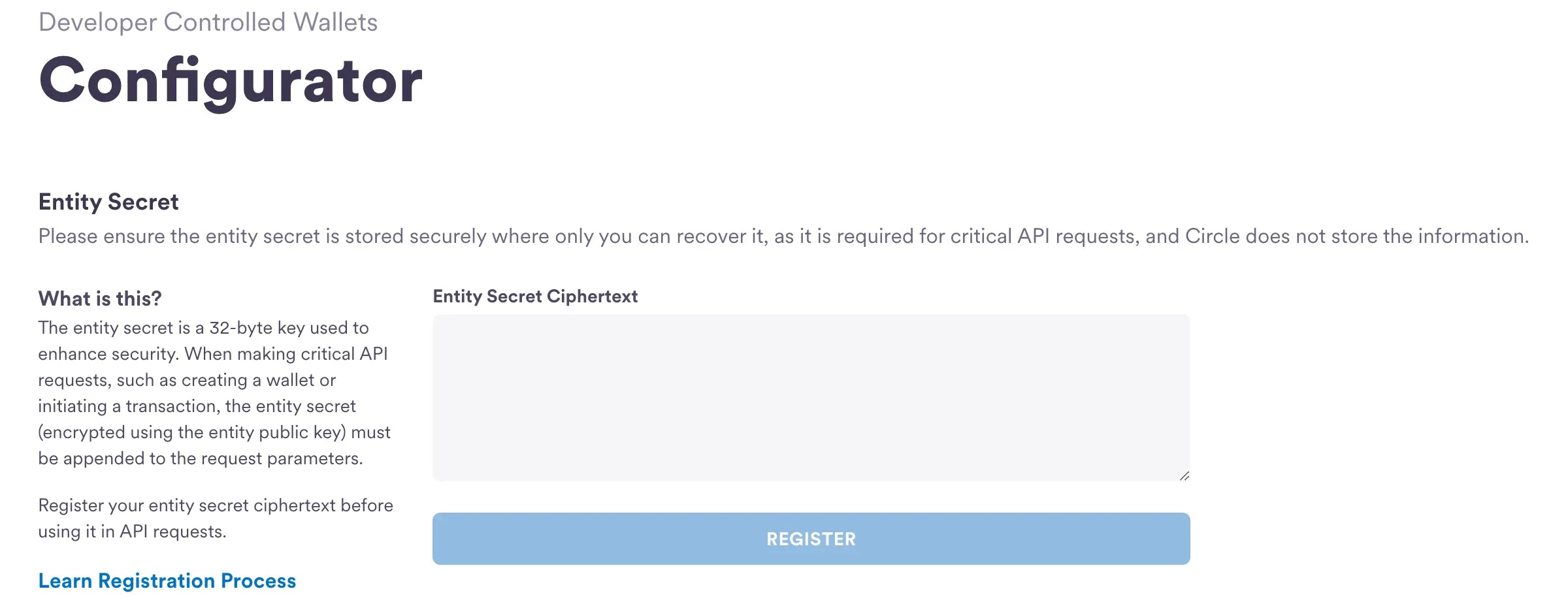
You can also register the Entity Secret Ciphertext within the Circle Console.
You need to register the ciphertext in the console only once by following the
steps below.
1. Access the
[Configurator Page](https://console.circle.com/wallets/dev/configurator) in
the Circle Console.
2. Enter the Entity Secret Ciphertext generated in the previous step.
3. Click **Register** to complete the Entity Secret Ciphertext registration.
 ## Final Considerations
**Note**: You must re-encrypt the Entity Secret to create a new ciphertext for
each API request.
Circle's
[APIs Requiring Entity Secret Ciphertext](/wallets/dev-controlled/entity-secret-management#apis-requiring-entity-secret-ciphertext)
enforces a different Entity Secret Ciphertext for each API request. One-time use
of Entity Secret Ciphertext tokens ensures that even if an attacker captures the
ciphertext from a previous communication, they cannot exploit it in subsequent
interactions.
**Caution**: Using the same Ciphertext for multiple requests will lead to
rejection.
To create a different Entity Secret Ciphertext token, repeat step
[2. Encrypt the Entity Secret](#2-encrypt-the-entity-secret). As long as the
Entity Secret Ciphertext comes from the same registered Entity Secret, it will
be valid for subsequent API requests.
**Note**: If you use the server-side SDK for API requests, you will only need
to configure the Entity Secret using the SDK. The SDK will then handle the
creation of a new ciphertext for each API request.
## Next Steps
You have successfully registered your entity secret! Jump into the next guide,
where you will learn how to:
1. [Create your first developer-controlled wallet](/wallets/dev-controlled/create-your-first-wallet)
2. [Rotate and Reset Entity Secret](/wallets/dev-controlled/transfer-tokens-across-wallets):
Check out how you can
[rotate and reset](/wallets/dev-controlled/entity-secret-management#how-to-rotate-the-entity-secret)
your Entity Secret.
## Final Considerations
**Note**: You must re-encrypt the Entity Secret to create a new ciphertext for
each API request.
Circle's
[APIs Requiring Entity Secret Ciphertext](/wallets/dev-controlled/entity-secret-management#apis-requiring-entity-secret-ciphertext)
enforces a different Entity Secret Ciphertext for each API request. One-time use
of Entity Secret Ciphertext tokens ensures that even if an attacker captures the
ciphertext from a previous communication, they cannot exploit it in subsequent
interactions.
**Caution**: Using the same Ciphertext for multiple requests will lead to
rejection.
To create a different Entity Secret Ciphertext token, repeat step
[2. Encrypt the Entity Secret](#2-encrypt-the-entity-secret). As long as the
Entity Secret Ciphertext comes from the same registered Entity Secret, it will
be valid for subsequent API requests.
**Note**: If you use the server-side SDK for API requests, you will only need
to configure the Entity Secret using the SDK. The SDK will then handle the
creation of a new ciphertext for each API request.
## Next Steps
You have successfully registered your entity secret! Jump into the next guide,
where you will learn how to:
1. [Create your first developer-controlled wallet](/wallets/dev-controlled/create-your-first-wallet)
2. [Rotate and Reset Entity Secret](/wallets/dev-controlled/transfer-tokens-across-wallets):
Check out how you can
[rotate and reset](/wallets/dev-controlled/entity-secret-management#how-to-rotate-the-entity-secret)
your Entity Secret.