> ## Documentation Index
> Fetch the complete documentation index at: https://circle-devdocs-test-ai-codegen-component.mintlify.site/llms.txt
> Use this file to discover all available pages before exploring further.
# Create Your First Developer-Controlled Wallet
> Create two developer-controlled wallets and send tokens between them.
Circle Wallets provide a comprehensive developer solution to storing, sending,
and spending Web3 digital currencies and NFTs. You or your users can manage
asset infrastructure. Circle provides a one-stop-shop experience with all the
tools and services to handle the complex parts, including security, transaction
monitoring, account recovery flows, and more.
This guide will assist you in creating a developer-controlled wallet. You will
learn how to create a wallet set, and ultimately establish a wallet. Throughout
this comprehensive guide, you will utilize both command line and API requests.
These can be achieved by referring to Circle's API references or utilizing cURL
requests. For how to navigate the API references, see the
[Testing API References](/api-reference) guide.
You can create wallets for both Smart Contract Accounts (SCA) and Externally
Owned Accounts (EOA). To learn more, see the
[Account Types](/wallets/account-types) guide.
This guide features developer-controlled wallets. Circle Wallets also supports
user-controlled wallets. Check out the [user-controlled wallets
quickstart](/wallets/user-controlled/react-native-sdk-ui-customization-api).
## Prerequisites
1. Get familiar with
[Wallet Sets](/w3s/programmable-wallets-primitives#wallet-sets).
2. Create a
[Developer Account and acquire an API key in the Console](/w3s/circle-developer-account).
3. Install the [Developer Services SDKs](/w3s/web3-services-sdks). *(optional
but recommended)*
4. Make sure to
[Register Your Entity Secret](/wallets/dev-controlled/register-entity-secret)
prior to this Quickstart.
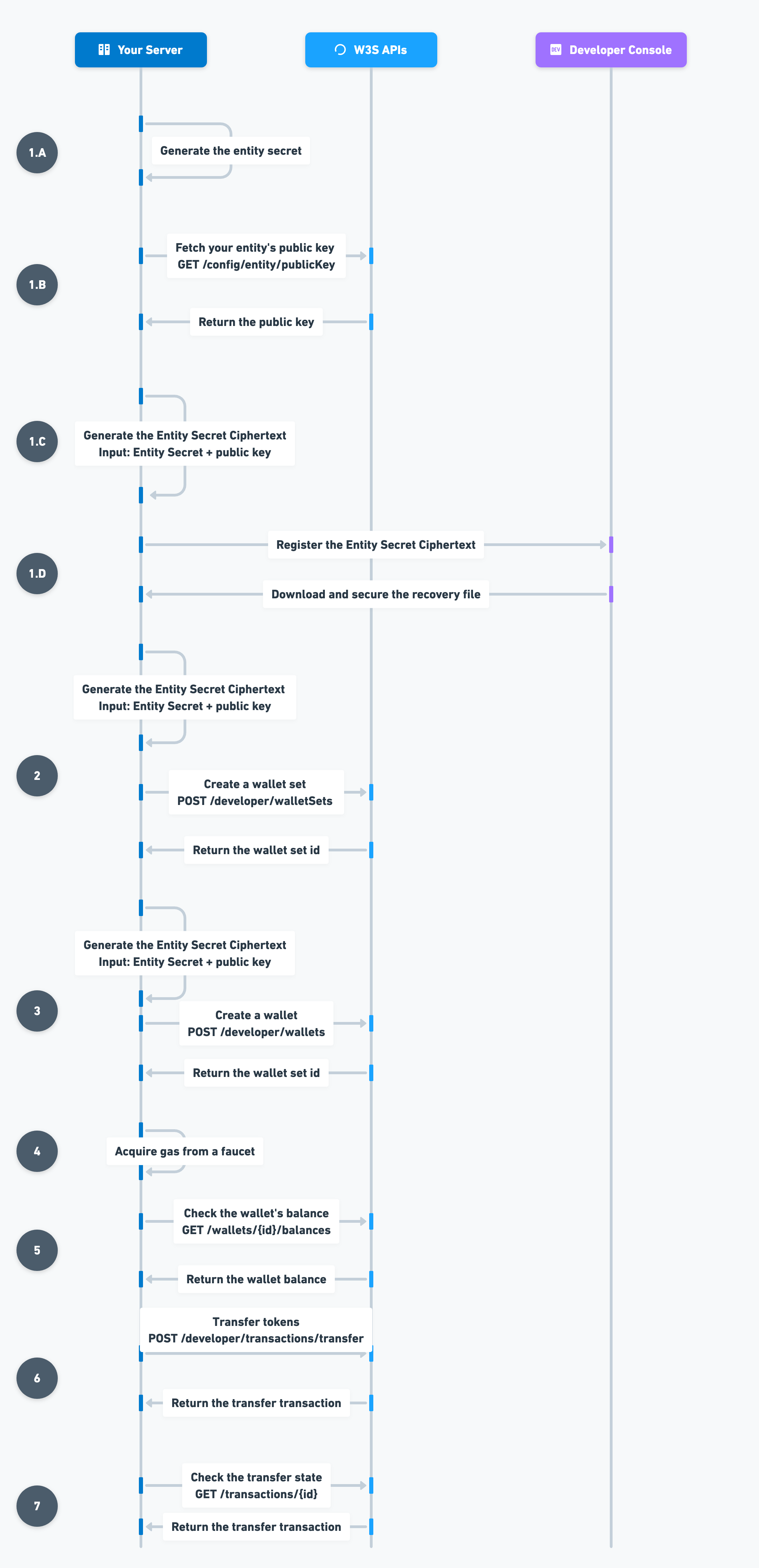 ## 1. Create a Wallet Set
A wallet set refers to a unified set of wallets, all managed by a single
cryptographic private key. This makes it possible to have wallets from different
blockchains sharing the same address.
To create a wallet set, make a request to
[`POST /developer/walletSets`](/api-reference/wallets/developer-controlled-wallets/create-wallet-set)
and create a wallet set providing a unique Entity Secret Ciphertext as described
in
[How to Re-Encrypt the Entity Secret](/wallets/dev-controlled/create-your-first-wallet#how-to-re-encrypt-the-entity-secret).
```javascript Node.js SDK theme={null}
const response = await circleDeveloperSdk.createWalletSet({
name: "Entity WalletSet A",
});
```
```coffeescript Python SDK theme={null}
# create an api instance
api_instance = developer_controlled_wallets.WalletSetsApi(client)
try:
request = developer_controlled_wallets.CreateWalletSetRequest.from_dict({
"name": "Entity WalletSet A",
})
resposne = api_instance.create_wallet_set(request)
print(resposne)
except developer_controlled_wallets.ApiException as e:
print("Exception when calling WalletSetsApi->create_wallet_set: %s\n" % e)
```
```curl cURL theme={null}
curl --request POST \
--url 'https://api.circle.com/v1/w3s/developer/walletSets' \
--header 'accept: application/json' \
--header 'content-type: application/json' \
--header 'authorization: Bearer ' \
--data '
{
"idempotencyKey": "8f459a01-fa23-479d-8647-6fe05526c0df",
"name": "Entity WalletSet A",
"entitySecretCiphertext": ""
}
'
```
```json Response Body theme={null}
{
"data": {
"walletSet": {
"id": "0189bc61-7fe4-70f3-8a1b-0d14426397cb",
"custodyType": "DEVELOPER",
"updateDate": "2023-08-03T17:10:51Z",
"createDate": "2023-08-03T17:10:51Z"
}
}
}
```
## 2. Create a Wallet
In Web3, a wallet isn't just a storage mechanism for digital tokens or NFTs;
it’s the core structure of all user interactions on the blockchain. A wallet is
comprised of a unique address and accompanying metadata stored on the
blockchain.
To create a wallet, make a `POST` request to
[`/developer/wallets`](/api-reference/wallets/developer-controlled-wallets/create-wallet)
using the `walletSet.id` from step 2 and a `count` of `2` as request parameters.
We'll use the second wallet in the following quickstart to transfer tokens from
wallet to wallet. **NOTE:** Don't forget to generate a new Entity Secret
Ciphertext.
### Amoy example
The following code samples show how to create an SCA wallet on Amoy and the
response.
```javascript Node.js SDK theme={null}
const response = await circleDeveloperSdk.createWallets({
accountType: "SCA",
blockchains: ["MATIC-AMOY"],
count: 2,
walletSetId: "",
});
```
```coffeescript Python SDK theme={null}
# create an api instance
api_instance = developer_controlled_wallets.WalletsApi(client)
try:
request = developer_controlled_wallets.CreateWalletRequest.from_dict({
"accountType": 'SCA',
"blockchains": ['MATIC-AMOY'],
"count": 2,
"walletSetId": ''
})
resposne = api_instance.create_wallet(request)
print(resposne)
except developer_controlled_wallets.ApiException as e:
print("Exception when calling WalletsApi->create_wallet: %s\n" % e)
```
```curl cURL theme={null}
curl --request POST \
--url 'https://api.circle.com/v1/w3s/developer/wallets' \
--header 'accept: application/json' \
--header 'content-type: application/json' \
--header 'authorization: Bearer ' \
--data '
{
"idempotencyKey": "0189bc61-7fe4-70f3-8a1b-0d14426397cb",
"accountType": "SCA",
"blockchains": [
"MATIC-MUMBAI"
],
"count": 2,
"entitySecretCiphertext": "",
"walletSetId": "71f2a6b4-ffa7-417a-ad5b-fb928753edc8"
}
'
```
```json Response Body theme={null}
{
"data": {
"wallets": [
{
"id": "ce714f5b-0d8e-4062-9454-61aa1154869b",
"state": "LIVE",
"walletSetId": "0189bc61-7fe4-70f3-8a1b-0d14426397cb",
"custodyType": "DEVELOPER",
"address": "0xf5c83e5fede8456929d0f90e8c541dcac3d63835",
"blockchain": "MATIC-AMOY",
"accountType": "SCA",
"updateDate": "2023-08-03T19:33:14Z",
"createDate": "2023-08-03T19:33:14Z"
},
{
"id": "703a83de-4851-47b8-ad08-94aa2271bfa6",
"state": "LIVE",
"walletSetId": "0189bc61-7fe4-70f3-8a1b-0d14426397cb",
"custodyType": "DEVELOPER",
"address": "0x7b777eb80e82f73f118378b15509cb48cd2c2ac3",
"blockchain": "MATIC-AMOY",
"accountType": "SCA",
"updateDate": "2023-08-03T19:33:14Z",
"createDate": "2023-08-03T19:33:14Z"
}
]
}
}
```
### Solana example
The following code samples show how to create an EOA wallet on Solana and the
response
```javascript Node.js SDK theme={null}
const response = await circleDeveloperSdk.createWallets({
accountType: "EOA",
blockchains: ["SOL-DEVNET"],
count: 1,
walletSetId: "",
});
```
```coffeescript Python SDK theme={null}
# create an api instance
api_instance = developer_controlled_wallets.WalletsApi(client)
try:
request = developer_controlled_wallets.CreateWalletRequest.from_dict({
"accountType": 'EOA',
"blockchains": ['SOL-DEVNET'],
"count": 1,
"walletSetId": ''
})
resposne = api_instance.create_wallet(request)
print(resposne)
except developer_controlled_wallets.ApiException as e:
print("Exception when calling WalletsApi->create_wallet: %s\n" % e)
```
```curl cURL theme={null}
curl --request POST \
--url 'https://api.circle.com/v1/w3s/developer/wallets' \
--header 'accept: application/json' \
--header 'content-type: application/json' \
--header 'authorization: Bearer ' \
--data '
{
"idempotencyKey": "0189bc61-7fe4-70f3-8a1b-0d14426397cb",
"accountType": "EOA",
"blockchains": [
"SOL-DEVNET"
],
"count": 1,
"entitySecretCiphertext": "",
"walletSetId": "71f2a6b4-ffa7-417a-ad5b-fb928753edc8"
}
'
```
```json Response Body theme={null}
{
"data": {
"wallets": [
{
"id": "a7b8c2d1-1c1e-4f7d-b2c3-7f5b9e8c4a9d",
"state": "LIVE",
"walletSetId": "0189bc61-7fe4-70f3-8a1b-0d14426397cb",
"custodyType": "DEVELOPER",
"address": "9FMYUH1mcQ9F12yjjk6BciTuBC5kvMKadThs941v5vk7",
"blockchain": "SOL-DEVNET",
"accountType": "EOA",
"updateDate": "2023-08-03T19:34:15Z",
"createDate": "2023-08-03T19:34:15Z"
}
]
}
}
```
## Next Steps
You have successfully created two developer-controlled wallets! Jump into the
next guide, where you will learn how to acquire Testnet tokens and transfer them
from wallet to wallet.
1. [Transfer Tokens from Wallet to Wallet](/wallets/dev-controlled/transfer-tokens-across-wallets):
Try out your first transfer from two onchain wallets.
2. [Deploy a Smart Contract](/contracts/scp-deploy-smart-contract): Use your
newly created wallet to deploy your first Smart Contract onchain.
3. [Infrastructure Models](/wallets/infrastructure-models): Learn more about the
difference between user-controlled and developer-controlled wallets.
4. [Unified Wallet Addressing on EVM Chains](/wallets/unified-wallet-addressing-evm):
Learn how to create and backfill wallets with the same address.
## 1. Create a Wallet Set
A wallet set refers to a unified set of wallets, all managed by a single
cryptographic private key. This makes it possible to have wallets from different
blockchains sharing the same address.
To create a wallet set, make a request to
[`POST /developer/walletSets`](/api-reference/wallets/developer-controlled-wallets/create-wallet-set)
and create a wallet set providing a unique Entity Secret Ciphertext as described
in
[How to Re-Encrypt the Entity Secret](/wallets/dev-controlled/create-your-first-wallet#how-to-re-encrypt-the-entity-secret).
```javascript Node.js SDK theme={null}
const response = await circleDeveloperSdk.createWalletSet({
name: "Entity WalletSet A",
});
```
```coffeescript Python SDK theme={null}
# create an api instance
api_instance = developer_controlled_wallets.WalletSetsApi(client)
try:
request = developer_controlled_wallets.CreateWalletSetRequest.from_dict({
"name": "Entity WalletSet A",
})
resposne = api_instance.create_wallet_set(request)
print(resposne)
except developer_controlled_wallets.ApiException as e:
print("Exception when calling WalletSetsApi->create_wallet_set: %s\n" % e)
```
```curl cURL theme={null}
curl --request POST \
--url 'https://api.circle.com/v1/w3s/developer/walletSets' \
--header 'accept: application/json' \
--header 'content-type: application/json' \
--header 'authorization: Bearer ' \
--data '
{
"idempotencyKey": "8f459a01-fa23-479d-8647-6fe05526c0df",
"name": "Entity WalletSet A",
"entitySecretCiphertext": ""
}
'
```
```json Response Body theme={null}
{
"data": {
"walletSet": {
"id": "0189bc61-7fe4-70f3-8a1b-0d14426397cb",
"custodyType": "DEVELOPER",
"updateDate": "2023-08-03T17:10:51Z",
"createDate": "2023-08-03T17:10:51Z"
}
}
}
```
## 2. Create a Wallet
In Web3, a wallet isn't just a storage mechanism for digital tokens or NFTs;
it’s the core structure of all user interactions on the blockchain. A wallet is
comprised of a unique address and accompanying metadata stored on the
blockchain.
To create a wallet, make a `POST` request to
[`/developer/wallets`](/api-reference/wallets/developer-controlled-wallets/create-wallet)
using the `walletSet.id` from step 2 and a `count` of `2` as request parameters.
We'll use the second wallet in the following quickstart to transfer tokens from
wallet to wallet. **NOTE:** Don't forget to generate a new Entity Secret
Ciphertext.
### Amoy example
The following code samples show how to create an SCA wallet on Amoy and the
response.
```javascript Node.js SDK theme={null}
const response = await circleDeveloperSdk.createWallets({
accountType: "SCA",
blockchains: ["MATIC-AMOY"],
count: 2,
walletSetId: "",
});
```
```coffeescript Python SDK theme={null}
# create an api instance
api_instance = developer_controlled_wallets.WalletsApi(client)
try:
request = developer_controlled_wallets.CreateWalletRequest.from_dict({
"accountType": 'SCA',
"blockchains": ['MATIC-AMOY'],
"count": 2,
"walletSetId": ''
})
resposne = api_instance.create_wallet(request)
print(resposne)
except developer_controlled_wallets.ApiException as e:
print("Exception when calling WalletsApi->create_wallet: %s\n" % e)
```
```curl cURL theme={null}
curl --request POST \
--url 'https://api.circle.com/v1/w3s/developer/wallets' \
--header 'accept: application/json' \
--header 'content-type: application/json' \
--header 'authorization: Bearer ' \
--data '
{
"idempotencyKey": "0189bc61-7fe4-70f3-8a1b-0d14426397cb",
"accountType": "SCA",
"blockchains": [
"MATIC-MUMBAI"
],
"count": 2,
"entitySecretCiphertext": "",
"walletSetId": "71f2a6b4-ffa7-417a-ad5b-fb928753edc8"
}
'
```
```json Response Body theme={null}
{
"data": {
"wallets": [
{
"id": "ce714f5b-0d8e-4062-9454-61aa1154869b",
"state": "LIVE",
"walletSetId": "0189bc61-7fe4-70f3-8a1b-0d14426397cb",
"custodyType": "DEVELOPER",
"address": "0xf5c83e5fede8456929d0f90e8c541dcac3d63835",
"blockchain": "MATIC-AMOY",
"accountType": "SCA",
"updateDate": "2023-08-03T19:33:14Z",
"createDate": "2023-08-03T19:33:14Z"
},
{
"id": "703a83de-4851-47b8-ad08-94aa2271bfa6",
"state": "LIVE",
"walletSetId": "0189bc61-7fe4-70f3-8a1b-0d14426397cb",
"custodyType": "DEVELOPER",
"address": "0x7b777eb80e82f73f118378b15509cb48cd2c2ac3",
"blockchain": "MATIC-AMOY",
"accountType": "SCA",
"updateDate": "2023-08-03T19:33:14Z",
"createDate": "2023-08-03T19:33:14Z"
}
]
}
}
```
### Solana example
The following code samples show how to create an EOA wallet on Solana and the
response
```javascript Node.js SDK theme={null}
const response = await circleDeveloperSdk.createWallets({
accountType: "EOA",
blockchains: ["SOL-DEVNET"],
count: 1,
walletSetId: "",
});
```
```coffeescript Python SDK theme={null}
# create an api instance
api_instance = developer_controlled_wallets.WalletsApi(client)
try:
request = developer_controlled_wallets.CreateWalletRequest.from_dict({
"accountType": 'EOA',
"blockchains": ['SOL-DEVNET'],
"count": 1,
"walletSetId": ''
})
resposne = api_instance.create_wallet(request)
print(resposne)
except developer_controlled_wallets.ApiException as e:
print("Exception when calling WalletsApi->create_wallet: %s\n" % e)
```
```curl cURL theme={null}
curl --request POST \
--url 'https://api.circle.com/v1/w3s/developer/wallets' \
--header 'accept: application/json' \
--header 'content-type: application/json' \
--header 'authorization: Bearer ' \
--data '
{
"idempotencyKey": "0189bc61-7fe4-70f3-8a1b-0d14426397cb",
"accountType": "EOA",
"blockchains": [
"SOL-DEVNET"
],
"count": 1,
"entitySecretCiphertext": "",
"walletSetId": "71f2a6b4-ffa7-417a-ad5b-fb928753edc8"
}
'
```
```json Response Body theme={null}
{
"data": {
"wallets": [
{
"id": "a7b8c2d1-1c1e-4f7d-b2c3-7f5b9e8c4a9d",
"state": "LIVE",
"walletSetId": "0189bc61-7fe4-70f3-8a1b-0d14426397cb",
"custodyType": "DEVELOPER",
"address": "9FMYUH1mcQ9F12yjjk6BciTuBC5kvMKadThs941v5vk7",
"blockchain": "SOL-DEVNET",
"accountType": "EOA",
"updateDate": "2023-08-03T19:34:15Z",
"createDate": "2023-08-03T19:34:15Z"
}
]
}
}
```
## Next Steps
You have successfully created two developer-controlled wallets! Jump into the
next guide, where you will learn how to acquire Testnet tokens and transfer them
from wallet to wallet.
1. [Transfer Tokens from Wallet to Wallet](/wallets/dev-controlled/transfer-tokens-across-wallets):
Try out your first transfer from two onchain wallets.
2. [Deploy a Smart Contract](/contracts/scp-deploy-smart-contract): Use your
newly created wallet to deploy your first Smart Contract onchain.
3. [Infrastructure Models](/wallets/infrastructure-models): Learn more about the
difference between user-controlled and developer-controlled wallets.
4. [Unified Wallet Addressing on EVM Chains](/wallets/unified-wallet-addressing-evm):
Learn how to create and backfill wallets with the same address.