> ## Documentation Index
> Fetch the complete documentation index at: https://circle-devdocs-test-ai-codegen-component.mintlify.site/llms.txt
> Use this file to discover all available pages before exploring further.

# CCTP

export const FeedbackButton = () => {
  const [isOpen, setIsOpen] = useState(false);
  const [isRequestOpen, setIsRequestOpen] = useState(false);
  const [rating, setRating] = useState(null);
  const [completed, setCompleted] = useState(false);
  const [requestType, setRequestType] = useState('');
  const handleSubmitProposal = () => {
    setIsOpen(false);
    setIsRequestOpen(true);
  };
  return <>
      <button className="feedback-button" onClick={() => setIsOpen(true)}>
        Give Feedback
      </button>

      {isOpen && <div className="feedback-modal-overlay" onClick={() => setIsOpen(false)}>
          <div className="feedback-modal" onClick={e => e.stopPropagation()}>
            <button className="feedback-modal-close" onClick={() => setIsOpen(false)}>
              ×
            </button>

            <h2 className="feedback-modal-title">Give Feedback</h2>

            <div className="feedback-form">
              <div className="feedback-field">
                <label className="feedback-label">Email address</label>
                <input type="email" className="feedback-input" placeholder="" />
              </div>

              <div className="feedback-checkbox">
                <input type="checkbox" id="completed" checked={completed} onChange={e => setCompleted(e.target.checked)} />
                <label htmlFor="completed">I completed the Interactive Tutorial</label>
              </div>

              <div className="feedback-field">
                <label className="feedback-label">How helpful did you find the Interactive Tutorial?</label>
                <div className="feedback-rating">
                  <span className="feedback-rating-label">Not helpful</span>
                  {[1, 2, 3, 4, 5].map(value => <label key={value} className="feedback-rating-option">
                      <input type="radio" name="rating" value={value} checked={rating === value} onChange={() => setRating(value)} />
                      <span className="feedback-rating-number">{value}</span>
                    </label>)}
                  <span className="feedback-rating-label">Helpful</span>
                </div>
              </div>

              <div className="feedback-field">
                <label className="feedback-label">Your feedback</label>
                <textarea className="feedback-textarea" rows="5" placeholder="" />
              </div>

              <button className="feedback-submit">
                SEND MESSAGE
              </button>

              <div className="feedback-footer">
                <div className="feedback-footer-section">
                  <div className="feedback-footer-title">Reach out directly</div>
                  <a href="mailto:customer-support@circle.com" className="feedback-footer-link">
                    customer-support@circle.com
                  </a>
                </div>
                <div className="feedback-footer-section">
                  <div className="feedback-footer-title">Join our Discord community</div>
                  <a href="https://discord.com/invite/buildoncircle" className="feedback-footer-link feedback-footer-link-discord">
                    <span className="discord-icon">
                      <Icon icon="discord" iconType="brands" size={16} color="#fff" />
                    </span>
                    Join Discord
                  </a>
                </div>
                <div className="feedback-footer-section">
                  <div className="feedback-footer-title">Have a feature or docs request?</div>
                  <button onClick={handleSubmitProposal} className="feedback-footer-link feedback-footer-button">
                    Submit a proposal
                  </button>
                </div>
              </div>
            </div>
          </div>
        </div>}

      {isRequestOpen && <div className="feedback-modal-overlay" onClick={() => setIsRequestOpen(false)}>
          <div className="request-modal" onClick={e => e.stopPropagation()}>
            <button className="feedback-modal-close" onClick={() => setIsRequestOpen(false)}>
              ×
            </button>

            <h2 className="request-modal-title">Make a request</h2>

            <p className="request-modal-subtitle">
              Thank you for taking the time to fill out this survey. We look forward to seeing what you build 🚀
            </p>

            <div className="request-form">
              <label className="request-label">What best describes your request?</label>

              <label className="request-option">
                <input type="radio" name="request-type" value="feature" checked={requestType === 'feature'} onChange={e => setRequestType(e.target.value)} />
                <div className="request-option-content">
                  <span className="request-option-icon">🏗️</span>
                  <div className="request-option-text">
                    <strong>Feature Request:</strong> a new capability or improvement to the product
                  </div>
                </div>
              </label>

              <label className="request-option">
                <input type="radio" name="request-type" value="content" checked={requestType === 'content'} onChange={e => setRequestType(e.target.value)} />
                <div className="request-option-content">
                  <span className="request-option-icon">📖</span>
                  <div className="request-option-text">
                    <strong>Content Request:</strong> creation, update, or optimization of informational or educational content related to the product
                  </div>
                </div>
              </label>

              <label className="request-option">
                <input type="radio" name="request-type" value="community" checked={requestType === 'community'} onChange={e => setRequestType(e.target.value)} />
                <div className="request-option-content">
                  <span className="request-option-icon">🌐</span>
                  <div className="request-option-text">
                    <strong>Community Request:</strong> ideas on how we can improve our community, for example additional workshops or events
                  </div>
                </div>
              </label>

              <button className="request-next-button">
                Next
              </button>
            </div>
          </div>
        </div>}
    </>;
};

export const FeatureItem = ({title, icon, iconColor = '#1061a6', children, iconSize = 20, iconType = 'regular', href}) => {
  const titleContent = href ? <a href={href} target="_blank" rel="noopener noreferrer">
      {title}
      <Icon icon="arrow-up-right-from-square" size={12} className="feature-link-icon" />
    </a> : title;
  return <div className="feature-item">
      <div className={`feature-icon`}>
        <Icon icon={icon} size={iconSize} color={iconColor} iconType={iconType} />
      </div>
      <div className="feature-content">
        <h3 className="feature-title">{titleContent}</h3>
        <div className="feature-description">
          {children}
        </div>
      </div>
    </div>;
};

export const FeatureGrid = ({children, cols = 2, backgroundColor}) => {
  const columns = cols === 1 ? 1 : 2;
  return <div className="feature-grid-container" style={backgroundColor ? {
    backgroundColor
  } : {}}>
      <div className="feature-grid" data-cols={columns} style={{
    gridTemplateColumns: `repeat(${columns}, 1fr)`
  }}>
        {children}
      </div>
    </div>;
};

## Introduction

Circle's Cross-Chain Transfer Protocol (CCTP) facilitates the transfer of USDC
between distinct blockchains, providing a more streamlined experience. By
integrating CCTP with Circle Wallets in your applications, you enable seamless
USDC transactions across multiple chains. This reduces the need for users to
manage separate wallets for different blockchains, potentially broadening your
audience and providing increased liquidity and adaptability. It's designed to
provide users with a cohesive and efficient digital currency experience.

<FeatureGrid cols={2}>
  <FeatureItem title="Leverage Blockchain-Specific Attributes" icon="bolt" iconType="solid">
    Use blockchain-specific characteristics to optimize your user experience.
    For instance, by bridging your ETH from Ethereum Mainnet to an Ethereum
    Layer 2 rollup, such as Polygon, you gain access to lower transaction fees
    while still enjoying the benefits of USDC.
  </FeatureItem>

  <FeatureItem title="Cross-Chain Swaps" icon="arrow-right-arrow-left">
    Enable cross-chain swaps, allowing users to exchange digital assets that
    reside on different chains. For example, users can swap AVAX for USDC on
    Avalanche, route it to Polygon Mainnet, and further swap it for MATIC
    token, expanding liquidity across multiple chains.
  </FeatureItem>

  <FeatureItem title="Cross-Chain Purchases" icon="circle-dollar">
    Facilitate cross-chain purchases with minimal effort. Users can utilize
    USDC on Avalanche to buy an NFT on Uniswap on Ethereum, then list it for
    sale on OpenSea. CCTP effortlessly routes the USDC from Avalanche to
    Ethereum for the purchase.
  </FeatureItem>

  <FeatureItem title="Solve Fragmented Liquidity" icon="cube">
    Remove liquidity fragmentation barriers. If a user needs to send USDC to
    an address on Avalanche but only holds USDC on Ethereum, the solution
    becomes seamless. By bridging the USDC from Ethereum to Avalanche through
    CCTP, users can transact across different blockchains.
  </FeatureItem>
</FeatureGrid>

### Outcomes of this Interactive Quickstart Guide

By the conclusion of this interactive guide, you will learn how to facilitate a
transfer of USDC across blockchains using a Circle Wallet. Specifically, the
guide will demonstrate a scenario wherein a user conducts a USDC transfer
leveraging the Cross-Chain Transfer Protocol, CCTP V1. You will follow
step-by-step instructions to create and execute a USDC transfer from Sepolia, an
Ethereum testnet, to Mumbai, the Polygon Testnet, via a Circle Wallet. This
practical walkthrough is designed to equip you with the knowledge to implement
CCTP V1 in your own applications.

**Completing a Cross-Blockchain Transfer: Step-By-Step Process**

<Steps>
  <Step title="Approve USDC Contract to Initiate Transfers">
    To utilize CCTP V1 effectively, it's necessary to authorize the USDC
    contract to conduct transfers on a user's behalf. In this guide, we approve
    only a small amount of USDC for demonstration. However, for operational
    efficiency, you might want to approve a larger amount to minimize the
    frequency of this action in a production environment.
  </Step>

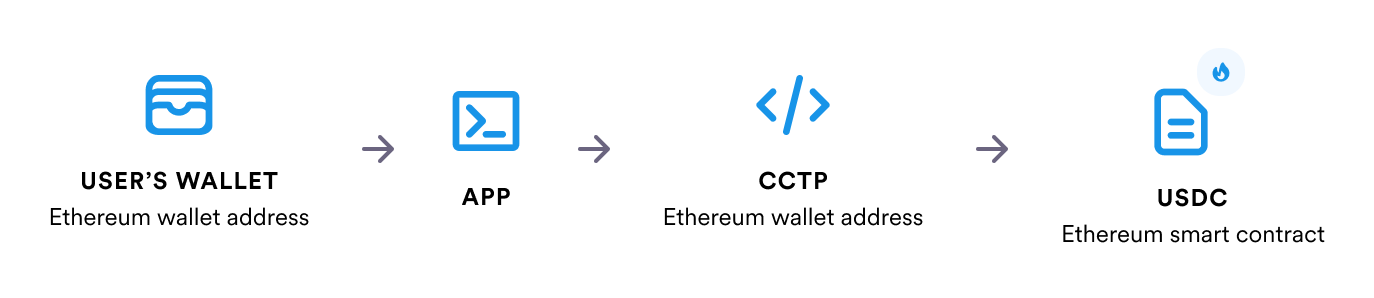
  <Step title="Initiate the Burning of USDC">
    Following the user's request to move USDC from Ethereum to Polygon,
    leverage the provided tools to initiate burning the specified amount of
    USDC from the Ethereum wallet created for this transaction.

    <Frame>
      <img src="https://mintcdn.com/circle-devdocs-test-ai-codegen-component/zjwlouYM7ujBrWdY/interactive-quickstarts/cctp/introduction/images/burn-usdc.png?fit=max&auto=format&n=zjwlouYM7ujBrWdY&q=85&s=022f03b5410bca196986772d3ae9f957" alt="Burn USDC" width="1374" height="298" data-path="interactive-quickstarts/cctp/introduction/images/burn-usdc.png" />
    </Frame>
  </Step>

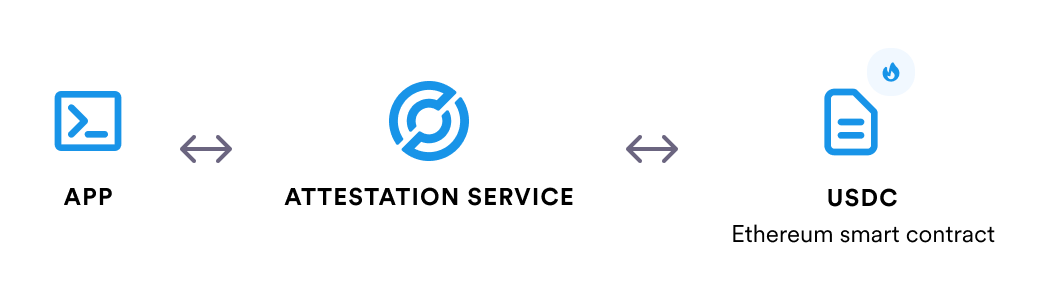
  <Step title="Obtain Circle's Attestation">
    Circle monitors the burn event on the Ethereum blockchain and issues an
    attestation. Retrieve this attestation using the relevant procedures,
    which serves as the authorization required to mint the corresponding
    USDC amount on the Polygon blockchain.

    <Frame>
      <img src="https://mintcdn.com/circle-devdocs-test-ai-codegen-component/zjwlouYM7ujBrWdY/interactive-quickstarts/cctp/introduction/images/fetch-attestation.png?fit=max&auto=format&n=zjwlouYM7ujBrWdY&q=85&s=0bbb2f348bfbff5dd6cbb6b9956a058c" alt="Fetch Attestation" width="1044" height="298" data-path="interactive-quickstarts/cctp/introduction/images/fetch-attestation.png" />
    </Frame>
  </Step>

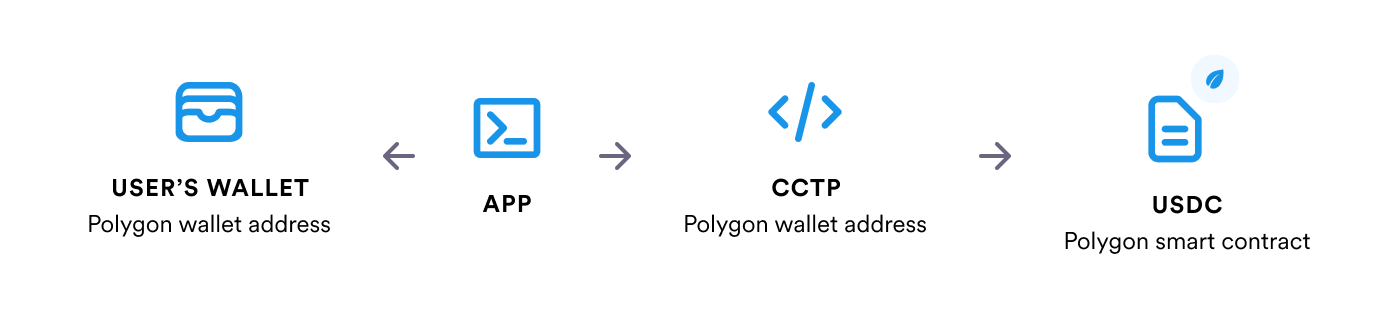
  <Step title="Trigger USDC Minting">
    Utilize the retrieved attestation to start the minting process. The
    attestation confirms the amount of USDC to mint on the Polygon
    blockchain, and the amount to allocate to the specified Polygon wallet.

    <Frame>
      <img src="https://mintcdn.com/circle-devdocs-test-ai-codegen-component/zjwlouYM7ujBrWdY/interactive-quickstarts/cctp/introduction/images/mint-usdc.png?fit=max&auto=format&n=zjwlouYM7ujBrWdY&q=85&s=f9e853687f9a59a3d86fbf1a3006ea79" alt="Mint USDC" width="1398" height="312" data-path="interactive-quickstarts/cctp/introduction/images/mint-usdc.png" />
    </Frame>
  </Step>
</Steps>

### Understanding Smart Contracts

Smart contracts are computer protocols that automate the execution of
agreements, operating under a set of predefined conditions. Once deployed onto a
blockchain, they follow an "if-then" logic to perform actions automatically when
specific conditions are met. The immutable nature of blockchain ensures that the
smart contract code cannot be changed once established, which reinforces their
reliability as they always execute exactly as programmed. A smart contract
typically consists of code that defines its operations, a data storage area,
memory, and a unique public address that can be interacted with through its
functions. For a comprehensive exploration of smart contracts, you are
encouraged to read further on the dedicated [resource](https://ethereum.org/en/developers/docs/smart-contracts/).

### Exploring CCTP

CCTP serves as an integral tool in blockchain infrastructure to guarantee the
secure and seamless transfer of USDC across various blockchain networks. By
adopting CCTP, users can benefit from a protected and efficient means of
transferring USDC between [supported chains](/cctp/cctp-supported-blockchains).
To learn more about CCTP, see the [CCTP Overview](/cctp) in the Circle Developer
Documentation.

To get started,
[create a Circle Developer Services account](https://console.circle.com/signup)
in the console.

***

## Prerequisites

Before you get started, ensure that you have:

* Have a
  [Developer Services account](/interactive-quickstarts/get-started#create-a-developer-services-account)
* Created your [API key](/interactive-quickstarts/get-started#create-your-api-key)
* Created a
  [Developer-Controlled Wallet](/interactive-quickstarts/dev-controlled-wallets#create-a-wallet)

***

## Burn USDC

In the process of transferring USDC from Ethereum to Polygon, you need to give
the TokenMessenger contract the necessary permissions to execute the USDC
transfer on your behalf. In essence, you're empowering the TokenMessenger
contract to access and transfer the specified amount of USDC from your source
wallet.

For this, we use the Wallets contract execution API:

<table>
  <thead>
    <tr>
      <th>Term</th>
      <th>Definition</th>
    </tr>
  </thead>

  <tbody>
    <tr>
      <td><strong>contractAddress</strong></td>
      <td>You interact with the USDC contract on the source chain, so the <code>contractAddress</code> parameter of the request is <strong>0x1c7D4B196Cb0C7B01d743Fbc6116a902379C7238</strong>.</td>
    </tr>

    <tr>
      <td><strong>abiFunctionSignature</strong></td>

      <td>
        The function called on the USDC contract is <strong>approve(address spender, uint256 value)</strong>. Calling approve allows the <code>spender</code> to spend <code>value</code> USDC on your behalf. This is necessary in the <code>depositForBurn</code> step later on.

        <br />

        <br />

        <strong>value</strong> is denominated in the smallest unit of USDC, which is a millionth of a dollar.

        <br />

        <br />

        In this case it's <code>approve(address,uint256)</code>
      </td>
    </tr>

    <tr>
      <td><strong>abiParameters</strong></td>

      <td>
        In this case, <code>address</code> is the TokenMessenger contract's <code>address</code> and value is 100000000 (100 USDC).

        <br />

        <br />

        In this case it's <code>\["0x9f3B8679c73C2Fef8b59B4f3444d4e156fb70AA5", 100000000]</code>
      </td>
    </tr>

    <tr>
      <td><strong>walletId</strong></td>
      <td>The wallet that performs the contract execution. This is the ID of the developer-controlled wallet you created earlier.</td>
    </tr>

    <tr>
      <td><strong>feeLevel</strong></td>
      <td>A dynamic blockchain fee level setting (LOW, MEDIUM, or HIGH) that will be used to pay gas for the transaction. <strong>HIGH</strong> is used for this transaction.</td>
    </tr>

    <tr>
      <td><strong>idempotencyKey</strong></td>
      <td>Universally unique identifier (UUID v4) idempotency key. This is automatically generated for you.</td>
    </tr>

    <tr>
      <td><strong>entitySecretCiphertext</strong></td>
      <td>A base64 string expression of the entity secret ciphertext. Refer to <a href="https://codesandbox.io/p/sandbox/generate-entity-secret-ciphertext-fzcyc9">this helpful tool</a>.</td>
    </tr>
  </tbody>
</table>

## ⚠️ Approve USDC Sepolia from source wallet

### ⚠️ ADD CODE SNIPPET HERE

The second step of the process facilitates a burn of the specified amount of
USDC on Ethereum Sepolia (the source chain) that you are looking to move to
Polygon Mumbai (the destination chain).

<Note>
  **Mint** and **Burn** are the terms used to refer to the creation and removal
  of a token from a blockchain network. During the CCTP V1 transfer, tokens on
  one blockchain are burnt, removing them from the total supply, before new
  tokens are minted on the destination blockchain - effectively moving USDC
  across chains.
</Note>

To do this, you again use the Wallets contract execution API:

<table>
  <thead>
    <tr>
      <th>Term</th>
      <th>Definition</th>
    </tr>
  </thead>

  <tbody>
    <tr>
      <td><strong>contractAddress</strong></td>
      <td>You interact with the Token Messenger contract on the source chain, so the <code>contractAddress</code> parameter of the request is <code>0x9f3B8679c73C2Fef8b59B4f3444d4e156fb70AA5</code>.</td>
    </tr>

    <tr>
      <td><strong>abiFunctionSignature</strong></td>

      <td>
        The function being called on the TokenMessenger contract is: <code>depositForBurn(uint256 amount, uint32 destinationDomain, bytes32 mintRecipient, address burnToken)</code>

        <br />

        <br />

        This will be the abiFunctionSignature property of the request. In this case it's <strong>depositForBurn(uint256,uint32,bytes32,address)</strong>
      </td>
    </tr>

    <tr>
      <td><strong>abiParameters</strong></td>

      <td>
        The abiParameters property defines the values to pass to the function. For the call to depositForBurn, they are amount, destinationDomain, mintRecipient and burnToken.

        <br />

        <br />

        <ul>
          <li><strong>amount</strong>: the amount of USDC to burn. This amount will be created on the destination chain after the mint. You will burn 1 USDC of the allowance you approved earlier.</li>
          <li><strong>destinationDomain</strong>: a Circle-issued identifier for a network/chain where CCTP V1 contracts are deployed. Since the destination is Polygon, you will use 7. See <a href="/cctp/v1/supported-domains">CCTP V1 Domain List</a>.</li>
          <li><strong>mintRecipient</strong>: this is the destination address, encoded to a Solidity address representation. This will be the same address as the source wallet. In your application, you will need to encode the destination address to the correct format using a library like web3js - but we have done it for you here.</li>
          <li><strong>burnToken</strong>: the contract address of the token that is being burnt. In this case, it is the USDC contract on the source chain.</li>
        </ul>

        <br />

        ```js JavaScript theme={null}
        const encodedDestinationAddress = web3.eth.abi.encodeParameter(
          "address",
          destinationAddress,
        );
        ```

        <br />

        Therefore, the complete abiParameters value is <strong>\[1000000, 7, {encodedDestinationAddress}, "0x1c7D4B196Cb0C7B01d743Fbc6116a902379C7238"]</strong>.
      </td>
    </tr>

    <tr>
      <td><strong>walletId</strong></td>
      <td>The wallet that is performing the contract execution. This will be the ID of the developer-controlled wallet you created earlier.</td>
    </tr>

    <tr>
      <td><strong>feeLevel</strong></td>
      <td>A dynamic blockchain fee level setting (LOW, MEDIUM, or HIGH) that will be used to pay gas for the transaction. <strong>HIGH</strong> is used for this transaction.</td>
    </tr>

    <tr>
      <td><strong>idempotencyKey</strong></td>
      <td>Universally unique identifier (UUID v4) idempotency key. This is automatically generated for you.</td>
    </tr>

    <tr>
      <td><strong>entitySecretCiphertext</strong></td>
      <td>A base64 string expression of the entity secret ciphertext. Refer to <a href="https://codesandbox.io/p/sandbox/generate-entity-secret-ciphertext-fzcyc9">this helpful tool</a>.</td>
    </tr>
  </tbody>
</table>

Just like your first contract execution request, the other parameters -
`walletId`, `feeLevel`, `idempotencyKey`, and `EntitySecretCiphertext` - were
automatically populated in the request.

## ⚠️ Deposit for Burn on Ethereum

### ⚠️ ADD CODE SNIPPET HERE

### Validating the Burn of 1 USDC in your Developer Console

After initiating the burn of USDC through our API, you can check whether it was
successful in our Developer Console.

<Steps>
  <Step title="Login to the Developer Services Console">
    To begin the process of validating your burn of USDC, log in to the Web3
    Services Console.
  </Step>

  <Step title="Navigate to the List of Wallets">
    Within the console, locate the **Wallets** page under **Dev Controlled
    Wallet**. This page displays all of the wallets you created thus far. Open
    the [Wallets page](https://console.circle.com/wallets/dev/transactions).
  </Step>

  <Step title="Open the Wallet Details Screen">
    Find and click on the Ethereum Sepolia wallet from which you initiated the
    USDC burn.
  </Step>

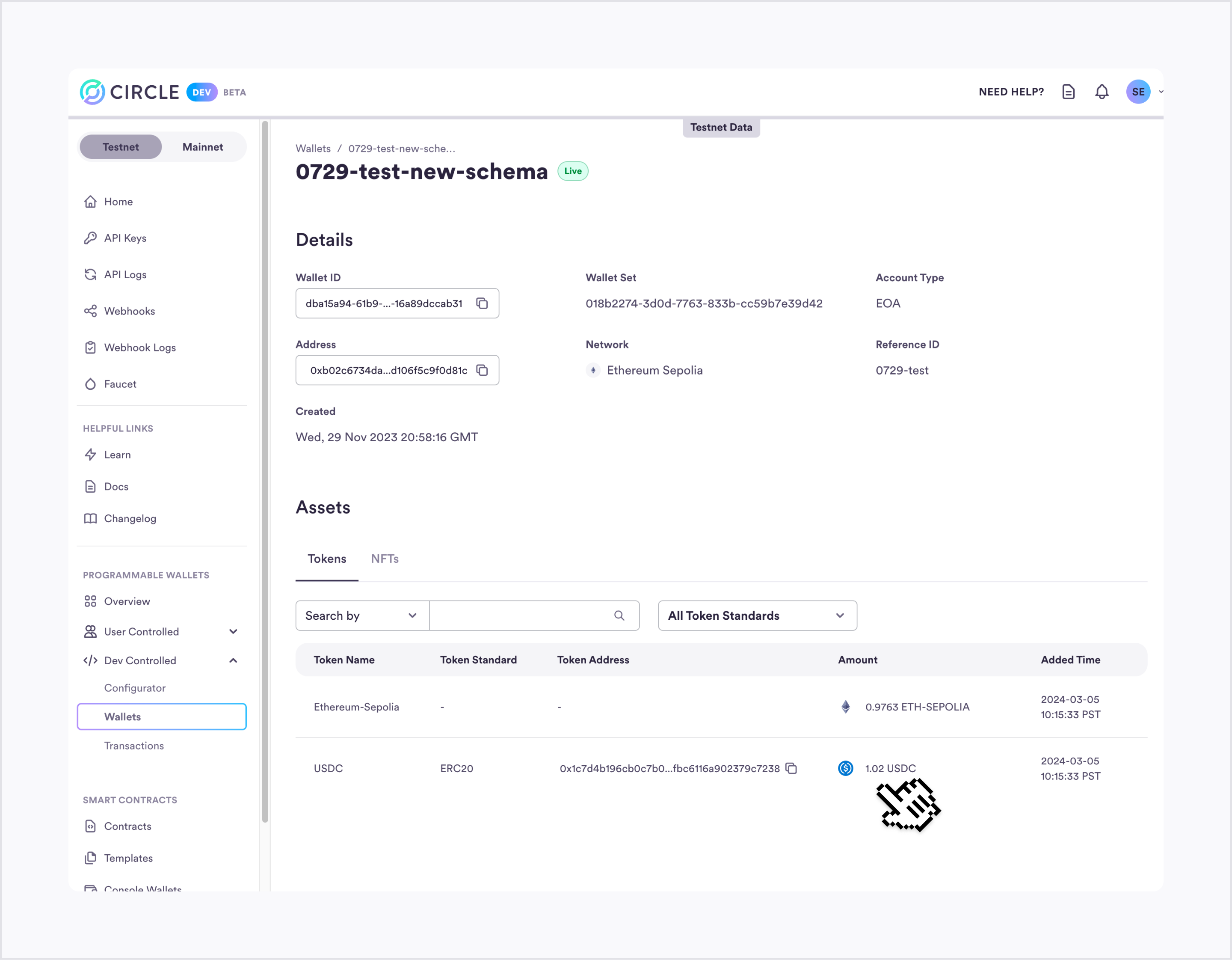
  <Step title="View Your Wallet Balance">
    On the wallet details screen, scroll down to the bottom to find the section
    displaying your wallet balances. As you successfully created your Sepolia
    Wallet, an initial deposit of 10 USDC was made. If you have successfully
    burned 1 USDC, the total wallet balance should now reflect 9 USDC,
    indicating the accurate deduction of the burned amount.

    <Frame>
      <img src="https://mintcdn.com/circle-devdocs-test-ai-codegen-component/zjwlouYM7ujBrWdY/interactive-quickstarts/cctp/burn-usdc/images/successful-burn.png?fit=max&auto=format&n=zjwlouYM7ujBrWdY&q=85&s=43b820df59fc7e5309f903bf1d64cdad" alt="Successful Burn Image" width="2880" height="2243" data-path="interactive-quickstarts/cctp/burn-usdc/images/successful-burn.png" />
    </Frame>
  </Step>
</Steps>

By following these step-by-step instructions and reviewing your wallet balance
in the Developer Services Console, you can confidently validate the burn of your
USDC tokens and verify the correct adjustment in your wallet's overall balance.

## Approve Burn

As a result of interacting with the TokenMessenger contract, Circle generates a
unique ID for the transaction. Starting with the returned transaction ID, you
call Circle's Attestation service to fetch an attestation that the burn took
place. This attestation proves that the USDC was removed from circulation on the
source chain.

<Note>
  The transactionId returned is a unique transaction ID generated by Circle. It
  is distinct from the unique identifier that is used to track the transaction
  on the blockchain - known as the transaction hash.
</Note>

The attestation is used on the destination chain to mint new USDC. You can make
API calls to get the transaction's `transactionHash`, retrieve the logs of the
`depositForBurn` transaction, and use Circle's Attestation API to fetch the
attestation signature. The steps have been broken down for you here, but you can
use the following "Try It Out" component to run all of these steps together.

<Steps>
  <Step title="Fetching the Deposit Transaction Object from the Wallets API">
    Call the Wallets API to fetch the transaction object for the `depositForBurn` transaction. Make a GET request using the provided code and the transaction ID. Retrieve the transaction object from the response data.

    <Tabs>
      <Tab title="SDK">
        <CodeGroup>
          ```javascript NodeJS theme={null}
            // Import & Initialize
            import { initiateDeveloperControlledWalletsClient } from '@circle-fin/developer-controlled-wallets';
            const client = initiateDeveloperControlledWalletsClient({
              apiKey: '<API_KEY>',
              entitySecret: '<ENTITY_SECRET>'
            });

            const response = await client.getTransaction({
              id: '<transaction-id>'
            });
          ```

          ```python Python theme={null}
            from circle.web3 import developer_controlled_wallets
            from circle.web3 import utils

            client = utils.init_developer_controlled_wallets_client(api_key="<your-api-key>", entity_secret="<your-entity-secret>")
            api_instance = developer_controlled_wallets.TransactionsApi(client)
            response = api_instance.get_transaction(id='<TRANSACTION_ID>')
          ```
        </CodeGroup>
      </Tab>

      <Tab title="Go">
        <CodeGroup>
          ```go Go theme={null}
            package main

            import (
              "fmt"
              "net/http"
              "io"
            )

            func main() {

              url := "https://api.circle.com/v1/w3s/transactions/__TRANSACTION_ID__"

              req, _ := http.NewRequest("GET", url, nil)

              req.Header.Add("Content-Type", "application/json")
              req.Header.Add("Authorization", "Bearer <YOUR_API_KEY>")

              res, _ := http.DefaultClient.Do(req)

              defer res.Body.Close()
              body, _ := io.ReadAll(res.Body)

              fmt.Println(string(body))

            }
          ```
        </CodeGroup>
      </Tab>

      <Tab title="NodeJS">
        <CodeGroup>
          ```javascript fetch theme={null}
            const fetch = require('node-fetch');

            const url = 'https://api.circle.com/v1/w3s/transactions/__TRANSACTION_ID__';
            const options = {
              method: 'GET',
              headers: {'Content-Type': 'application/json', Authorization: 'Bearer <YOUR_API_KEY>'}
            };

            fetch(url, options)
              .then(res => res.json())
              .then(json => console.log(json))
              .catch(err => console.error('error:' + err));
          ```

          ```javascript axios theme={null}
            const axios = require('axios');

            const options = {
              method: 'GET',
              url: 'https://api.circle.com/v1/w3s/transactions/__TRANSACTION_ID__',
              headers: {'Content-Type': 'application/json', Authorization: 'Bearer <YOUR_API_KEY>'}
            };

            axios
              .request(options)
              .then(function (response) {
                console.log(response.data);
              })
              .catch(function (error) {
                console.error(error);
              });
          ```

          ```java native theme={null}
            const http = require('https');

            const options = {
              method: 'GET',
              hostname: 'api.circle.com',
              port: null,
              path: '/v1/w3s/transactions/__TRANSACTION_ID__',
              headers: {
                'Content-Type': 'application/json',
                Authorization: 'Bearer <YOUR_API_KEY>'
              }
            };

            const req = http.request(options, function (res) {
              const chunks = [];

              res.on('data', function (chunk) {
                chunks.push(chunk);
              });

              res.on('end', function () {
                const body = Buffer.concat(chunks);
                console.log(body.toString());
              });
            });

            req.end();
          ```

          ```javascript request theme={null}
            const request = require('request');

            const options = {
              method: 'GET',
              url: 'https://api.circle.com/v1/w3s/transactions/__TRANSACTION_ID__',
              headers: {'Content-Type': 'application/json', Authorization: 'Bearer <YOUR_API_KEY>'}
            };

            request(options, function (error, response, body) {
              if (error) throw new Error(error);

              console.log(body);
            });
          ```

          ```javascript unirest theme={null}
            const unirest = require('unirest');

            const req = unirest('GET', 'https://api.circle.com/v1/w3s/transactions/__TRANSACTION_ID__');

            req.headers({
              'Content-Type': 'application/json',
              Authorization: 'Bearer <YOUR_API_KEY>'
            });

            req.end(function (res) {
              if (res.error) throw new Error(res.error);

              console.log(res.body);
            });
          ```
        </CodeGroup>
      </Tab>

      <Tab title="Java">
        <CodeGroup>
          ```java asynchttp theme={null}
            AsyncHttpClient client = new DefaultAsyncHttpClient();
            client.prepare("GET", "https://api.circle.com/v1/w3s/transactions/__TRANSACTION_ID__")
              .setHeader("Content-Type", "application/json")
              .setHeader("Authorization", "Bearer <YOUR_API_KEY>")
              .execute()
              .toCompletableFuture()
              .thenAccept(System.out::println)
              .join();

            client.close();
          ```

          ```java nethttp theme={null}
            HttpRequest request = HttpRequest.newBuilder()
                .uri(URI.create("https://api.circle.com/v1/w3s/transactions/__TRANSACTION_ID__"))
                .header("Content-Type", "application/json")
                .header("Authorization", "Bearer <YOUR_API_KEY>")
                .method("GET", HttpRequest.BodyPublishers.noBody())
                .build();
            HttpResponse<String> response = HttpClient.newHttpClient().send(request, HttpResponse.BodyHandlers.ofString());
            System.out.println(response.body());
          ```

          ```java okhttp theme={null}
            OkHttpClient client = new OkHttpClient();

            Request request = new Request.Builder()
              .url("https://api.circle.com/v1/w3s/transactions/__TRANSACTION_ID__")
              .get()
              .addHeader("Content-Type", "application/json")
              .addHeader("Authorization", "Bearer <YOUR_API_KEY>")
              .build();

            Response response = client.newCall(request).execute();
          ```

          ```java unirest theme={null}
            HttpResponse<String> response = Unirest.get("https://api.circle.com/v1/w3s/transactions/__TRANSACTION_ID__")
              .header("Content-Type", "application/json")
              .header("Authorization", "Bearer <YOUR_API_KEY>")
              .asString();
          ```
        </CodeGroup>
      </Tab>

      <Tab title="JavaScript">
        <CodeGroup>
          ```javascript axios theme={null}
            import axios from 'axios';

            const options = {
              method: 'GET',
              url: 'https://api.circle.com/v1/w3s/transactions/__TRANSACTION_ID__',
              headers: {'Content-Type': 'application/json', Authorization: 'Bearer <YOUR_API_KEY>'}
            };

            axios
              .request(options)
              .then(function (response) {
                console.log(response.data);
              })
              .catch(function (error) {
                console.error(error);
              });
          ```

          ```javascript fetch theme={null}
            const options = {
              method: 'GET',
              headers: {'Content-Type': 'application/json', Authorization: 'Bearer <YOUR_API_KEY>'}
            };

            fetch('https://api.circle.com/v1/w3s/transactions/__TRANSACTION_ID__', options)
              .then(response => response.json())
              .then(response => console.log(response))
              .catch(err => console.error(err));
          ```

          ```javascript jquery theme={null}
            const settings = {
              async: true,
              crossDomain: true,
              url: 'https://api.circle.com/v1/w3s/transactions/__TRANSACTION_ID__',
              method: 'GET',
              headers: {
                'Content-Type': 'application/json',
                Authorization: 'Bearer <YOUR_API_KEY>'
              },
              processData: false,
              data: undefined
            };

            $.ajax(settings).done(function (response) {
              console.log(response);
            });
          ```

          ```javascript xhr theme={null}
            const data = JSON.stringify(undefined);

            const xhr = new XMLHttpRequest();
            xhr.withCredentials = true;

            xhr.addEventListener('readystatechange', function () {
              if (this.readyState === this.DONE) {
                console.log(this.responseText);
              }
            });

            xhr.open('GET', 'https://api.circle.com/v1/w3s/transactions/__TRANSACTION_ID__');
            xhr.setRequestHeader('Content-Type', 'application/json');
            xhr.setRequestHeader('Authorization', 'Bearer <YOUR_API_KEY>');

            xhr.send(data);
          ```
        </CodeGroup>
      </Tab>

      <Tab title="Kotlin">
        <CodeGroup>
          ```kotlin Kotlin theme={null}
            val client = OkHttpClient()

            val request = Request.Builder()
              .url("https://api.circle.com/v1/w3s/transactions/__TRANSACTION_ID__")
              .get()
              .addHeader("Content-Type", "application/json")
              .addHeader("Authorization", "Bearer <YOUR_API_KEY>")
              .build()

            val response = client.newCall(request).execute()
          ```
        </CodeGroup>
      </Tab>

      <Tab title="PHP">
        <CodeGroup>
          ```curl curl theme={null}
            <?php

            $curl = curl_init();

            curl_setopt_array($curl, [
              CURLOPT_URL => "https://api.circle.com/v1/w3s/transactions/__TRANSACTION_ID__",
              CURLOPT_RETURNTRANSFER => true,
              CURLOPT_ENCODING => "",
              CURLOPT_MAXREDIRS => 10,
              CURLOPT_TIMEOUT => 30,
              CURLOPT_HTTP_VERSION => CURL_HTTP_VERSION_1_1,
              CURLOPT_CUSTOMREQUEST => "GET",
              CURLOPT_HTTPHEADER => [
                "Authorization: Bearer <YOUR_API_KEY>",
                "Content-Type: application/json"
              ],
            ]);

            $response = curl_exec($curl);
            $err = curl_error($curl);

            curl_close($curl);

            if ($err) {
              echo "cURL Error #:" . $err;
            } else {
              echo $response;
            }
          ```

          ```php guzzle theme={null}
            <?php
            require_once('vendor/autoload.php');

            $client = new \GuzzleHttp\Client();

            $response = $client->request('GET', 'https://api.circle.com/v1/w3s/transactions/__TRANSACTION_ID__', [
              'headers' => [
                'Authorization' => 'Bearer <YOUR_API_KEY>',
                'Content-Type' => 'application/json',
              ],
            ]);

            echo $response->getBody();
          ```

          ```python http1 theme={null}
            <?php

            $request = new HttpRequest();
            $request->setUrl('https://api.circle.com/v1/w3s/transactions/__TRANSACTION_ID__');
            $request->setMethod(HTTP_METH_GET);

            $request->setHeaders([
              'Content-Type' => 'application/json',
              'Authorization' => 'Bearer <YOUR_API_KEY>'
            ]);

            $request->setContentType('application/json');
            $request->setBody(json_encode(null));

            try {
              $response = $request->send();

              echo $response->getBody();
            } catch (HttpException $ex) {
              echo $ex;
            }
          ```

          ```python http2 theme={null}
            <?php

            $client = new http\Client;
            $request = new http\Client\Request;

            $body = new http\Message\Body;
            $body->append(json_encode(null));
            $request->setRequestUrl('https://api.circle.com/v1/w3s/transactions/__TRANSACTION_ID__');
            $request->setRequestMethod('GET');
            $request->setBody($body);

            $request->setHeaders([
              'Content-Type' => 'application/json',
              'Authorization' => 'Bearer <YOUR_API_KEY>'
            ]);

            $client->enqueue($request)->send();
            $response = $client->getResponse();

            echo $response->getBody();
          ```
        </CodeGroup>
      </Tab>

      <Tab title="Python">
        <CodeGroup>
          ```python Python theme={null}
            import requests

            url = "https://api.circle.com/v1/w3s/transactions/__TRANSACTION_ID__"

            headers = {
                "Content-Type": "application/json",
                "Authorization": "Bearer <YOUR_API_KEY>"
            }

            response = requests.get(url, headers=headers)

            print(response.text)
          ```
        </CodeGroup>
      </Tab>

      <Tab title="Ruby">
        <CodeGroup>
          ```ruby Ruby theme={null}
            require 'uri'
            require 'net/http'

            url = URI("https://api.circle.com/v1/w3s/transactions/__TRANSACTION_ID__")

            http = Net::HTTP.new(url.host, url.port)
            http.use_ssl = true

            request = Net::HTTP::Get.new(url)
            request["Content-Type"] = 'application/json'
            request["Authorization"] = 'Bearer <YOUR_API_KEY>'

            response = http.request(request)
            puts response.read_body
          ```
        </CodeGroup>
      </Tab>

      <Tab title="Shell">
        <CodeGroup>
          ```bash curl theme={null}
            curl --request GET \
              --url https://api.circle.com/v1/w3s/transactions/__TRANSACTION_ID__ \
              --header 'Authorization: Bearer <YOUR_API_KEY>' \
              --header 'Content-Type: application/json'
          ```

          ```bash httpie theme={null}
            http GET https://api.circle.com/v1/w3s/transactions/__TRANSACTION_ID__ \
              Authorization:'Bearer <YOUR_API_KEY>' \
              Content-Type:application/json
          ```

          ```bash wget theme={null}
            wget --quiet \
              --method GET \
              --header 'Content-Type: application/json' \
              --header 'Authorization: Bearer <YOUR_API_KEY>' \
              --output-document \
              - https://api.circle.com/v1/w3s/transactions/__TRANSACTION_ID__
          ```
        </CodeGroup>
      </Tab>

      <Tab title="Swift">
        <CodeGroup>
          ```swift Swift theme={null}
            import Foundation

            let headers = [
              "Content-Type": "application/json",
              "Authorization": "Bearer <YOUR_API_KEY>"
            ]

            let request = NSMutableURLRequest(url: NSURL(string: "https://api.circle.com/v1/w3s/transactions/__TRANSACTION_ID__")! as URL,
                                                    cachePolicy: .useProtocolCachePolicy,
                                                timeoutInterval: 10.0)
            request.httpMethod = "GET"
            request.allHTTPHeaderFields = headers

            let session = URLSession.shared
            let dataTask = session.dataTask(with: request as URLRequest, completionHandler: { (data, response, error) -> Void in
              if (error != nil) {
                print(error as Any)
              } else {
                let httpResponse = response as? HTTPURLResponse
                print(httpResponse)
              }
            })

            dataTask.resume()
          ```
        </CodeGroup>
      </Tab>
    </Tabs>
  </Step>

  <Step title="Decoding and Creating messageBytes and messageHash with a Web3 Library">
    Using a Web3 library like [web3](https://www.npmjs.com/package/web3) or [ethers](https://www.npmjs.com/package/ethers), decode and create `messageBytes` and `messageHash` from the transaction object's `txHash`. Follow the provided code snippet to extract the relevant information.

    ```js JavaScript theme={null}
    // get messageBytes from EVM logs using txHash of the transaction.
    const transactionReceipt = await web3.eth.getTransactionReceipt(
    transaction.txHash,
    )
    const eventTopic = web3.utils.keccak256('MessageSent(bytes)')
    const log = transactionReceipt.logs.find((l) => l.topics[0] === eventTopic)
    const messageBytes = web3.eth.abi.decodeParameters(['bytes'], log.data)[0]
    const messageHash = web3.utils.keccak256(messageBytes)
    ```
  </Step>

  <Step title="Fetch Attestation Signature from Circle's Iris API">
    Retrieve the attestation signature from Circle's Iris API using the `messageHash` obtained in the previous step. Use the provided code inside a loop to query the API until the attestation status is "complete". Access the attestation signature from the response.

    ```js JavaScript theme={null}
    // Get attestation signature from iris-api.circle.com
    let attestationResponse = { status: 'pending' }
    while (attestationResponse.status != 'complete') {
      const response = await fetch(
        `https://iris-api-sandbox.circle.com/attestations/${messageHash}`,
      )
      attestationResponse = await response.json()
      await new Promise((r) => setTimeout(r, 2000))
    }
    ```

    <Warning>
      The attestation service is rate-limited. Please limit your requests to less
      than 10 per second.
    </Warning>
  </Step>
</Steps>

<Note>
  Message hash refers to the cryptographic value that represents the specific
  message related to the USDC burn transaction. It serves as a fingerprint of
  the transaction and helps ensure its integrity and authenticity. The message
  hash plays a crucial role in verifying and validating the burn transaction on
  the source blockchain, allowing participants to track and confirm the
  successful burning of tokens. As a developer, you will need to generate the
  message hash using the Keccak-256 hash of the bytes emitted by the
  `MessageSent` event, as shown previously.
</Note>

## ⚠️ Fetch Attestation

### ⚠️ ADD CODE SNIPPET HERE

## Mint USDC

To mint USDC on the destination blockchain, we're using the `messageBytes` from
the `depositForBurn` event and the attestation signature
(`attestationResponse.attestation`). We're fetching both from Circle's
attestation services and calling the `receiveMessage` function on the Message
Transmitter contract in the destination blockchain network.

Using the Wallets smart contract execution API:

<table>
  <thead>
    <tr>
      <th>Term</th>
      <th>Definition</th>
    </tr>
  </thead>

  <tbody>
    <tr>
      <td><strong>contractAddress</strong></td>
      <td>You interact with the Message Transmitter contract on the destination chain, so the <code>contractAddress</code> parameter of the request is <strong>0x7865fAfC2db2093669d92c0F33AeEF291086BEFD</strong></td>
    </tr>

    <tr>
      <td><strong>abiFunctionSignature</strong></td>

      <td>
        The function being called on the Message Transmitter contract is: <code>receiveMessage(bytes message, ,bytes attestation)</code>

        <br />

        <br />

        This is the <code>abiFunctionSignature</code> property of the request <strong>receiveMessage(bytes,bytes)</strong>
      </td>
    </tr>

    <tr>
      <td><strong>abiParameters</strong></td>

      <td>
        For the call to receiveMessage, the abiParameters are

        <ul>
          <li><strong>message</strong>: the bytes emitted by MessageSent event from the depositForBurn transaction logs. This is messageBytes from the attestation steps earlier.</li>
          <li><strong>Attestation</strong>: The signature from Circle's attestation service. This is attestationResponse.attestation from earlier.</li>
        </ul>
      </td>
    </tr>

    <tr>
      <td><strong>walletId</strong></td>
      <td>The wallet that is performing the contract execution. This will be the ID of the developer-controlled wallet you created earlier.</td>
    </tr>

    <tr>
      <td><strong>feeLevel</strong></td>
      <td>A dynamic blockchain fee level setting (LOW, MEDIUM, or HIGH) that will be used to pay gas for the transaction. <strong>HIGH</strong> is used for this transaction.</td>
    </tr>

    <tr>
      <td><strong>idempotencyKey</strong></td>
      <td>Universally unique identifier (UUID v4) idempotency key. This is automatically generated for you.</td>
    </tr>

    <tr>
      <td><strong>entitySecretCiphertext</strong></td>
      <td>A base64 string expression of the entity secret ciphertext. Refer to <a href="https://codesandbox.io/p/sandbox/generate-entity-secret-ciphertext-fzcyc9">this helpful tool</a>.</td>
    </tr>
  </tbody>
</table>

Once the message has been received, the specified amount of USDC is minted at
the recipient's address on the destination blockchain.

## ⚠️ Mint on Polygon

### ⚠️ ADD CODE SNIPPET HERE

This returns a `transactionId` after you submit the `receiveMessage` request.
You can use this `transactionId` to look up the status and details of the final
transaction.

## ⚠️ Check transaction

### ⚠️ ADD CODE SNIPPET HERE

## Congratulations on your Progress!

Throughout this process, you've successfully:

<FeatureGrid cols={1} backgroundColor="transparent">
  <FeatureItem title="Set up a Developer-Controlled Wallet" icon="check">
    You successfully established a developer-controlled wallet using the
    Programmable Wallet system. This wallet gives you full control and
    flexibility over your users' wallets, ensuring a secure and frictionless
    experience.
  </FeatureItem>

  <FeatureItem title="Interacted with USDC and CCTP V1 Contracts" icon="check">
    Using your newly created wallet, you seamlessly interacted with the USDC
    and CCTP V1 contracts. This enabled you to initiate and monitor USDC
    transfers, ensuring transparency and control over the process.
  </FeatureItem>

  <FeatureItem title="Completed USDC Mint on Mumbai" icon="check">
    To finalize the USDC minting process on the Mumbai testnet, you called
    Circle's attestation service. This step ensures the successful creation
    and verification of USDC tokens on Matic.
  </FeatureItem>
</FeatureGrid>

### Stay connected & Explore more

Your journey with us doesn't stop here. There's so much more to discover und
dive into:

<FeatureGrid cols={1} backgroundColor="transparent">
  <FeatureItem title="Dive into our documentation" icon="book-open" href="/">
    Your comprehensive resource for understanding our web3 tools,
    technologies, and best practices.
  </FeatureItem>

  <FeatureItem title="Join our Discord server" icon="message" href="https://discord.com/invite/buildoncircle">
    Engage, ask, share, and collaborate. Become an integral part of our
    vibrant developer community.
  </FeatureItem>

  <FeatureItem title="Sample Apps" icon="code" href="https://github.com/orgs/circlefin/repositories">
    Get hands-on with real-world use cases, or gain inspiration for your next
    big project.
  </FeatureItem>

  <FeatureItem title="Start building with our SDKs" icon="lightbulb-on" href="/w3s/web3-services-sdks">
    Explore our server and client-side SDKs to start building.
  </FeatureItem>
</FeatureGrid>

**Engage, Build, Share!** Dive into our forums, share your feedback, and keep an
eye out for exciting challenges and hackathons. Your unique perspective and
skills are valuable, and we're eager to see the innovations you'll introduce to
our growing ecosystem.

### Your feedback matters

Before you embark further on your journey, we'd love to hear from you. Your
feedback shapes the future of our platform and helps us provide a better
experience for all developers.

What did you love about the process? Was there something you wish was different?
Every insight, no matter how small, matters to us.

<FeedbackButton />

Thank you for your trust, dedication, and enthusiasm. Here's to the next chapter
in your web3 journey and the marvelous innovations you'll bring forth.

**Happy Building!** 🚀

**Next: Explore more Quickstarts**

<Columns cols={2}>
  <Card title="Developer-Controlled Wallet" icon="code" href="/interactive-quickstarts/dev-controlled-wallets" arrow="true" cta="Start Tutorial">
    Will show you how to set up custodial wallets by establishing your entity secret and how to initiate a transaction.
  </Card>

  <Card title="User-Controlled Wallet" icon="code" href="/interactive-quickstarts/user-controlled-wallets" arrow="true" cta="Start Tutorial">
    Learn how to set up non-custodial wallets for your end-users and initiate a transfer for them.
  </Card>
</Columns>