> ## Documentation Index
> Fetch the complete documentation index at: https://circle-devdocs-test-ai-codegen-component.mintlify.site/llms.txt
> Use this file to discover all available pages before exploring further.
# Quickstart: Deploy a Smart Contract using Bytecode
Circle Contracts provides an API for deploying, exploring, and interacting with
smart contracts. The platform offers a powerful toolset for developers to build
decentralized applications and for businesses to transition to web3.
This guide can also be followed to deploy smart contracts on the Ethereum
network by changing the blockchain parameter in your request. Additionally, you
can deploy to Mainnet by swapping out the Testnet API key for a Mainnet API key.
See the [Testnet vs Mainnet](/w3s/sandbox-vs-production) guide for more details.
## Part One: Fund Your Wallet with Gas
If you already have a Circle developer-controlled wallet on Polygon Amoy with
Testnet MATIC, proceed to
[part two](/contracts/scp-deploy-smart-contract#part-two-write-and-deploy-smart-contract).
If you haven't created a developer-controlled wallet, head to our quickstart
[Create Your First Developer-Controlled Wallet](/wallets/dev-controlled/create-your-first-wallet)
guide. Once completed, jump into steps one and two below to acquire gas for
deploying your first contract.
## 1. Acquire Tokens for Gas Fees
In Web3, gas fees refers to transaction fees that are always
paid in the native currency of the blockchain network. For example, to deploy a
contract on a contract on the Ethereum network, you must pay the transaction fee
in Ether (ETH). Similarly, on the Polygon network, the fee would be in MATIC. To
ensure smooth transactions, it is important to have a sufficient amount of the
native token in your wallet.
To gather tokens for gas, we recommend using the
[Polygon](https://faucet.polygon.technology/) Faucet. When
you visit the faucet's website, you will be prompted to provide your wallet's
address. To acquire it, make a request to
[`GET /wallets`](/api-reference/wallets/developer-controlled-wallets/get-wallets) as
shown below noting down Wallet One's address `wallets[0].address`.
```javascript Node.js SDK theme={null}
// Import and configure the developer-controlled wallet SDK
const {
initiateDeveloperControlledWalletsClient,
} = require("@circle-fin/developer-controlled-wallets");
const circleDeveloperSdk = initiateDeveloperControlledWalletsClient({
apiKey: "",
entitySecret: "",
});
// Import and configure the smart contract SDK
const {
initiateSmartContractPlatformClient,
} = require("@circle-fin/smart-contract-platform");
const circleContractSdk = initiateSmartContractPlatformClient({
apiKey: "",
entitySecret: "",
});
const response = await circleDeveloperSdk.listWallets({
blockchain: "MATIC-AMOY",
});
```
```coffeescript Python SDK theme={null}
from circle.web3 import developer_controlled_wallets
from circle.web3 import utils
// Import and configure the developer-controlled wallet SDK
client = utils.init_developer_controlled_wallets_client(api_key=key, entity_secret=entitySecret)
// Import and configure the smart contract SDK
scpClient = utils.init_smart_contract_platform_client(api_key=key, entity_secret=entitySecret)
# create an api instance
api_instance = developer_controlled_wallets.WalletsApi(client)
try:
resposne = api_instance.get_wallets(blockchain='MATIC-AMOY')
print(resposne)
except developer_controlled_wallets.ApiException as e:
print("Exception when calling WalletsApi->get_wallets: %s\n" % e)
```
```curl Bash theme={null}
curl --request GET \
--url 'https://api.circle.com/v1/w3s/wallets' \
--header 'accept: application/json' \
--header 'authorization: Bearer '
```
```json Response Body theme={null}
{
"data": {
"wallets": [
{
"id": "17c411ba-7aef-4c5d-a4f8-951a60ce7fb1",
"state": "LIVE",
"walletSetId": "018b42d3-8934-7ad5-8ec7-a34179a7e6e5",
"custodyType": "DEVELOPER",
"address": "0x09e768def76316d8f127efb73047a046598fef7b",
"blockchain": "MATIC-AMOY",
"accountType": "EOA",
"updateDate": "2023-10-18T12:48:45Z",
"createDate": "2023-10-18T12:48:45Z"
},
{
"id": "8172d817-32b5-4f52-b071-4a8d789e08fc",
"state": "LIVE",
"walletSetId": "018b42d3-8934-7ad5-8ec7-a34179a7e6e5",
"custodyType": "DEVELOPER",
"address": "0x48f2d63f13f62ff1e3ab9dbda56f3e5c531557b2",
"blockchain": "MATIC-AMOY",
"accountType": "EOA",
"updateDate": "2023-10-18T12:48:45Z",
"createDate": "2023-10-18T12:48:45Z"
}
]
}
}
```
## 2. Check the Wallet's Balance
Before deploying the contract, double-check the MATIC tokens were received. This
can be done by making a request to
[`GET /wallets/{id}/balances`](/api-reference/wallets/developer-controlled-wallets/list-wallet-balance)
providing the ID of Wallet One from the previous step.
```javascript Node.js SDK theme={null}
const response = await circleDeveloperSdk.getWalletTokenBalance({
id: "17c411ba-7aef-4c5d-a4f8-951a60ce7fb1",
});
```
```coffeescript Python SDK theme={null}
from circle.web3 import developer_controlled_wallets
from circle.web3 import utils
client = utils.init_developer_controlled_wallets_client(api_key=key, entity_secret=entitySecret)
api_instance = developer_controlled_wallets.WalletsApi(client)
try:
resposne = api_instance.list_wallet_ballance(id="15a3c18b-e8c5-572e-be55-89f36e1ba4c4")
print(resposne)
except developer_controlled_wallets.ApiException as e:
print("Exception when calling WalletsApi->list_wallet_ballance: %s\n" % e)
```
```curl Bash theme={null}
curl --request GET \
--url 'https://api.circle.com/v1/w3s/wallets/{id}/balances' \
--header 'accept: application/json' \
--header 'authorization: Bearer '
```
```json Response Body theme={null}
{
"data": {
"tokenBalances": [
{
"token": {
"id": "e4f549f9-a910-59b1-b5cd-8f972871f5db",
"blockchain": "MATIC-AMOY",
"name": "Polygon-Amoy",
"symbol": "MATIC-AMOY",
"decimals": 18,
"isNative": true,
"updateDate": "2023-06-29T02:37:14Z",
"createDate": "2023-06-29T02:37:14Z"
},
"amount": "0.2",
"updateDate": "2023-08-03T22:22:07Z"
}
]
}
}
```
## Part Two: Write and Deploy Smart Contract
## 3. Writing the Smart Contract
**OpenZeppelin**
This tutorial will use OpenZeppelin’s Contract Wizard to generate an ERC-721
smart contract. OpenZeppelin offers a secure smart contract development
library - built on top of a foundation of community-vetted code.
The Contract Wizard includes:
1. Implementations of standards like ERC-20 and ERC-721.
2. Flexible role-based permissions scheme.
3. Reusable Solidity components to build custom contracts and complex
decentralized systems.
In the OpenZeppelin
[Contract Wizard](https://docs.openzeppelin.com/contracts/5.x/wizard)
1. Select the ERC-721 template and the additional features you want to add to
your contract.
2. Select **Mintable**. By default, this selects the **Ownable** access control,
restricting the `safeMint` function to the wallet owner.
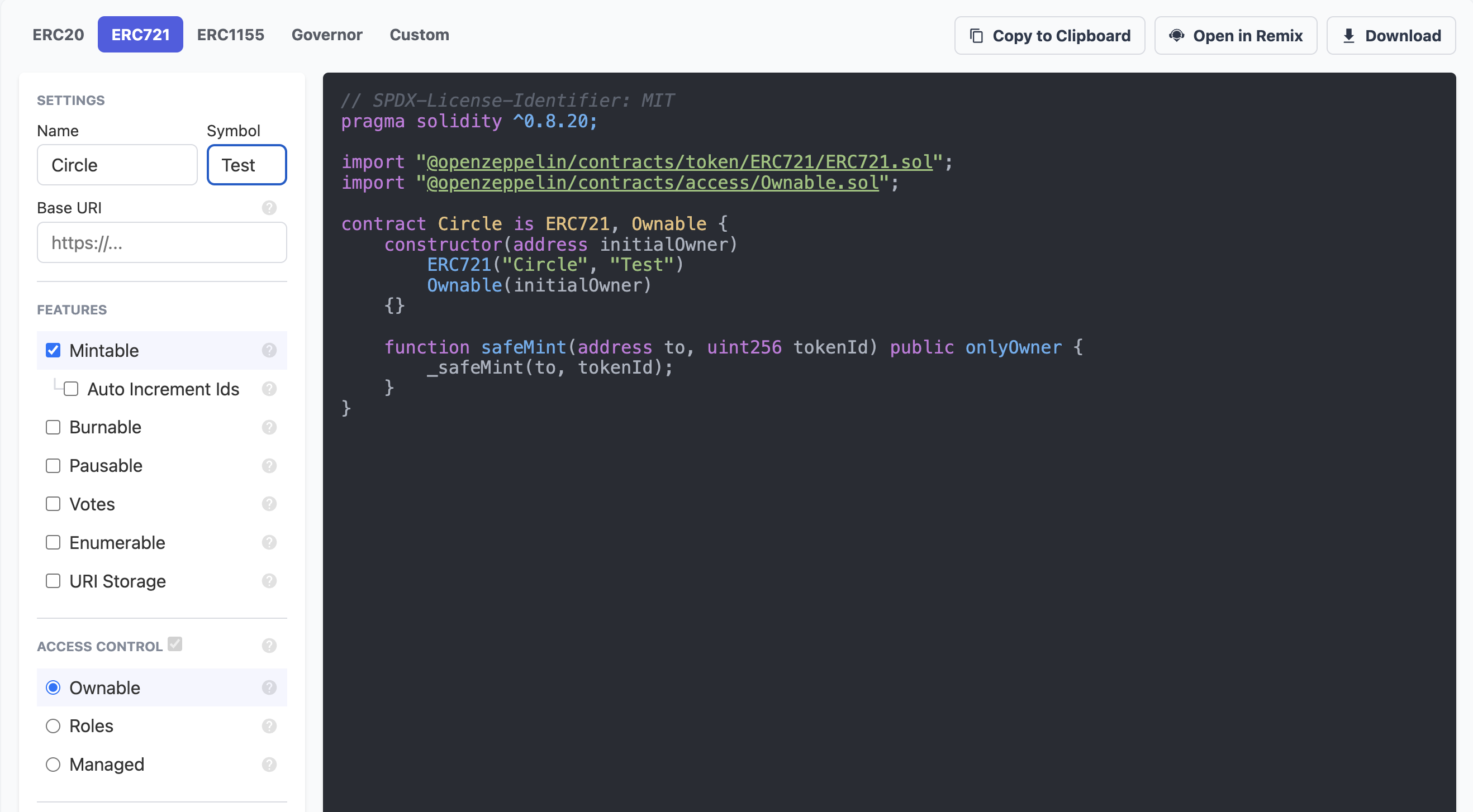 3. Select **Open in Remix** button to create a new workspace in
[Remix](http://remix.ethereum.org) and compile the contract.
4. Select **Compile contract** to compile the Solidity code into bytecode for
the Ethereum Virtual Machine (EVM). We recommend using the default compiler
settings which are appropriate for most use cases.
1. In Remix, you don’t need to update the code at all.
2. If you don't see compile contract, ensure you are in the **Solidity
Compiler** section. If not, select it in the left-hand navigation bar.
3. Select **Open in Remix** button to create a new workspace in
[Remix](http://remix.ethereum.org) and compile the contract.
4. Select **Compile contract** to compile the Solidity code into bytecode for
the Ethereum Virtual Machine (EVM). We recommend using the default compiler
settings which are appropriate for most use cases.
1. In Remix, you don’t need to update the code at all.
2. If you don't see compile contract, ensure you are in the **Solidity
Compiler** section. If not, select it in the left-hand navigation bar.
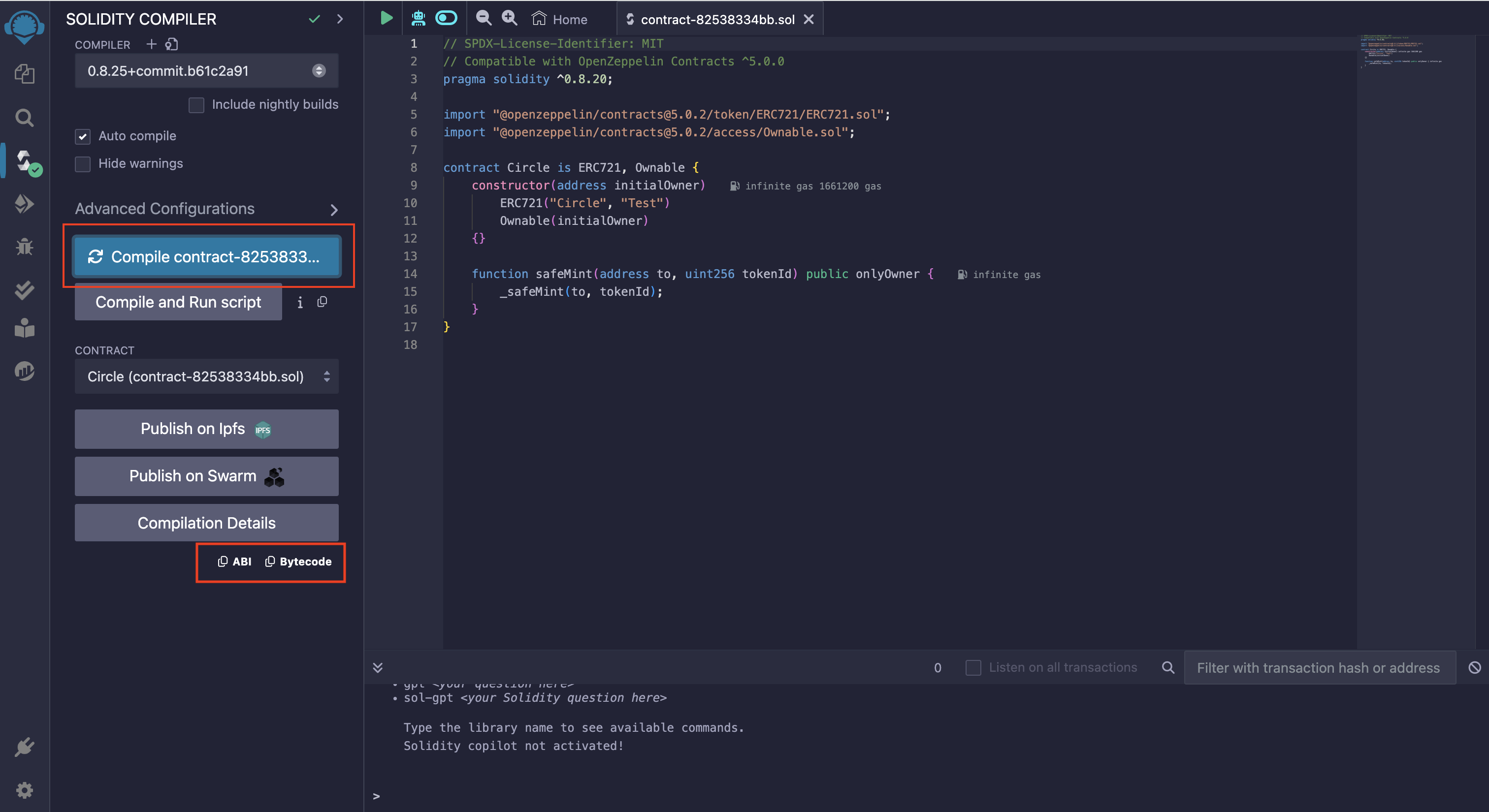 5. Once the compilation is complete, note down the ABI and bytecode. These
values will be used in the next step.
1. The compiler output is available under **Compilation Details**. For more
information on the Solidity compiler’s outputs, see
[using the compiler](https://docs.soliditylang.org/en/v0.8.21/using-the-compiler.html).
2. The Application Binary Interface (ABI) is the standard way to interact
with contracts on an EVM from outside the blockchain and for
contract-to-contract interaction.
## 4. Deploy the Smart Contract
To deploy a smart contract, we will use the
[`POST /contracts/deploy`](/api-reference/contracts/smart-contract-platform/deploy-contract)
method. In the request body, you will provide the following values gathered from
the prior steps:
1. **`entitySecretCiphertext`** uniquely generated
Entity Secret Ciphertext. To learn more about generating
the ciphertext for this request, see the guide [How to Re-Encrypt the Entity
Secret](/wallets/dev-controlled/entity-secret-management#how-to-re-encrypt-the-entity-secret).
2. **`walletId`** acquired from step 1. This is the identifier of your wallet on
a specific blockchain.
3. **`abiJSON`** acquired from the Solidity compiler in step 3.
4. **`bytecode`** acquired from the Solidity compiler in step 3.
5. **`constructorParameters`** the address to set as the initial owner of the
contract. For this guide, it should be the address of your wallet, but it can
be any address.
5. Once the compilation is complete, note down the ABI and bytecode. These
values will be used in the next step.
1. The compiler output is available under **Compilation Details**. For more
information on the Solidity compiler’s outputs, see
[using the compiler](https://docs.soliditylang.org/en/v0.8.21/using-the-compiler.html).
2. The Application Binary Interface (ABI) is the standard way to interact
with contracts on an EVM from outside the blockchain and for
contract-to-contract interaction.
## 4. Deploy the Smart Contract
To deploy a smart contract, we will use the
[`POST /contracts/deploy`](/api-reference/contracts/smart-contract-platform/deploy-contract)
method. In the request body, you will provide the following values gathered from
the prior steps:
1. **`entitySecretCiphertext`** uniquely generated
Entity Secret Ciphertext. To learn more about generating
the ciphertext for this request, see the guide [How to Re-Encrypt the Entity
Secret](/wallets/dev-controlled/entity-secret-management#how-to-re-encrypt-the-entity-secret).
2. **`walletId`** acquired from step 1. This is the identifier of your wallet on
a specific blockchain.
3. **`abiJSON`** acquired from the Solidity compiler in step 3.
4. **`bytecode`** acquired from the Solidity compiler in step 3.
5. **`constructorParameters`** the address to set as the initial owner of the
contract. For this guide, it should be the address of your wallet, but it can
be any address.
**Common Syntax Errors**
* `abiJSON` must be stringified i.e. quote escaped. To stringfy the JSON you can
use the
[JsonFormatter's Stringfy](https://jsonformatter.org/json-stringify-online)
tool.
* `bytecode` must be prefixed with `0x`.
```javascript Node.js SDK theme={null}
const response = await circleContractSdk.deployContract({
name: "First Contract Name",
description: "First Contract Description",
walletId: "046b6c7f-0b8a-43b9-b35d-6489e6daee91",
blockchain: "MATIC-AMOY",
fee: {
type: "level",
config: {
feeLevel: "MEDIUM",
},
},
constructorParameters: ["0x6F77e56DFA40190349E1078e97ac3Eb479E0Dac6"],
entitySecretCiphertext: "0NtD3d3+nmgb4GqYQXzAjKF8h5Zq6sHM2k/...",
abiJSON:
'[\n\t{\n\t\t"inputs": [],\n\t\t"stateMutability": "nonpayable",\n\t\t"type": "constructor"\n\t},\n\t{\n\t\t"anonymous": false,',
bytecode: "0x...",
});
```
```coffeescript Python SDK theme={null}
from circle.web3 import smart_contract_platform
from circle.web3 import utils
scpClient = utils.init_smart_contract_platform_client(api_key=key, entity_secret=entitySecret)
# create an api instance
api_instance = smart_contract_platform.DeployImportApi(scpClient)
try:
request = smart_contract_platform.ContractDeploymentRequest.from_dict({
"name": 'First Contract Name',
"description": 'First Contract Description',
"walletId": '046b6c7f-0b8a-43b9-b35d-6489e6daee91',
"blockchain": 'MATIC-AMOY',
"feeLevel": 'MEDIUM',
"constructorParameters": ['0x6F77e56DFA40190349E1078e97ac3Eb479E0Dac6'],
"abiJson":
'[\n\t{\n\t\t"inputs": [],\n\t\t"stateMutability": "nonpayable",\n\t\t"type": "constructor"\n\t},\n\t{\n\t\t"anonymous": false,',
"bytecode": '0x...'
})
resposne = api_instance.deploy_contract(request)
print(resposne)
except smart_contract_platform.ApiException as e:
print("Exception when calling DeployImportApi->deploy_contract: %s\n" % e)
```
```curl Bash theme={null}
curl --request POST \
--url 'https://api.circle.com/v1/w3s/contracts/deploy' \
--header 'accept: application/json' \
--header 'content-type: application/json' \
--header 'authorization: Bearer ' \
--data '
{
"idempotencyKey": "046b6c7f-0b8a-43b9-b35d-6489e6daee91",
"name": "First Contract Name",
"description": "First Contract Description",
"walletId": "046b6c7f-0b8a-43b9-b35d-6489e6daee91",
"blockchain": "MATIC-MUMBAI",
"feeLevel": "MEDIUM",
"constructorSignature": "constructor(address initialOwner)",
"constructorParameters": ["0x6F77e56DFA40190349E1078e97ac3Eb479E0Dac6"],
"entitySecretCiphertext": "0NtD3d3+nmgb4GqYQXzAjKF8h5Zq6sHM2k/...",
"abiJSON": "[\n\t{\n\t\t\"inputs\": [],\n\t\t\"stateMutability\": \"nonpayable\",\n\t\t\"type\": \"constructor\"\n\t},\n\t{\n\t\t\"anonymous\": false,",
"bytecode": "0x..."
}
'
```
If the call is successful, you will receive a `transactionId` and a `contractId`
in the response.
```json Response Body theme={null}
{
"data": {
"contractId": "0189db12-4089-72eb-b4a8-2aee38cc38fe",
"transactionId": "7b989c65-9678-56d8-a998-d295b8b04535"
}
}
```
You can now call
[`GET /contracts/{id}`](/api-reference/contracts/smart-contract-platform/get-contract)
to check the status of your transaction. When the transaction has been confirmed
on-chain, the contract response object will contain the `contractAddress` and
have a status of `PENDING`. After 12 block confirmations, the contract will have
a status of `COMPLETE` - as seen below.
```javascript Node.js SDK theme={null}
const response = await circleContractSdk.getContract({
id: "0189db84-72b7-7fcc-832b-5bf886b9a0ef",
});
```
```coffeescript Python SDK theme={null}
# create an api instance
api_instance = smart_contract_platform.ViewUpdateApi(scpClient)
try:
resposne = api_instance.get_contract(id='0189db84-72b7-7fcc-832b-5bf886b9a0ef')
print(resposne)
except smart_contract_platform.ApiException as e:
print("Exception when calling ViewUpdateApi->get_contract: %s\n" % e)
```
```curl Bash theme={null}
curl --request GET \
--url 'https://api.circle.com/v1/w3s/contracts/{id}' \
--header 'accept: application/json' \
--header 'authorization: Bearer '
```
```json JSON theme={null}
{
"data": {
"contract": {
"id": "0189db84-72b7-7fcc-832b-5bf886b9a0ef",
"deploymentTransactionId": "4f5bfa38-c598-56a6-932e-8b5bbd3d5fc9",
"name": "First Contract Name",
"description": "First Contract Description",
"contractInputType": "BYTECODE",
"createDate": "2023-08-09T18:17:17Z",
"updateDate": "2023-08-09T18:17:17Z",
"archived": false,
"contractAddress": "0x1e124d7384cd34448ea5907bd0052a79355ab5eb",
"blockchain": "MATIC-AMOY",
"status": "COMPLETE",
"deployerAddress": "0x1bf9ad0cc2ad298c69a2995aa806ee832788218c",
"txHash": "0x241c4df6f08f9ed2b569c9f9b1cc48fb6074ffffaeee7552e716ce059161a743",
"abiJSON": "[\n\t{\n\t\t\"inputs\": [],\n\t\t\"stateMutability\": \"nonpayable\",\n\t\t\"type\": \"constructor\"\n\t},\n\t{\n\t\t\"anonymous\": false,",
"functions": [
{
"name": "approve",
"type": "function",
"inputs": [
{
"name": "to",
"type": "address"
},
{
"name": "tokenId",
"type": "uint256"
}
],
"stateMutability": "nonpayable"
}
],
"verificationStatus": "UNVERIFIED"
}
}
}
```
If you have configured [Webhooks](/wallets/webhook-notifications), you will
receive notifications on the status of the deployment transaction. Additionally,
you can view your deployed contract on the Polygon Amoy block explorer
[Polygonscan](https://amoy.polygonscan.com/) by running a search using
`contractAddress`.