> ## Documentation Index
> Fetch the complete documentation index at: https://circle-devdocs-test-ai-codegen-component.mintlify.site/llms.txt
> Use this file to discover all available pages before exploring further.
# Notifications Quickstart
> Configure a notification subscriber endpoint and be notified when a payment is received.
*Circle notifications will inform you every time the status of a resource
changes, such as changes in payment status. Notifications can be accessed by
setting up a notification subscriber endpoint on your end. This quickstart guide
shows how to set up notifications for the Circle APIs. Follow this to configure
a subscriber endpoint that sends a notification each time the resource status
changes.*
Note: This guide addresses the payment resource, but is applicable to any of the
resources mentioned in
[Circle API Notifications](/circle-mint/notifications-data-models).
## 1. Expose a Subscriber Endpoint
To receive notifications on changes in resource status, you must expose a
publicly accessible subscriber endpoint on your side. The endpoint must handle
both `HEAD` and `POST` requests over HTTPS.
To expose an endpoint for testing, you can use
[webhook.site](https://webhook.site/) to inspect, test and automate incoming
HTTPS requests or e-mails directly in the web browser.
**💡 Tip:**
When you visit [webhook.site](https://webhook.site/) for the first time, you
should see a status message that looks similar to the following:
`Your unique URL (Please copy it from here, not from the address bar!) https://webhook.site/83fa21a0-f00a-4673-bb50-bcf62c78b1f7`
Navigate to [webhook.site](https://webhook.site/) and record the value of the
URL shown as `Your unique URL`:
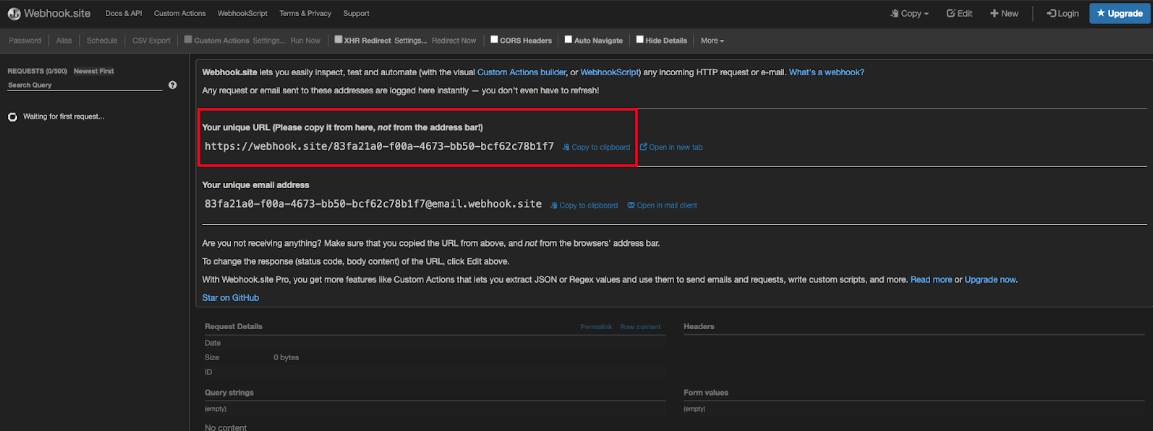 In the example above, the unique URL
is:`https://webhook.site/83fa21a0-f00a-4673-bb50-bcf62c78b1f7`. Use the
public-facing URL you receive as you progress throughout this guide.
## 2. Subscribe to Status Notifications
Now that you have a publicly accessible endpoint, you need to register your
endpoint as a subscriber to webhook notifications by doing the following:
1. Navigate to **Developer > Subscriptions** in your Circle Mint account and
click **Add Subscription**.
In the example above, the unique URL
is:`https://webhook.site/83fa21a0-f00a-4673-bb50-bcf62c78b1f7`. Use the
public-facing URL you receive as you progress throughout this guide.
## 2. Subscribe to Status Notifications
Now that you have a publicly accessible endpoint, you need to register your
endpoint as a subscriber to webhook notifications by doing the following:
1. Navigate to **Developer > Subscriptions** in your Circle Mint account and
click **Add Subscription**.
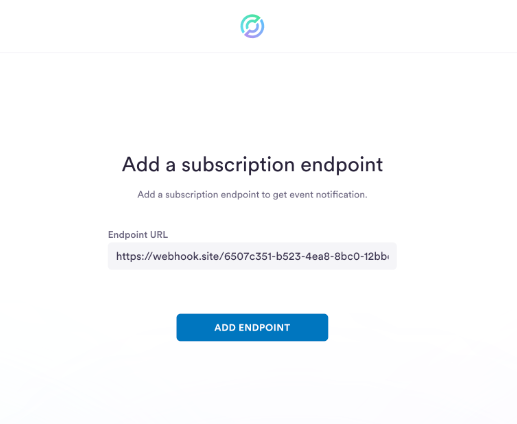
 2. Enter your endpoint URL from above. It will be similar to the earlier
example: `https://webhook.site/83fa21a0-f00a-4673-bb50-bcf62c78b1f7`.
3. Click **Add Subscription**:
2. Enter your endpoint URL from above. It will be similar to the earlier
example: `https://webhook.site/83fa21a0-f00a-4673-bb50-bcf62c78b1f7`.
3. Click **Add Subscription**:
 4. You should receive two responses on your local server shell that confirm the
subscription with a body similar to the following:
```json JSON theme={null}
{
"Type": "SubscriptionConfirmation",
"MessageId": "ddbdcdcf-d36a-45b5-927c-da25b9b009ae",
"Token": "2336412f37fb687f5d51e6e2425f004aed7b7526d5fae41bc257a0d80532a6820258bf77eb25b90453b863450713a2a5a4250696d725a306ef39962b5b543752c9003e0841c0e61253fd6c517a94edebe44f36c5fe4ba131c8ea5f6f42a43f97f6e1865505e2f29f79a62f89e18f97e03a0dd5d982a7578c8d6e21154163f2d6aae523cff25557f9bc21b2503d413006",
"TopicArn": "arn:aws:sns:us-west-2:908968368384:sandbox_platform-notifications-topic",
"Message": "You have chosen to subscribe to the topic arn:aws:sns:us-west-2:908968368384:sandbox_platform-notifications-topic.\nTo confirm the subscription, visit the SubscribeURL included in this message.",
"SubscribeURL": "https://sns.us-west-2.amazonaws.com/?Action=ConfirmSubscription&TopicArn=arn:aws:sns:us-west-2:908968368384:sandbox_platform-notifications-topic&Token=2336412f37fb687f5d51e6e2425f004aed7b7526d5fae41bc257a0d80532a6820258bf77eb25b90453b863450713a2a5a4250696d725a306ef39962b5b543752c9003e0841c0e61253fd6c517a94edebe44f36c5fe4ba131c8ea5f6f42a43f97f6e1865505e2f29f79a62f89e18f97e03a0dd5d982a7578c8d6e21154163f2d6aae523cff25557f9bc21b2503d413006",
"Timestamp": "2020-04-11T20:50:16.324Z",
"SignatureVersion": "1",
"Signature": "kBr9z/ysQrr0ldowHY4lThkOA+dwyjcsyx7NwkbTkgEKG4N61BSSEA+43aYQEB/Ml09hclybvyjyRKWYOjaxQgbUXWmyWrCQ7vY93WYhuGvOqZxAMPiDiILxLs6/KtOxneKVvzfpK4abLrYyTTA+z/dQ52h9L8eoiSKSW81e4clfYBTJkGmuAPKFC08FvEAVT89VikPp68mBf4CctPv3Em0b4J1VvDhAB21B2LekgUmwUE0aE7fUbsF3XsKGQd/fDshLOJasQEuXSqdB5X7LITBA8r24FY+wCjwm8oR3VI9IMy21fUC6wMgoFIVZHW1KxzpEkMCSe7R1ySdNIru8SQ==",
"SigningCertURL": "https://sns.us-west-2.amazonaws.com/SimpleNotificationService-a86cb10b4e1f29c941702d737128f7b6.pem"
}
```
**Note:** The response body above is in a plain text format, so be sure you're
not expecting a JSON content type.
5. To complete the subscription process, visit the `SubscribeURL` link in each
response. Messages won't be sent to the endpoint until you confirm the
subscription by accessing the URL.
6. After you visit the `SubscribeURL` links, the subscription status updates to
`COMPLETE`, indicating it's ready for use.
**Note:** In the Circle sandbox environment, if your subscription is stuck in
the `PENDING` (unconfirmed) state, reach out to
[customer-support@circle.com](mailto:customer-support@circle.com) to remove
it.
In the production environment, if your subscription is stuck in the `PENDING`
state, it's automatically removed after 72 hours.
4. You should receive two responses on your local server shell that confirm the
subscription with a body similar to the following:
```json JSON theme={null}
{
"Type": "SubscriptionConfirmation",
"MessageId": "ddbdcdcf-d36a-45b5-927c-da25b9b009ae",
"Token": "2336412f37fb687f5d51e6e2425f004aed7b7526d5fae41bc257a0d80532a6820258bf77eb25b90453b863450713a2a5a4250696d725a306ef39962b5b543752c9003e0841c0e61253fd6c517a94edebe44f36c5fe4ba131c8ea5f6f42a43f97f6e1865505e2f29f79a62f89e18f97e03a0dd5d982a7578c8d6e21154163f2d6aae523cff25557f9bc21b2503d413006",
"TopicArn": "arn:aws:sns:us-west-2:908968368384:sandbox_platform-notifications-topic",
"Message": "You have chosen to subscribe to the topic arn:aws:sns:us-west-2:908968368384:sandbox_platform-notifications-topic.\nTo confirm the subscription, visit the SubscribeURL included in this message.",
"SubscribeURL": "https://sns.us-west-2.amazonaws.com/?Action=ConfirmSubscription&TopicArn=arn:aws:sns:us-west-2:908968368384:sandbox_platform-notifications-topic&Token=2336412f37fb687f5d51e6e2425f004aed7b7526d5fae41bc257a0d80532a6820258bf77eb25b90453b863450713a2a5a4250696d725a306ef39962b5b543752c9003e0841c0e61253fd6c517a94edebe44f36c5fe4ba131c8ea5f6f42a43f97f6e1865505e2f29f79a62f89e18f97e03a0dd5d982a7578c8d6e21154163f2d6aae523cff25557f9bc21b2503d413006",
"Timestamp": "2020-04-11T20:50:16.324Z",
"SignatureVersion": "1",
"Signature": "kBr9z/ysQrr0ldowHY4lThkOA+dwyjcsyx7NwkbTkgEKG4N61BSSEA+43aYQEB/Ml09hclybvyjyRKWYOjaxQgbUXWmyWrCQ7vY93WYhuGvOqZxAMPiDiILxLs6/KtOxneKVvzfpK4abLrYyTTA+z/dQ52h9L8eoiSKSW81e4clfYBTJkGmuAPKFC08FvEAVT89VikPp68mBf4CctPv3Em0b4J1VvDhAB21B2LekgUmwUE0aE7fUbsF3XsKGQd/fDshLOJasQEuXSqdB5X7LITBA8r24FY+wCjwm8oR3VI9IMy21fUC6wMgoFIVZHW1KxzpEkMCSe7R1ySdNIru8SQ==",
"SigningCertURL": "https://sns.us-west-2.amazonaws.com/SimpleNotificationService-a86cb10b4e1f29c941702d737128f7b6.pem"
}
```
**Note:** The response body above is in a plain text format, so be sure you're
not expecting a JSON content type.
5. To complete the subscription process, visit the `SubscribeURL` link in each
response. Messages won't be sent to the endpoint until you confirm the
subscription by accessing the URL.
6. After you visit the `SubscribeURL` links, the subscription status updates to
`COMPLETE`, indicating it's ready for use.
**Note:** In the Circle sandbox environment, if your subscription is stuck in
the `PENDING` (unconfirmed) state, reach out to
[customer-support@circle.com](mailto:customer-support@circle.com) to remove
it.
In the production environment, if your subscription is stuck in the `PENDING`
state, it's automatically removed after 72 hours.
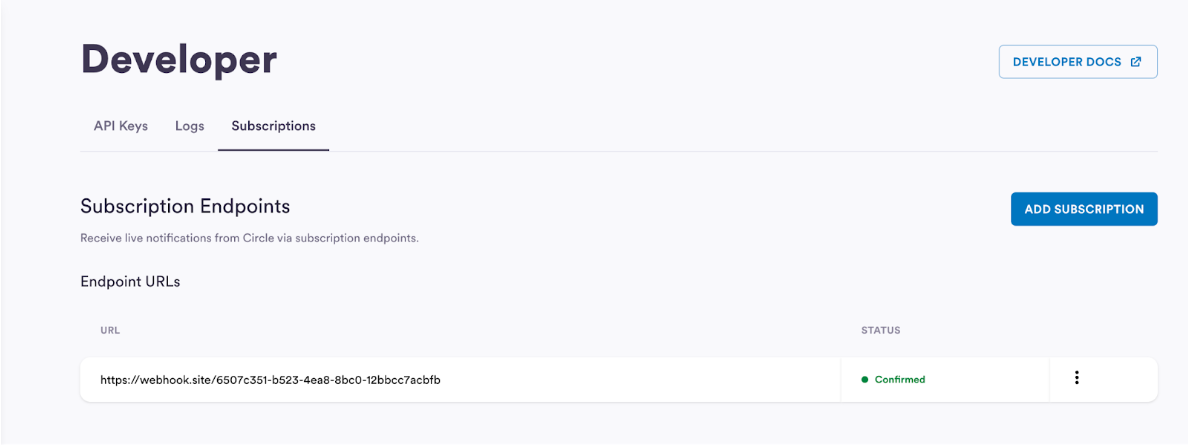 You now have a sample local environment ready to receive notifications.